


New Calling Features on Microsoft Teams
In this article, we summarize the recent improvements to telephony on Microsoft Teams, which make it easier for organizations and their employees to strengthen relationships and build new ones with a quick phone call.
Increase the richness of your calling experience
Calling is a great way to reconnect and share information quickly. When you integrate calls with different modes of communication, they can act as a productivity force multiplier. There are many ways to create a more powerful and streamlined calling experience.
Simplified calling experience
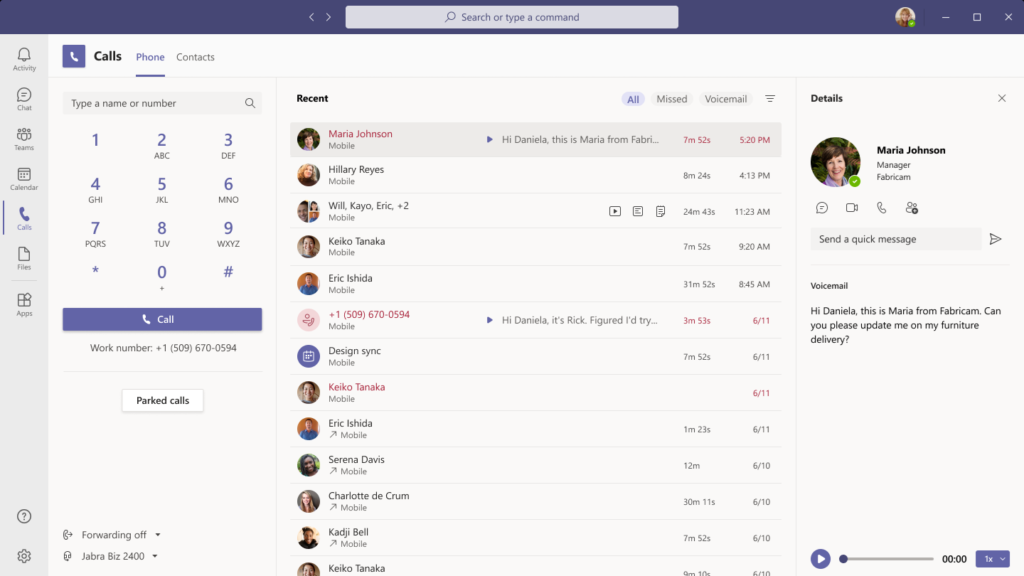
Teams is the hub for chat, collaboration, meetings, applications and workflows. The call functionality has been improved and now brings together the most important elements such as - the keypad, call history, voicemail, contacts and settings - in one place. This makes it easier for you to stay connected to your workflow.
Save call recordings in OneDrive and SharePoint
Call recordings are a great way to track the ad- ad -hoc brainstorming that often occurs during a call. Now, team administrators can take advantage of the tight integration between Teams and OneDrive or SharePoint and choose to make OneDrive or SharePoint the default recording storage location instead of Stream. This new feature offers powerful capabilities such as sharing with external guests, faster access to transcripts, and greater storage capacity. Learn more.
CarPlay support
Making and receiving calls in the car will soon be easier than ever, thanks to CarPlay support for Teams Calling. With CarPlay, you can use your vehicle's built-in controls to operate Teams, including using Siri/Bixby to make and answer calls.
Identification of the spam
spam calls are frustrating, disrupt your workflow, and make you less likely to answer calls from unknown phone numbers. Using industry-leading technology, Teams will identify potential spam calls so you can be confident in answering incoming calls. In addition, Teams will digitally certify outgoing calls to prevent them from being rejected by external recipients.
Transferring calls between a mobile and a desktop computer
Sometimes you need to move locations or devices to complete your call. Starting in early 2021, you'll be able to transfer calls between your mobile and desktop endpoints through an ergonomic interface on the Teams app.
Merge call
Callers can merge multiple individual calls to combine conversations and simplify managing multiple conversations.Call mergingis now available for PSTN calls and VoIP.
Low data mode
Whether you want to conserve data or are simply in a location with a poor or limited network connection, sometimes it's helpful to limit the amount of data you use during a video call or meeting. Starting in early 2021, users will be able to adjust their settings in Teams to cap the amount of data that will be used during video calls and set different settings based on network availability (cellular, wifi, ...).
Improved reverse number search
With automatic reverse number lookup, you will see the name of the caller as they call, in your activity stream and voicemail.
Advanced calling options for your business
Some parts of the business require additional calling capabilities and workflows. Whether it's keeping critical operations running or resolving key customer issues, Teams supports a wide range of needs across your enterprise with these new capabilities.
Voice activated channels
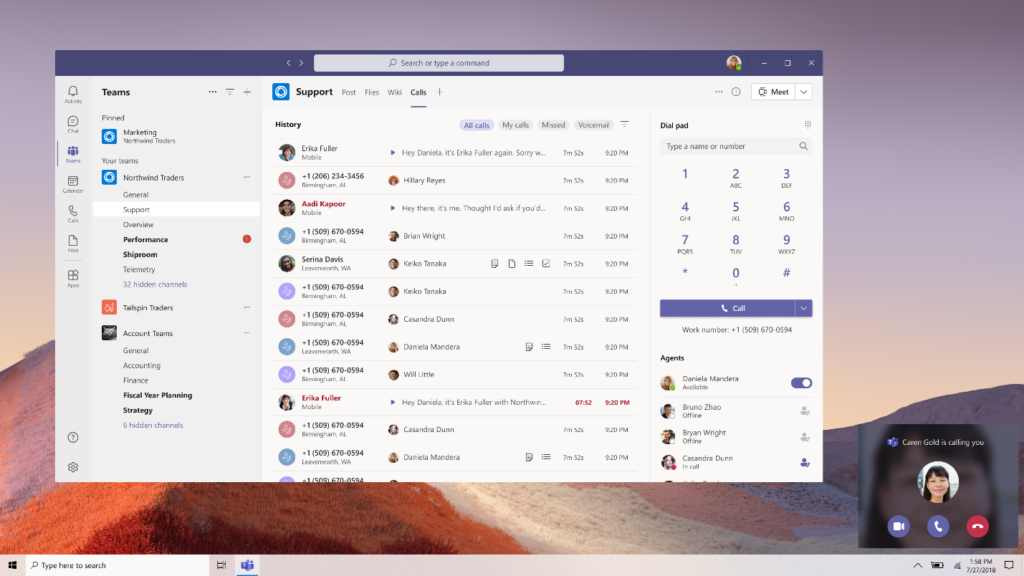
A new collaborative calling capability allows teams to integrate call queues into a specific channel, enabling collaboration and information sharing before, during and after the call. For example, IT or HR help desks can now be managed from one channel so that available team members can answer the call and easily share information about service tickets. Starting in early 2021, Teams users will have the ability to create new voice-activated channels to begin using this feature in preview.
Certified Contact Center/Call Center Solutions
Resolving a customer call in a contact center is often a team effort, so it’s important to quickly identify and reach the right colleague. Contact center solutions can use presence and user API to seamlessly integrate with Teams, enabling agents to find the right colleagues to assist them. Contact center providers can now seek Microsoft certification for their solutions to give customers the confidence they need to manage important customer interactions.
Resilient calls
To ensure that the most critical conversations are handled in the event of an outage, the new Survivable Branch Appliance (SBA) allows users to make and receive calls PSTN even if the network goes down. This SBA is available from SBC such as AudioCodesRibbon Communications/Sonus. This new feature, available on SBC customers also allows them to work in Teams Offline Mode and continue collaborating in the event of a connection loss with the tenant Microsoft 365. Lambert Consulting has already been implementing these SBA for years for its customers Skype for Business to ensure continuity in the event of a loss of connection to the main site, loss of the SIP trunk, etc.
Call transfer reminder
While call transfers can be useful for connecting the right people, making sure calls stay connected during the process is essential for an excellent calling experience. Now, Teams users can rest assured that when you transfer an important call, it won't disconnect simply because someone on the other end of the line isn't available. If the recipient of the transfer does not answer the call, the call is forwarded to the person making the transfer.
Your Microsoft project Teams s with Lambert Consulting
Our expertise in this field continues to grow, positioning us as a key partner for your telecommunications projects.
Over 10 years of experience with Microsoft Skype for Business/Lync and MS-Teams
Certified – Microsoft Gold Communications Partner / Microsoft Partner Advanced Specializations
Reduce your costs with the free choice of your telephone operators
Versatility and experience of our engineers
Choice Among Several Gateway Technologies VoIP
High quality of service at all levels
Responsiveness and care for our customers
Active in Switzerland and internationally


What an article Can't Know
An article describes what applies to everyone. What varies from one organization to another is the inventory: which applications, which accounts, and which pieces of equipment are actually involved in your organization. The inventory determines the scope of the effort, and it cannot be summarized on a single page.
You'll be speaking directly with the engineers who will be doing the work, not with a middleman. We'll respond within 24 business hours.
Check what is still true
Announced dates are sometimes postponed, products are renamed, and conditions change. The blog tracks these topics over time: when a rule changes, a new post announces it.
Search for a topic in the blogIn the same issue
Three articles on the same topic. The blog has 138 articles, all of which are freely available.