


The Benefits of Microsoft Phone Teams, and What Teams Phone Doesn't Replace
Teams Phone provides the functions of a telephone switchboard, but does not include hardware that requires user accounts. The license does not include the line: the connection to the telephone network must be selected and purchased separately, and this choice determines the budget, the timeline, and emergency call capabilities.
Your phone system is working. The person who knew the numbering plan may have changed jobs, and the maintenance contract renews automatically. So issues with telephony in Microsoft Teams almost never arise because something is broken—they arise because a contract is expiring, because a site is relocating, or because some employees are already calling each other in Teams without picking up the phone on their desk.
The benefits of Microsoft Teams telephony are best understood by looking at what Teams Phone does in place of your PBX, rather than through a list of features. Three separate issues arise, and they have different costs and timelines: PBX functions, connection to the public switched telephone network—referred to as “ PSTN ” in Microsoft’s documentation—and the status of devices connected behind the PBX that do not have a user account.
What the " Teams Phone" Borrows from the Telephone Switchboard
Microsoft states that Teams Phone allows you to replace your existing PBX with a set of features delivered from the same platform as productivity tools. The Teams Phone Standard license provides a hosted phone service with PBX capabilities: voicemail, call forwarding, call transfer, auto-attendant, call queues, and caller ID. This list is not exhaustive.
By default, calls betwe Teams users in the same organization are routed through Teams and never pass through the public telephone network, which eliminates carrier charges for these calls. In a multi-site company where a significant portion of the traffic is internal, this portion is excluded from the minute count.
The license is not the line: the connection to the public telephone network is separate from the Teams Phone license, and must be selected and purchased separately. The former provides phone numbers and access to domestic, international, and emergency calls; the latter gives the user calling capabilities and the right to access this service. A company that already owns the licenses therefore does not yet have a phone service.
What " Teams Phone" Does Not Include: Devices Without a User Account
Your PBX didn't just serve employees' extensions. It also carried traffic connected via a copper pair that never had a user account.
Microsoft provides documentation on connecting analog devices as part of Direct Routingone of the four connection methods: you need an analog telephone adapter (ATA) supported by the manufacturer of the SBC Session Border Controller —the device that connects the carrier’s network to Teams. For Microsoft, analog equipment is any device capable of sending tones to initiate a call, and Microsoft specifically mentions analog phones, fax machines, and public address speakers. Keeping a fax machine is therefore not impossible, but it complicates the routing decision and requires an additional piece of equipment. And an analog phone connected via an adapter does not appear in the search results at Teams : to call it, you must dial the number manually.
The entrance intercom, the elevator car phone, and the alarm transmitter are not included in these examples. The equipment manufacturer is responsible for this, and it is better to consult them before making a decision than during the migration.
SIP phones that have already been purchased can remain in use: Microsoft has released SIP Gateway, which allows users to use a SIP device compatible with Teams, provided the user has a phone number with calls to the telephone network enabled. A SIP device can also act as an agent in a queue, but SIP Gateway does not publish the presence of these devices, so presence-based routing is not supported.
The Four Ways to Connect to the Telephone Network
Microsoft describes four connection models, and an organization can combine several of them depending on the people and locations involved. The chosen approach determines who provides the service, who responds when it goes down, and what you can configure yourself.
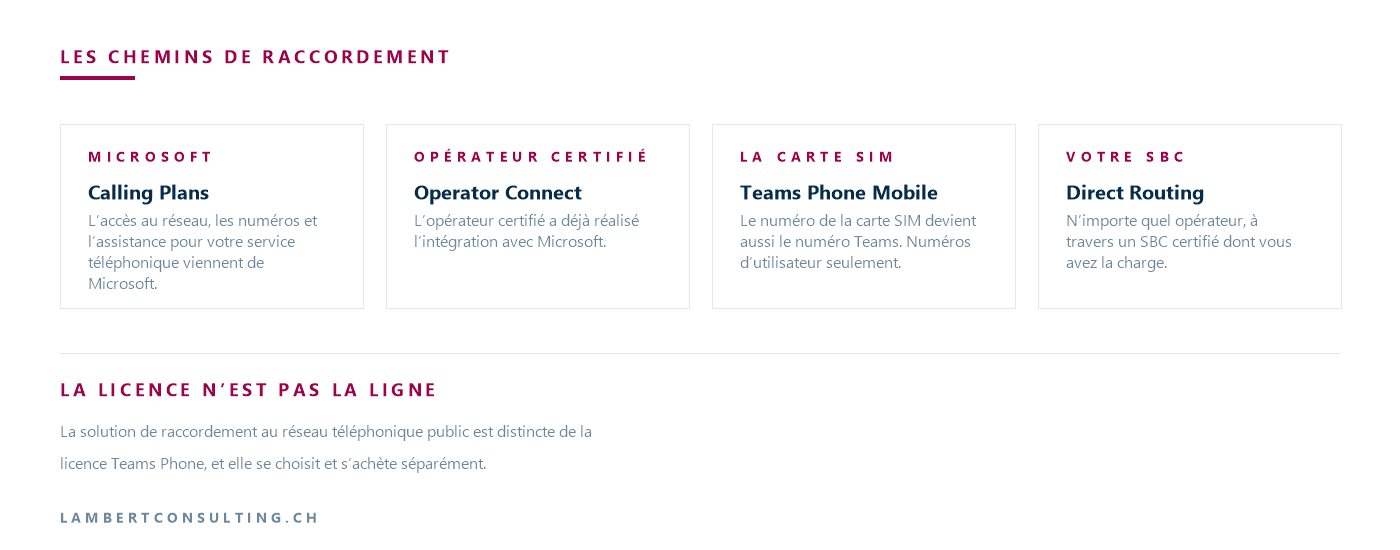
Calling Plans. Microsoft is your service provider: network access, phone numbers, and support for your phone service are provided by Microsoft, and this setup requires a Microsoft calling plan license. Everything comes from the same provider, and the phone service is governed by the Microsoft contract—including the timeframe for obtaining phone numbers.
Operator Connect. A certified provider has already completed the integration with Microsoft, and all you need is a subscription with that provider. The provider handles network access, number provisioning and porting, call services, and network-related support; Microsoft handles Teams and the integration between the two. A company that already has a telephony provider and does not intend to change it therefore keeps its provider and its contract—the model is detailed in our article on what “ Operator Connect ” is. One prerequisite becomes clear early on: Operator Connect it assumes users are configured in “ Teams Only” mode, in which a user receives calls and conversations in Teams and can no longer initiate them from Skype for Business.
Teams Teams. The mobile numbers assigned to the user’s SIM card are also assigned as numbers. This method requires a contract with a participating mobile carrier and a Phone license. Teams Teams Phone Mobile accepts only user numbers and does not support audio conference numbers or voice application numbers—that is, automated switchboards and queues. A company whose customer service relies on a main number cannot therefore rely on this single route; the other three routes accept all three types of numbers.
Direct Routing. You can use any operator through a SBC certified provider under your supervision: Microsoft leaves the acquisition, installation, and administration to the customer, their integrator, or a service provider offering this as a service. This approach therefore requires a contract with a carrier and a SBC. In addition to this equipment, Microsoft requires a connection to the telephone network, a company domain verified by Microsoft, a public IP address accessible via Teams , and a trusted certificate: all of these elements have an owner and associated operating costs, which must be included in the budget alongside the purchase price. Updates to the model are covered in our article on what’s new with the Direct Routing at Teams.
Licenses: What's Included, What Costs Extra
Teams Phone requires a separate add-on license. For PBX functions alone, you purchase Teams Phone Standard; to make external calls, you must also select a connection path.
With an Microsoft 365 E5 license, there is no need to additionally assign the Teams Phone Standard license, because E5 includes the application Microsoft 365 Phone System—the one that provides the PBX functions. A company on E5 therefore already has the PBX, though this still does not provide it with a phone line.
The separation between the suite and Teams, however, affected Switzerland earlier than the rest of the world. As of April 1, 2024, a new Enterprise customer who wants both Microsoft Teams and the features of the E1, E3, or E5 suites must purchase two separate products: the suite without Teams, and Teams as a standalone product. For Enterprise customers in the European Economic Area and Switzerland, this change took effect on October 1, 2023, and suites that included Teams are no longer offered to new customers.
Other licenses do not follow the logic of the user license.
- Shared workstations. A reception or conference room phone is linked to a Microsoft Teams Shared Space license, known as Microsoft Teams Shared Devices prior to April 2026. Microsoft specifies that no additional server license is required; it is included.
- Automatic switchboards and queues. They require at least one Teams Phone license within the organization, and one resource account license per switchboard or queue—the latter is free.
- Outgoing calls from voice applications. As of November 1, 2025, a queue or auto-attendant resource account that uses a Microsoft plan number to make outgoing calls requires a pay-as-you-go calling license or Communications Credits. Microsoft states that without this license or these credits, outgoing calls will fail.
For employees who make few calls, Shared Calling eliminates the need for a dedicated number and a calling plan: a single “ Teams Phone” license is sufficient for the user, and a resource account carries the shared number. This resource account, however, must be assigned a pay-as-you-go calling plan license as soon as it uses a Microsoft service number—the savings come from the users, not the line. And telephone conferencing, which allows users to join a meeting by dialing a number, is not the same as a Teams Phone license: the two are purchased separately.
Prices published by Microsoft for Switzerland
| Offer | Monthly price per user | Offer Details |
|---|---|---|
| Microsoft Teams Phone Standard | 8.10 CHF | switch functions, without network access |
| Teams Phone with pay-as-you-go calling (Zone 2 countries) | 10.50 CHF | one number; outgoing calls billed per use |
| Teams Phone with domestic calls (Zone 2 countries) | 17.80 CHF | one number, 1,200 minutes of outgoing local calls |
| Teams Phone service with domestic and international calls | 27.50 CHF | one number, 1,200 domestic minutes, or 600 international minutes |
Prices as of September 1, 2026, from the Swiss page of Microsoft’ Teams Phone. The terms associated with these prices are just as important as the amounts themselves: annual payment, automatically renewing annual subscription, VAT not included. All four plans specify that a separate license for Microsoft Teams is required, and the last three note that Teams Phone with a calling plan is available in certain markets. The minute allowances listed are those announced for the rest of the world.
This table does not mention the cost of the other three options: if the telephone network is provided by an operator other than Microsoft, Microsoft does not require any additional licenses, because the access costs are billed by that operator. The complete comparison therefore lists, in the Microsoft column, an operator’s offer that must be obtained separately, plus the “ Teams Phone Standard” license at 8.10 CHF, plus the equipment and its operation in the case of Direct Routing.
Swiss numbers and the availability of each route
Microsoft calling plans are available for purchase in Switzerland, as is audio conferencing. Microsoft lists Zurich as a city where premium-rate numbers are available and notes that outbound calls to premium-rate numbers are not supported at this time. Retrieved September 1, 2026.
For Operator Connect Teams , the answer doesn’t depend on Switzerland but on your carrier: Microsoft publishes, for each of the two programs, a list of participating carriers and the countries where their service is available. All you need to do is send an email to your current carrier to check. For Direct Routing, two questions determine availability: Does your carrier agree to provide a link to a SBC, and is the SBC one you’ve chosen is among those certified by Microsoft.
That leaves the numbers, for which the deadlines determine the switchover date:
- Obtaining new Swiss phone numbers from Microsoft takes up to 4 business days if they are available, and up to 90 business days if they need to be ordered;
- Mobile numbers are not available from Microsoft for Switzerland;
- Porting existing numbers takes 10 to 30 business days, and a partial port requires an order of at least ten numbers;
- An OFCOM allocation document is required for non-geographic numbers;
- A geographic number is assigned to a user, a voice application, and an audio conference; a toll-free number is assigned to a voice application and an audio conference, but not to a user.
The last line refers to companies where a toll-free number is assigned to a user rather than to a voice application: the number list provides the answer.
Emergency calls: what Microsoft documents, and what the Swiss order requires
The handling of emergency calls depends on the user's location and the selected connection path.
For Switzerland, Microsoft describes a mechanism based on the registered address, rather than the caller’s location: call routing depends on the caller’s address; this address, which is registered for the number, is stored in a national database, and the emergency dispatch center retrieves it from the caller’s number to display it to the operator. For countries in Europe, the Middle East, and Africa, an emergency address is required when the number is obtained from Microsoft 365or when it is transferred from another provider.
Real-time location tracking depends on the country. Microsoft states that Microsoft plans, partners, Operator Connect and Teams Phone Mobile partners provide dynamic emergency routing for users located in the United States and Canada. The scope is the same for all four options: dynamic location tracking is supported in the United States, and similarly in Canada, with the exception that emergency calls there are first filtered at the national level before being forwarded to the call center. Switzerland is not included in this coverage area for any of the four services; therefore, for a Swiss organization, this feature is not a selection criterion.
Microsoft’s Terms of Use include the following warnings, among others. Teams may not know a caller’s actual location, which could result in the call being routed to the wrong call center or emergency responders being sent to the wrong location. If the Teams client is offline, or if the device cannot access the Internet for any reason—such as a network outage or power failure—calls to emergency services are not supported and are not expected to work. Additionally, users should not call emergency services from a location outside their home country, as the call will likely not be routed to the correct call center.
Note: Microsoft's reference table lists the following emergency numbers for Switzerland: 112, 117, 118, 143, 144, 147, 145, and 1414.
Two operational considerations factor into the decision. With Operator Connect, each user is automatically enabled for emergency calls, but the company’s ability to set the registered address depends on the capabilities assigned to the number by the carrier: Microsoft states that the company may not need to do so, or may not be able to do so. With Direct Routing, if the Teams client fails to obtain an emergency routing rule, the user is not enabled for emergency calls.
On the Swiss side, the Telecommunications Services Ordinance was amended specifically on this point: its sections on emergency services and location tracking were introduced or rewritten by the ordinance of May 6, 2026, which has been in effect since July 1, 2026. It requires public telephone service providers to ensure, free of charge, direct access to emergency services from every telephone connection, to guarantee that such calls are routed to the appropriate emergency centers, and to give such calls priority over other calls. Regarding location tracking, Article 29 establishes the following principle: to the extent that the chosen technology permits, real-time location tracking of calls to emergency services must be guaranteed, and the device’s location tracking functions may be activated without the customer’s express consent. OFCOM sets and publishes the date from which this location tracking must be guaranteed.
The ordinance designates the public telephone service provider as the party responsible for these obligations. The contract entered into with the operator specifies who holds this status in a given setup, not the documentation provided by a software vendor.
Calls When the Connection Drops
Microsoft documents the case of a site that, during an Internet outage, can no longer access its services, but whose internal network is still functioning and whose users can still reach the SBC. A failover mechanism exists for this situation: code that Microsoft distributes to manufacturers of SBC, who integrate it into their embedded software or provide it to run on a separate machine. During the outage, the Teams client automatically switches to this mechanism; ongoing calls continue without interruption, and the user does not need to take any action.
This mechanism belongs to Direct Routing : it therefore assumes this path and a SBC. Survival mode is enabled only on desktop clients installed on a physical machine— Teams at Windows, Teams at macOS , and phones at Teams ; virtual machines and the web client are not supported at this time. The only visible indication that the system is in this mode is a banner: without this banner, the user is not in survival mode and calls will not work.
Furthermore, during an outage, calls to emergency services are not supposed to go through. A company with a facility open to the public—or with a workshop that operates without any other means of communication—therefore needs to address this issue separately from regular telephone service.
Waiting Lines and the Contact Center: Where Does the Basic License End?
Automatic switchboards and call queues are among the call center features th Teams Phone offers. What the basic license does not include is the Queues app—the application that gives a manager an overview of calls in the queue, wait times, and the ability to remove an agent from the queue. It requires the user to have both a Teams Phone license and a Teams Premium license. Additionally, a queue can accommodate a maximum of 200 agents.
Furthermore, Microsoft states that Teams Phone supports coexistence integrations when an organization has another phone system or contact center. The choice between the queues provided with Teams and a third-party contact center depends on the volume of incoming calls, the need for statistics, and the other channels to be handled: we discussed this in our article comparing a third-party contact center with Microsoft’s Queues app, and—when customer relations are the focus—in the article on the “ CRM ” who answers the phone.
Our Reading
Let’s decide on the order of the questions. You don’t choose the connection path by comparing tables of functions; it’s determined based on two inventories: one of the devices connected behind the central office that do not have user accounts, and one of your phone numbers, including the type and assignee for each.
Our position, once these lists have been compiled: for a company in French-speaking Switzerland whose telephony system consists of employees at their desks and on the go, Operator Connect or where Microsoft plans are sufficient, and Direct Routing is what we use when physical or contractual constraints require it—an analog system that must be retained, a carrier contract we’re keeping, a site that must continue to make calls during an outage, or a third-party PBX that needs to coexist with our system. Choosing Direct Routing without one of these reasons amounts to installing and managing a SBC system without the benefit that justifies it. The answer changes in one scenario: if one of your sites is open to the public or employs people who work alone, the need for emergency calls and business continuity takes precedence over everything else, and that alone may dictate the approach.
In certain situations, the right decision is to wait. When the PBX maintenance contract is still in effect and no deadline is approaching, it’s not a project—it’s a preparation process: both inventories are carried out at a leisurely pace. When the organization isn’t yet in “ Teams -Only” mode, this task takes priority, sinceOperator Connect it’s a prerequisite. And when the actual need is a contact center, telephony isn’t the main focus—it’s just one component.
We do not publish average durations or average costs for migration. These figures depend on the number of locations, the number of numbers to be ported, the actual time it takes to obtain missing numbers, and the availability of the outgoing carrier; using an average borrowed from another company would not help you budget for your own. The reliable figures regarding the timeline are those published by Microsoft: up to 90 business days for ordering numbers, and 10 to 30 business days for porting.
“We already have E5; phone service is included” is true for the PBX features but false for the line itself. What’s included is the PBX; what you still need to purchase is access to the telephone network, phone numbers, and the support that goes with them.
What You Can Do on Your Own
- List the devices connected to your PBX that do not have a user account: analog phones, fax machines, public address speakers, intercoms, elevator cabs, and alarm transmitters. For each one, note the manufacturer and model.
- List your phone numbers, specifying the type of each one—landline, toll-free, or cell phone—and the person, service, or app to which it is assigned.
- Ask your current carrier in writing if it participates in the program Operator Connect, and whether it participates in the Teams Phone Mobile program.
- Review your PBX maintenance contract: the expiration date, the notice period for termination, and what the contract stipulates regarding the installed equipment at the end of the contract.
- Check whether your users are in " Teams -Only" mode, and if not, how many are not; then count your licenses Microsoft 365 by type to see which ones already include the central functions.
- Make a list of the locations where a loss of Internet access would affect people’s safety, and ask the provider you’re considering this question before comparing prices.
None of these six points requires a power of attorney: the first five can be handled using your own documents and invoices, and the sixth is simply a question to ask. Nor does any of them require that you have made any decisions.
Sources
- PSTN connectivity options
- What is a " Teams " Phone?
- Teams Phone Licensing
- Microsoft Teams , add-on licenses
- Voice Application Prerequisites and Licensing
- Manage Queues app for Microsoft Teams
- Plan for Operator Connect
- Teams -Phone Plan
- Map Direct Routing
- How to Use Analog Devices with Direct Routing
- Survivable Branch Appliance (SBA) for Direct Routing
- SIP Gateway Diagram
- Teams and Skype for Business coexistence and interoperability
- Availability in Switzerland
- Phone Number Management for Switzerland
- Emergency call routing for different countries and regions
- Emergency Calling Terms and Conditions
- Configure dynamic emergency calling
- Considerations for Calling Plans
- Considerations for Operator Connect
- Considerations for Direct Routing
- Teams -Phone Mobile: Things to Consider
- Emergency numbers for countries and regions
- Microsoft Teams Phone — Offers and Prices for Switzerland
- Ordinance on Telecommunications Services (OST, RS 784.101.1)
What an article Can't Know
An article describes what applies to everyone. What varies from one organization to another is the inventory: which applications, which accounts, and which pieces of equipment are actually involved in your organization. The inventory determines the scope of the effort, and it cannot be summarized on a single page.
You'll be speaking directly with the engineers who will be doing the work, not with a middleman. We'll respond within 24 business hours.
Check what is still true
Announced dates are sometimes postponed, products are renamed, and conditions change. The blog tracks these topics over time: when a rule changes, a new post announces it.
Search for a topic in the blogIn the same issue
Three articles on the same topic. The blog has 155 articles, all of which are freely available.