


Memory Integrity: Updates Windows activate it from October 2026
Starting in October 2026, quality updates of Windows They progressively enable memory integrity, and VBS if needed, on eligible devices, without changing the settings. To check: the drivers, the actual state read by msinfo32 or WMI, and the policies Intune , group or App Control deployed.
Microsoft announced on September 1, 2026 that starting in October 2026, quality updates of Windows Memory integrity, also known as hypervisor-protected code integrity (HVCI) in the documentation, is starting to be enabled on more eligible devices. Where virtualization-based security (VBS) is not yet enabled, these same updates will also enable it. The rollout is gradual and may not reach all eligible devices simultaneously.
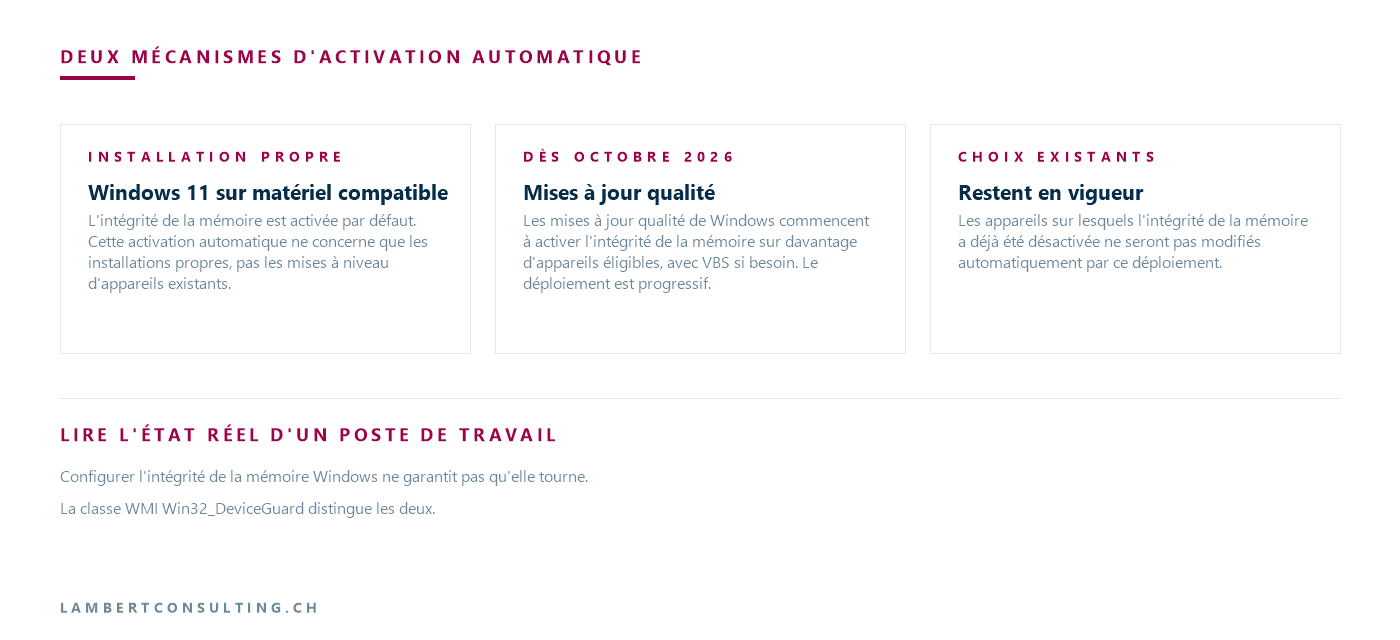
Prior to this announcement, Microsoft documented two cases where Windows activates the integrity of its own memory: the clean installation of Windows 11 on compatible hardware, and Secure-core PCs. The October 2026 change will be implemented through quality updates, and therefore targets devices already installed. Microsoft specifies that existing choices and strategies made by administrators and users will remain in effect.
| Case | What Microsoft is documenting | Source and date |
|---|---|---|
| Clean installation of Windows 11 on compatible hardware | Memory integrity is enabled by default; this does not apply to upgrading an existing device. | OEM page "Memory integrity and VBS enablement", retrieved on September 29, 2026 |
| Secured-core PC | Memory integrity is enabled by default. | Same page |
| Existing and eligible device, from October 2026 | Activation via quality updates, with VBS if needed, in a gradual manner | Ticket Windows IT Pro and Windows Message center, September 1, 2026 |
| Device where memory integrity has been disabled | Not automatically modified by this deployment | Same sources, September 1, 2026 |
Retrieved on September 29, 2026 from Microsoft documentation.
Two automatic activation mechanisms, documented separately
The first mechanism concerns the installation. The page for manufacturers indicates that memory integrity is enabled by default on clean installations of Windows 11 on compatible hardware, and that it is also compatible on Secured-core PCs. It specifies that this automatic activation only applies to clean installations, not upgrades of existing devices. Its hardware criteria are as follows:
- 8th generation Intel processor or newer Windows 11 version 22H2, AMD Zen 2 architecture or newer, or Qualcomm Snapdragon 8180 or newer;
- 8 GB of RAM minimum, for x64 processors;
- a minimum 64GB SSD;
- drivers compatible with memory integrity;
- Virtualization enabled in the BIOS.
The same page adds that 11th generation Intel Core desktop processors are not part of the current default activation logic, while remaining a recommended platform that the manufacturer can activate.
The second mechanism is the one announced on September 1, 2026: activation via quality updates on devices that already have the software installed. Microsoft's blog post refers users to the page for manufacturers for details on the requirements. However, the criteria mentioned above are written for clean installations, and the September 1, 2026 post does not list them individually.
That Windows evaluate before activating memory integrity
Before activating the function, Windows automatically assesses the device's readiness. Among the signals evaluated, the report specifically mentions hardware capabilities, compatibility, and performance considerations. The input of the Windows message center adds, in particular, the system requirements of Windows 11 and the recommended integrated protections.
The activation documentation indicates that memory integrity works best with Intel Kaby Lake and newer processors featuring Mode-Based Execution Control, and with AMD Zen 2 and newer processors featuring Guest Mode Execute Trap. Older processors rely on an emulation of these features called Restricted User Mode, which has a greater impact on performance.
Existing choices remain in effect, including any deactivation already made.
Microsoft states that existing administrator and user decisions and policies remain in effect, and that devices on which memory integrity has already been disabled will not be automatically changed by this deployment. Where the feature is not enabled by default, it can still be enabled using standard management tools.
Side Intune , the documented parameter is HypervisorEnforcedCodeIntegrity of CSP The VirtualizationBasedTechnology policy, available in the settings catalog under Virtualization Based Technology > Hypervisor Enforced Code Integrity, accepts three values:
0, the default value, which disables remote memory integrity if it had been configured without a UEFI lock;1, which activates it with UEFI lock;2which activates it without a UEFI lock.
This CSP applies to Windows Version 21H2 and later, Pro, Enterprise, Education, and IoT Enterprise editions. It corresponds to the group policy Computer Configuration > Administrative Templates > System > Device Guard > Turn On Virtualization Based Security, Virtualization Based Protection of Code Integrity element, whose key is SOFTWARE\Policies\Microsoft\Windows\DeviceGuard.
Microsoft advises using "Enabled with UEFI lock" only to prevent remote disabling or disabling via a policy update. Once this lock is in place, disabling memory integrity requires access to the UEFI menu to disable Secure Boot, and the recovery procedure... Windows RE also requires it.
An App Control strategy for Business can itself enable memory integrity, via the Hypervisor-protected Code Integrity option or the element <HVCIOptions>Microsoft clarifies that it activates this feature even if the policy is in audit mode. Therefore, an App Control policy deployed in audit mode with this option has already activated the function on the targeted machines.
Incompatible drivers: symptoms and recovery Windows D
Microsoft warns that some applications and device drivers may be incompatible with memory integrity. This incompatibility can cause a device or software to malfunction and, in rare cases, lead to a blue screen of death. These problems can occur after or during activation.
Memory integrity compatibility has been required for all drivers since Windows 10 Anniversary Update (1607), but the driver compatibility page acknowledges that some drivers remain incompatible. Among the observed incompatibilities, Microsoft cites game anti-cheat solutions, third-party input methods, and third-party banking password protections. The same page, dated April 2023, states that if a boot-critical driver is incompatible, memory integrity is disabled without warning if it had been automatically enabled. This page predates the September 1, 2026 announcement and describes the default activation on a clean installation.
Blocked drivers can be read in the Event Viewer, under Applications and Service Logs\Microsoft\ Windows \CodeIntegrity\Operational; memory integrity compatibility events typically carry the identifier 3087. When faced with an incompatible application, Microsoft recommends checking for an update to both the application and its version before disabling protection. A driver that fails to load or crashes can sometimes be updated from Device Manager.
If the device no longer starts or becomes unstable after activation, the documented recovery procedure involves Windows RE, in four steps: first, disable the policies that enable VBS and memory integrity (Group Policy, for example); start the affected machine in Windows RE; set the memory integrity key to zero with the command below; then reboot.
reg add "HKLM\SYSTEM\CurrentControlSet\Control\DeviceGuard\Scenarios\HypervisorEnforcedCodeIntegrity" /v "Enabled" /t REG_DWORD /d 0 /fReading the actual state of a workstation: configuration and execution
Configure memory integrity Windows does not guarantee that it will run. The WMI class Win32_DeviceGuard distinguishes the two, and can be read from a session Windows PowerShell high:
Get-CimInstance -ClassName Win32_DeviceGuard -Namespace root\Microsoft\Windows\DeviceGuardThree properties are used in an inventory:
VirtualizationBasedSecurityStatus:0if VBS is not enabled,1if it is activated but not running,2if it is activated and running;SecurityServicesConfigured: the presence of the value2indicates that memory integrity is configured;SecurityServicesRunning: the presence of the value2indicates that it is rotating.
The property AvailableSecurityProperties It also provides information about the equipment: the presence of the value 7 This indicates that MBEC or GMET is available. These are the functions that older processors emulate, with a greater impact on performance.
On a standalone machine, msinfo32 gives the same response at the bottom of the system summary: the "Virtualization-based security Services Running" line should display "Hypervisor enforced Code Integrity". The volatile registry key HKLM\System\CurrentControlSet\Control\CI\State, value HVCIEnabledIt also reflects the state of the function. The user sees it in Windows Security > Device security > Core isolation details > Memory integrity; from Windows 11 22H2, Windows Security displays a warning when it is disabled, which the user can ignore.
The configuration, on the other hand, is read below HKLM\SYSTEM\CurrentControlSet\Control\DeviceGuard\Scenarios\HypervisorEnforcedCodeIntegrity, value Enabledand the strategy under SOFTWARE\Policies\Microsoft\Windows\DeviceGuardIt is the gap between what is configured and what is actually running that an inventory seeks to highlight.
Enable memory integrity before deployment on a test group
There's no need to wait for Microsoft's rollout. The documented methods are Windows Security, Intune speak CSP Group Policy, the registry, and App Control. For Group Policy, Microsoft recommends Enabled without UEFI lock, then a restart or gpupdate /force in an elevated prompt on a domain-joined machine.
The documentation reminds users that all system drivers must be compatible, otherwise the system may fail, and recommends enabling these features on a group of test computers before installing them on user workstations. Regarding the Mandatory option, it explains that this mode prevents the boot loader from continuing the startup process if the hypervisor, the Secure Kernel, or one of their modules fails to load: the workstation then refuses to boot.
Other Microsoft deadlines for the fall of 2026 for the desktop include the end of service for Windows Version 11, 24H2 Home and Pro, are grouped together in our end-of-support calendar of October 13, 2026 .
Our Reading
We would treat this deployment as a configuration change to the existing system, arriving via patches, rather than as a new feature to be discovered afterward. The function itself is not new; what is different is that it can be activated on already installed machines during a regular update cycle.
For workstations that must remain without memory integrity because an identified driver is not compatible with it, we would prefer an explicit strategy. Intune or group policy, rather than relying on the history of each device. Microsoft writes that existing choices and policies remain in effect; a documented policy has the advantage of being visible, revisable, and identical across all devices in the group.
For the others, we would activate the feature ourselves on a pilot group, without a UEFI lock, before the rollout reaches them. We would then choose the timing, read the Code Integrity log, and patch a driver under controlled conditions. We would avoid the UEFI lock on standard workstations: it protects against remote disabling, but it transforms a recovery into a firmware intervention.
What to Check
- The status of each station by
Win32_DeviceGuard:VirtualizationBasedSecurityStatus, and the presence of the value2InSecurityServicesConfiguredand inSecurityServicesRunning. - The positions where memory integrity is disabled, and the documented reason for this disabling.
- Strategies Intune
HypervisorEnforcedCodeIntegrityand the Device Guard group policies already deployed, with their value and the presence of a UEFI lock. - App Control strategies for Business which carry the Hypervisor-protected Code Integrity option, including in audit mode.
- The drivers and software known to be at risk in the fleet, including third-party input methods and password protections, were tested on a workstation where the function was running.
- The CodeIntegrity Operational log, event 3087, on the pilot group and then on the fleet.
- The takeover procedure by Windows RE, with the strategy deactivated beforehand.
Microsoft Sources
What an article Can't Know
An article describes what applies to everyone. What varies from one organization to another is the inventory: which applications, which accounts, and which pieces of equipment are actually involved in your organization. The inventory determines the scope of the effort, and it cannot be summarized on a single page.
You'll be speaking directly with the engineers who will be doing the work, not with a middleman. We'll respond within 24 business hours.
Check what is still true
Announced dates are sometimes postponed, products are renamed, and conditions change. The blog tracks these topics over time: when a rule changes, a new post announces it.
Search for a topic in the blogIn the same issue
Three articles on the same topic. The blog has 143 articles, all freely accessible.