


Copilot on SharePoint Server : the connector that indexes a local farm in Microsoft 365
The connector Microsoft 365 Copilot for SharePoint Server indexes documents and pages from a 2016, 2019, or Subscription Edition farm in Microsoft 365, where Copilot Chat and agents can use them. The indexed content is stored in the tenant region. Prerequisites, licenses, authentication, and limits.
Microsoft notes that the contents of a farm SharePoint Server is not accessible to experiments Microsoft 365, and the SharePoint Server Copilot Connector is designed to bridge this gap. It analyzes documents and site pages in a farm SharePoint Server 2016, 2019, or Subscription Edition (SPSE), then sends them to the Microsoft 365, where they become available in Microsoft Search, Copilot Search, Copilot Chat , and declarative agents.
Data is collected by the Microsoft Graph connector, a Windows service installed on your network that requires only outbound connections to Microsoft 365 : no incoming rules are required in the firewall. In return, an indexed copy of the content leaves the farm.
| Element | Documented value |
|---|---|
| Versions of SharePoint Server | 2016, 2019, Subscription Edition |
| Indexed Content | Documents and Web Pages |
| Dishes Served | Microsoft Search, Copilot Search, Copilot Chat, declarative agents |
| Authentication | Basic (deprecated), Windows (NTLM), Microsoft Entra ID OIDC |
| Default Permissions | Only people who have access to the content in SharePoint |
| Default Synchronization | Full analysis every day, incremental analysis every 15 minutes |
Values taken on September 29, 2026, from Microsoft documentation.
What the connector indexes, and what it leaves out
The connector indexes two types of items: files in document libraries—including Word, Excel, PowerPoint, and PDF files—and pages in the Site Pages library, including wiki pages and modern pages. It retrieves these items along with their permissions. The administrator selects the site collections to be indexed from the list that the connector generates based on the web application’s URL.
Microsoft lists five limitations:
- Only documents and web pages are indexed;
- Exclusions apply only to sites and subsites, not to a list, a library, or a type of content within a site;
- Rollout in phases is not supported for connections SharePoint Server ;
- As a source of knowledge for a declarative agent, SharePoint Server is supported only by the Microsoft 365 Agents Toolkit in Visual Studio Code;
- Microsoft's custom engine agents Copilot Studio cannot use the content from this connector.
Each web application SharePoint requires its own connection. And when a connection spans multiple site collections, only the default properties are supported: a site collection that requires custom columns must use a separate connection.
The indexed content leaves the farm
Synchronized connectors, of which this one is a part, index the content from the external source in Microsoft 365. Microsoft specifies that data entering its cloud via the connector platform is stored in the region where the tenant is located Microsoft 365, that it is encrypted by default using the keys Microsoft 365, with the option to provide your own key, and that it is retained according to the general retention period of Microsoft 365.
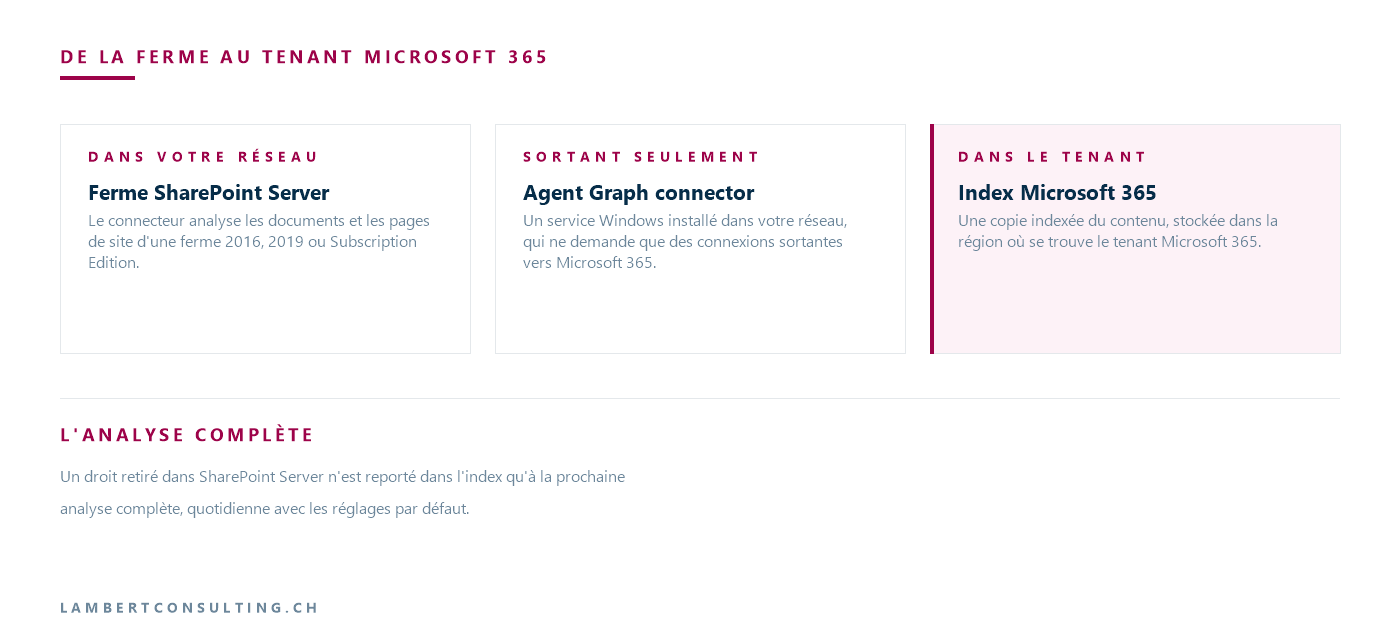
For an organization that has kept SharePoint Server locally for regulatory or contractual reasons, the connector thus changes the nature of the system: an indexed copy of the selected documents now resides in the tenant. The issue then becomes one of compliance rather than technology, and it ties in with the topic explored in our article on the GDPR, the AI Act, and sovereignty. In the connector, what is sent out is determined by the choice of site collections and by exclusions.
Licenses: Microsoft Search for Everyone, Copilot with the Copilot license
The Microsoft licensing table distinguishes between different uses. With a license Microsoft 365, regardless of the plan, the content from a synchronized connector appears in Microsoft Search but is not used for Copilot anchoring or by agents. With the Microsoft 365 Copilot license as an add-on, or with Microsoft 365 E7, all three use cases are covered. A Copilot Studio license, or the pay-as-you-go option for Microsoft 365 Copilot, adds agents to Microsoft Search, without Copilot anchoring. Licensing table retrieved on September 29, 2026, from the connectors’ prerequisites page.
Microsoft states that indexing data from a synchronized connector does not incur any additional costs for tenants that have licenses Microsoft 365, and that semantic search requires at least one Microsoft 365 Copilot license in the tenant. Deployment is performed by an account with the AI administrator role in the admin center Microsoft 365.
Permissions: Synchronization Active Directory determines
There are two modes. The default mode, “Only people with access to the content in the data source,” shows an item only to users who have access to it in SharePoint Server. The “Everyone” mode displays it to everyone in the organization, regardless of their permissions SharePoint.
The first mode relies on the synchronization ofActive Directory to Microsoft Entra IDs. Without it, the connector cannot map permissions SharePoint Server with the identities Microsoft 365, and the mode will not function properly. If the UPN suffixes differ between Active Directory Entra ID, Microsoft recommends verifying the configuration of Microsoft Entra Connect Sync.
Microsoft notes a specific case: SharePoint Server does not support distribution lists as access control lists. If permissions SharePoint apply to groups that contain nested distribution lists, members of those lists may gain access through the connector that was not intended.
Changes to rights are awaiting a comprehensive analysis
The Copilot connector documentation explains what each type of scan does. A full scan processes the entire source, updates the index to reflect deletions, and updates permissions. An incremental scan updates only the elements that have changed since the last scan: it does not process deletions, and currently does not support permission updates.
A right that has been revoked SharePoint Server is therefore not removed from the index until the next full, daily scan using the default settings, and a deleted document remains there until then.
At least one Full Read account, and three authentications without Kerberos or ADFS
The account used for authentication must have at least Full Read permission at the web application level in SharePoint Server. For indexing, Microsoft requires that this account be granted Full Control at the web application level or be made a farm administrator. Indexing skips items that this account does not have access to.
Three types of authentication are available:
- Basic: deprecated, retained for legacy systems, and set to be phased out;
- Windows (NTLM) : usernames in the format
domaine\utilisateur; Kerberos is not supported; - Microsoft Entra ID OIDC: the most secure option according to Microsoft, using tokens, but limited to SharePoint Server Subscription Edition.
ADFS authentication is not supported: a farm that uses ADFS as an identity provider must use one of the three methods listed above.
The OIDC connector requires the Subscription Edition and the ScopedClientIdentifier
OIDC requires a full Subscription Edition at the November 2024 build level (16.0.17928.20238) or later, a version 3.1.2.0 or later of the Microsoft Graph connector agent, and web applications running over HTTPS. In the application registration Entra ID created for OIDC, you must expose an API whose Application ID URI corresponds to the web application’s URL, and add the scope user_impersonation, and authorize the agent's client ID, cb15c983-0c91-416f-8dc0-6c0e1de4ed42.
Finally, you need to provide information about the property ScopedClientIdentifier from the SPTrustedIdentityTokenIssuer, within SharePoint Management Shell. OIDC works without it in SharePoint Server, but the connector requires it: without this mapping, SharePoint Server it cannot verify the connector’s identity for the site, and the scan fails with a 401 error. The command is repeated for each distinct URL to be scanned.
One final point regarding Entra ID : if a Conditional Access connection frequency policy applies to the account that authorized the connection, Microsoft requires that it be at least twice the full scan interval—that is, 48 hours for the default 24-hour interval. Otherwise, the refresh token may expire between scans, and the connection may lose access to SharePoint Server.
Microsoft Graph -Connector Agent: Three Recommended Connections Per Instance
The agent is installed on the server SharePoint itself or on any machine with network access to the farm. For an instance handling up to three connections, Microsoft recommends 8 cores at 3 GHz, 16 GB of RAM, .NET Framework 4.7.2, the .NET Core Desktop Runtime 10.0 (x64), 40 GB of disk space for 5 million items, and access to the data source and the Internet via port 443. “ proxy ” authentication is not supported: if the proxy requires it, the agent must bypass it.
A single agent can handle multiple connections, but Microsoft recommends not exceeding three connections per agent: beyond that, the performance of all its connections may degrade. For more than three web applications, you must install additional agents and distribute the connections among them.
Deploy the connection, then verify it
The connection is created in the Admin Center Microsoft 365, under Copilot > Connectors, on the Gallery tab, then SharePoint Server. The steps are: display name, instance URL, agent selection, authentication type, and then “Authorize,” which verifies access and loads the list of site collections. All that’s left is to choose the collections, accept the data indexing notification, and then select “Create.” Indexing starts immediately.
Microsoft emphasizes the importance of the connection description, which is requested during the initial synchronization: it helps Copilot find the right content and helps users select the correct connection for their agents. Once the connection is in the "Ready" state, the " Index browser " tab verifies that a specific item has been indexed based on its URL SharePoint, and "Check user access " confirms whether a given user has access to it.
SharePoint Server 2016 and 2019 have been out of support since July 14, 2026
The connector supports the 2016 and 2019 farm versions, but extended support for both of these versions ended on July 14, 2026. The connector does not change this situation, and OIDC—the authentication method that Microsoft describes as the most secure—is only available for the Subscription Edition anyway. Options for migration for a 2016 or 2019 farm are covered in our article on the end of support for SharePoint Server 2016 and 2019.
Our Reading
The connector addresses a situation faced by organizations that have retained SharePoint Server : years’ worth of procedures, contracts, and documentation that Copilot cannot see. It does so without migration. But we wouldn’t deploy it until we’ve answered a question that isn’t technical: why has the farm remained on-premises? If it’s a regulatory or contractual requirement, an indexed copy in the tenant could conflict with it, and the decision rests with those responsible for that requirement. If it’s simply inertia, the connector can serve as a stepping stone toward a migration.
Technically, we would start with the Subscription Edition with OIDC, the default permissions mode, and a small number of site collections with their own permissions. We believe two checks are essential before enabling access: search for distribution lists nested within groups that have permissions, and use “Check User Access” to verify a few documents with restricted access. For content whose permissions change frequently, keep in mind that a revoked permission does not disappear from the index until the next full crawl. The same logic for resetting permissions also applies to SharePoint Online, as explained in our article on access rights to review before Microsoft 365 Copilot.
What to Check
- The reason the farm remained local: if it is due to a regulatory or contractual requirement, the copy indexed in the tenant Microsoft 365 is directly relevant to it.
- The farm version, and for the Subscription Edition, the build level—at least 16.0.17928.20238 for OIDC.
- Synchronization ofActive Directory to Entra ID, and any discrepancies in UPN suffixes.
- Distribution lists nested within groups that have permissions SharePoint.
- Licenses: Microsoft 365 The standard version only includes Microsoft Search; using Copilot requires the Microsoft 365 Copilot or Microsoft 365 E7 license, and a Copilot Studio , or pay-as-you-go license only unlocks the agents.
- The analysis account: At least Full Read; Full Control or farm administrator for indexing.
- The login frequency Conditional Access for the account that allows an OIDC connection is at least 48 hours with the default interval.
- Agent sizing, and no more than three connections per agent.
- The selected site collections and the sites to be excluded.
Microsoft Sources
- SharePoint Server Connector Overview
- Set up the SharePoint Server service for connector ingestion
- Deploy the SharePoint Server connector
- Install and configure the Microsoft Graph connector agent
- Prerequisites for deploying connectors
- Microsoft 365 Copilot Connectors FAQ
- Products and Services Reaching the End of Support in 2026
What an article Can't Know
An article describes what applies to everyone. What varies from one organization to another is the inventory: which applications, which accounts, and which pieces of equipment are actually involved in your organization. The inventory determines the scope of the effort, and it cannot be summarized on a single page.
You'll be speaking directly with the engineers who will be doing the work, not with a middleman. We'll respond within 24 business hours.
Check what is still true
Announced dates are sometimes postponed, products are renamed, and conditions change. The blog tracks these topics over time: when a rule changes, a new post announces it.
Search for a topic in the blogIn the same issue
Three articles on the same topic. The blog has 142 articles, all of which are freely available.