


The mailbox quota increases to 100 GB on these plans Microsoft 365 Business
Microsoft 365 Business Basic, Business Standard, and Business Premium now include an additional 50 GB of email storage. The main mailbox capacity has therefore increased from 50 to 100 GB for eligible users. The rollout took place from June through September 2026, as part of the annual packaging changes Microsoft 365 for the year, with advance notice posted in each tenant’s message center.
The increase is automatic. What isn't automatic is the certainty that it actually applies to each of your users—and there are several perfectly normal reasons why a 100 GB quota might not be reached.
How the quota is actually delivered
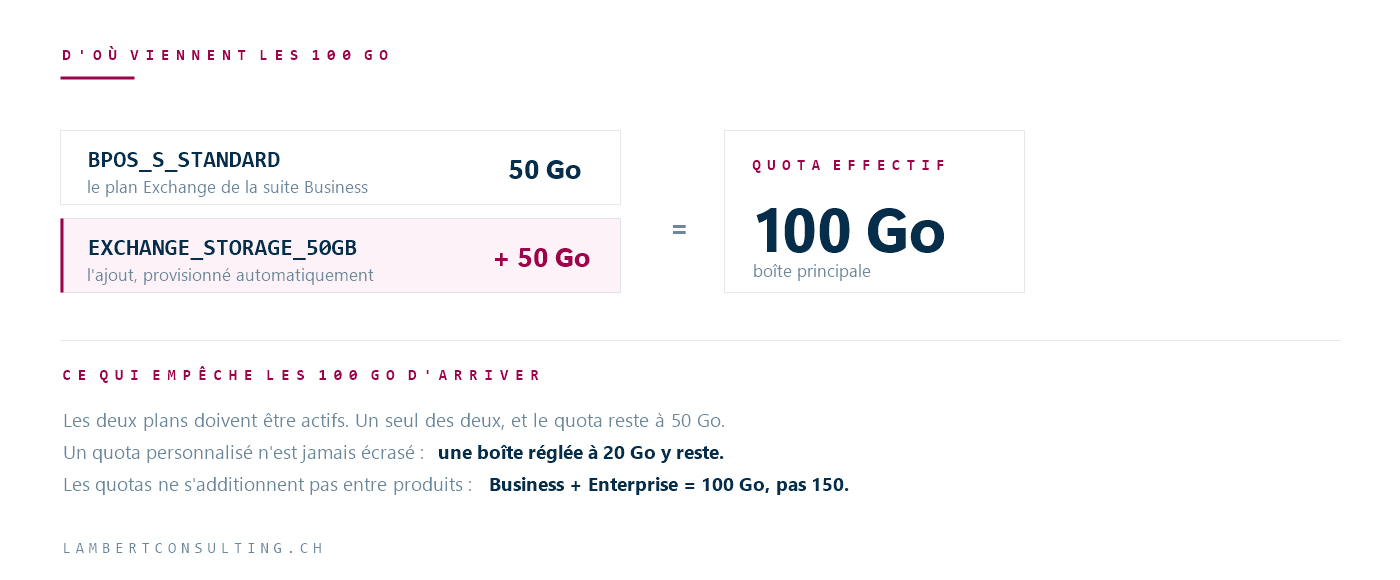
The add-on is not a mailbox setting. It is a licensing setting supported by two service plans, both of which must be active:
| Service Plan | Contribution |
|---|---|
BPOS_S_STANDARD | The plan Exchange of the Business plan, which offers 50 GB. |
EXCHANGE_STORAGE_50GB | The add-on, which provides an additional 50 GB. |
If either of these is missing or has not been provisioned, the effective quota remains at 50 GB. Since this involves licensing data, the plan must be assigned and processed beforeExchange returns the higher value. During deployment waves, it is therefore normal for some users within the same tenant to already have the full 100 GB while others do not.
Do not revoke or reassign a Exchange license to force a quota refresh, unless explicitly instructed to do so by Microsoft Support. Revoking a product revokes access to its services and initiates the corresponding data retention cycle. The catch-up process occurs automatically.
What This Quota Is Not
There are three common misconceptions, and each has budgetary implications.
This isn't archiving. The increase applies only to the size of the main mailbox—and nothing else. It does not provide any online archiving capacity. An organization that was counting on those 50 GB to solve a long-term retention problem hasn't solved its problem—it has merely postponed it.
Quotas do not add up across products. A user with multiple licenses receives the maximum allowed by a single product, not the sum of the quotas. A Business Suite plus an Enterprise license that includes thExchange Online Plan 2 provides 100 GB, not 150.
Not all licenses are affected. The price increase applies to the three Business suites listed above. A Exchange stand-alone Online Plan 1 license remains capped at 50 GB. In a mixed environment—which is common whenever there are service accounts, shared accounts, or field employees—both plans coexist.
The most surprising case: personalized quotas
If an administrator has set a custom quota, the surcharge logic does not override it. This is a deliberate choice by Microsoft, and it protects management decisions made at the tenant level.
The effect is counterintuitive. Let’s take an organization that had reduced its storage quotas from 50 to 20 GB to manage storage capacity. The new service plan arrives; it’s properly provisioned, and the storage quotas remain at 20 GB. Nothing is broken: the custom quota wins out. But the team that was expecting 100 GB will conclude that the deployment failed and will open a support ticket.
Similarly, removing the addition does not override a custom value that is subsequently set by an administrator.
Check, in two steps
Control is exercised at two levels, and both are necessary: the service plan on the license side and the actual quota on the Exchange.
As for the cast, featuring Microsoft Graph PowerShell :
$licenses = Get-MgUserLicenseDetail -UserId [email protected] $licenses.ServicePlans | Where-Object ServicePlanName -eq "EXCHANGE_STORAGE_50GB" | Select-Object ServicePlanName, ProvisioningStatusClick here Exchange, to see what the service actually charges:
Get-Mailbox -Identity [email protected] | Format-List IssueWarningQuota, ProhibitSendQuota, ProhibitSendReceiveQuota, UseDatabaseQuotaDefaultsFor a Business Suite user, with the provisioned add-on and no custom quota, the effective maximum should be 100 GB. If UseDatabaseQuotaDefaults is at False, it's because a personalized quota is in place: that's what determines it, and that's the answer to the question.
In the administration center Microsoft 365, the same check can be performed by going to Users > Active Users, then the Licenses and Applications tab. The Billing > Licenses page also indicates whether the product was assigned directly or through a group.
What This Really Changes
Doubling the main mailbox size resolves a real pain point: organizations that were nearing the 50 GB limit were spending a disproportionate amount of time having their users clean up their mailboxes. That time is now saved.
On the other hand, a 100-GB box is one where you can’t store anything anymore. This was already a problem for search; it’s an even bigger problem when assistants rely on the contents of these boxes to provide answers. The unsorted data becomes noise that a search tool treats as a signal.
So the relevant question isn’t “Do we have the 100 GB?”, but “What justifies keeping what we’re keeping?” A retention policy established while storage space is ample costs far less than one implemented in a rush when space runs out again—and archiving remains a separate issue that no quota has resolved.
This packaging change is part of a series of ongoing updates Microsoft 365 taking place this year; others have specific deadlines, which we’ve compiled in our article on the deadlines for Microsoft 365 and Entra ID through April 2027.
Microsoft Sources
- Understanding the new 100 GB mailbox quota for Microsoft 365 Business suites — Exchange Team Blog
- Exchange Online Limits — Microsoft Service Descriptions
- Demystifying Online Mailbox Quotas in Exchange — Exchange Team Blog
What an article Can't Know
An article describes what applies to everyone. What varies from one organization to another is the inventory: which applications, which accounts, and which pieces of equipment are actually involved in your organization. The inventory determines the scope of the effort, and it cannot be summarized on a single page.
You'll be speaking directly with the engineers who will be doing the work, not with a middleman. We'll respond within 24 business hours.
Check what is still true
Announced dates are sometimes postponed, products are renamed, and conditions change. The blog tracks these topics over time: when a rule changes, a new post announces it.
Search for a topic in the blogIn the same issue
Three articles on the same topic. The blog has 149 articles, all of which are freely accessible.