


Skype for Business Server 2019
Despite the extensive marketing surrounding its offering Office 365, Microsoft will indeed continue to roll out its Office products On-Premise. This type of suite includes server of its various products, such as Exchange Server 2019 and Skype for Business Server 2019, which we will discuss in this article.
This year will see the release of the new version of Skype for Business Server 2019, which will become the most recent on-premises version of the solution Skype for Business; it follows the 2015 version and Lync 2013. Microsoft states that customers using the Skype for Business Server will be offered standard support through at least the end of calendar year 2023 if they upgrade to a new version of the software Skype for Business Server 2019. Depending on market trends and, consequently, demand, Microsoft will release a new version Server On-Premise by 2023. This new 2019 version can be purchased as a standalone product or with Office 2019, Exchange 2019, and SharePoint 2019. Microsoft states that the Skype for Business Server 2019 will also include enhancements for hybrid deployments, such as the shared management portal, unified user authentication, and access to cloud-based calling services cloud and call queues—where both on-premises and cloud-based services cloud are used.
Aside from these additions, the Skype for Business Server 2019 will change hybrid deployments. Currently, administrators of applications with hybrid deployments Skype for Business must place end users on either the platform Skype for Business Server or the Skype for Business Online—a decision that determines whether all services are provided by one platform or the other. The minimum requirements for using this latest version are Windows Server 2016 and SQL Server 2016.
Interoperability between Skype for Business Entreprise Voice &
Teams
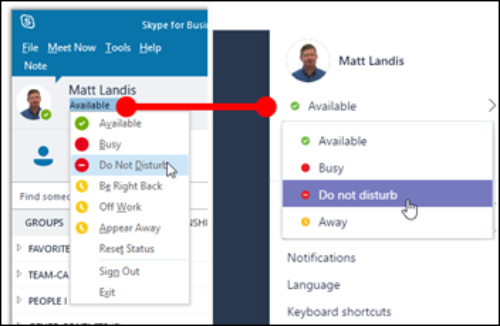
Starting in Skype for Business Server 2019, application administrators will be able to configure a single user simultaneously on both the Skype for Business Server and Microsoft Teams, using the new shared user management and authentication features. This enables a dual-client approach: users benefit from the Entreprise Voice and the Contact Center integration Skype for Business Server as well as the innovative Worktream collaboration features for persistent messaging and meetings from the Microsoft Teams service based on the Cloud.

This approach can also be used as a transition strategy while Microsoft Teams develops its enterprise voice capabilities,
or as a longer-term solution, since Microsoft seems intent on supporting it Skype for Business Server for many years to come.
Recommendations
Plan to upgrade to Skype for Business Server 2019 (including Windows 2016 and SQL Server 2016) if you decide to remain on the on-premises platform for the long term.
For companies that already use Skype for Business Server for Enterprise Voice, the decision to migrate to enterprise voice based on Microsoft Teams will need to be carefully evaluated, as there is still work to be done before Microsoft can bring this feature up to par with Skype for Business Server.
Continue to deploy contact centers with Skype for Business Server for the foreseeable future, as there are currently no clear indications from Microsoft regarding support for the API required to integrate contact centers with Microsoft Teams. Contact center API will not change with the 2019 release of Skype for Business Server 2019, so existing solutions will continue to work (see the “Market Guide for Microsoft Skype for Business Contact Center Partners” for vendors that best meet this need).
Evaluate the use of the dual-client hybrid approach to continue leveraging Skype for Business Server for a more mature " Enterprise Voice " while simultaneously using workstream collaboration and online meeting services via Microsoft Teams.
For companies looking for a deployment model cloud with the features of Skype for Business Server, Microsoft partners offer hosted solutions worth exploring. These partners can also meet the need for features Skype for Business Server with their own products or integrate third-party technologies to meet the company’s communication and networking needs.
Get an experienced specialist to help you think through the right decisions.
Microsoft's presentation of Ignite 2017
Quality label

What an article Can't Know
An article describes what applies to everyone. What varies from one organization to another is the inventory: which applications, which accounts, and which pieces of equipment are actually involved in your organization. The inventory determines the scope of the effort, and it cannot be summarized on a single page.
You'll be speaking directly with the engineers who will be doing the work, not with a middleman. We'll respond within 24 business hours.
Check what is still true
Announced dates are sometimes postponed, products are renamed, and conditions change. The blog tracks these topics over time: when a rule changes, a new post announces it.
Search for a topic in the blogIn the same issue
Three articles on the same topic. The blog has 139 articles, all of which are freely available.