


Teams detects note-taking bots and places them in the waiting room
A participant can invite a meeting assistant to a videoconference: a transcription tool, an automatic note-taker, or a service that produces meeting minutes. The tool joins the meeting as a regular participant, accesses the audio and video content, and exports the generated data to a platform outside the organization, without prior approval and without its presence being disclosed to other participants.
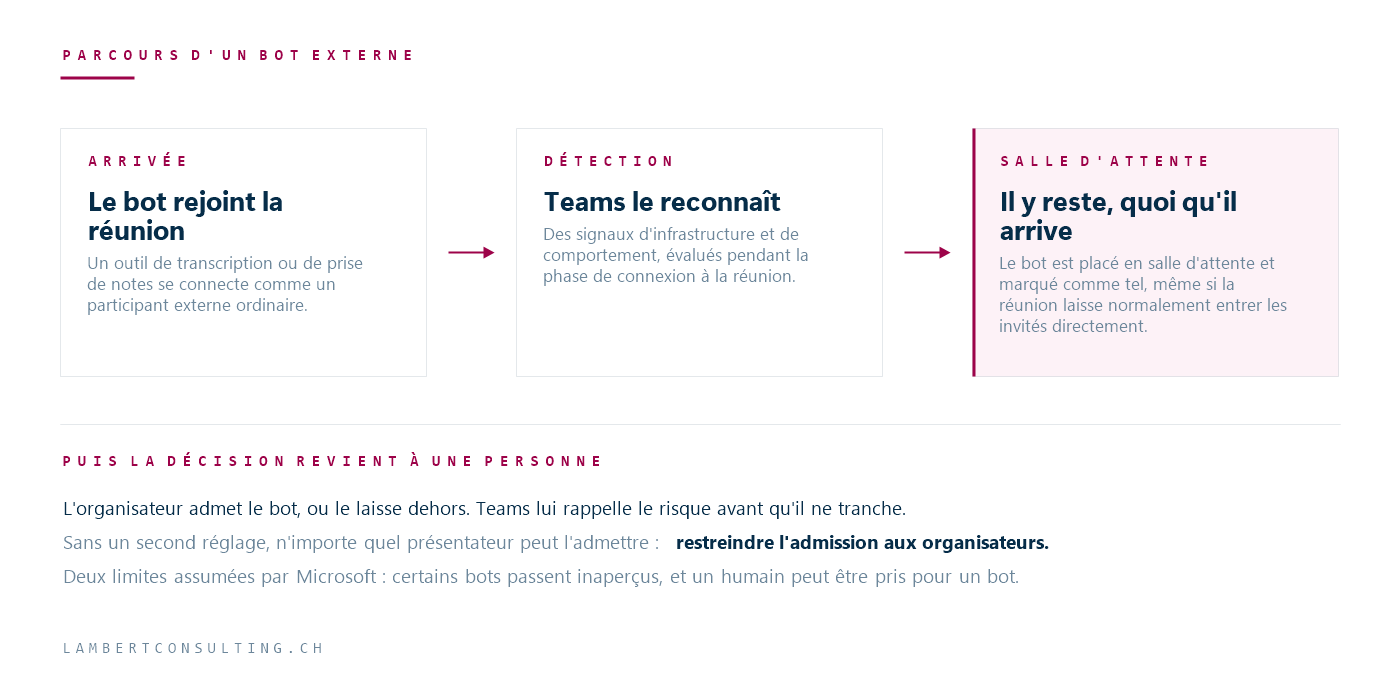
Microsoft Teams now recognizes these external bots when they join the meeting, places them in a waiting room, and requires explicit admission by the host. This behavior is enabled by default.
What Detection Does
Teams Identifies external bots based on infrastructure and behavioral signals collected during the meeting connection phase. When a participant is classified as a bot, they are placed in the waiting room regardless of the meeting’s waiting room settings. The bot setting is therefore evaluated before the standard waiting room rules.
The organizer—and, depending on the configuration, the presenters—must then explicitly acknowledge this. At that point, Teams displays a reminder of the risks associated with this acknowledgment.
Bots no longer appear as ordinary external participants: they are marked as bots in the waiting room and in the meeting.
Configuration in meeting policies Teams
This setting is configured in meeting policies at Teams, in the “Meeting Join and Lobby” section, under “Manage external bots and their access to meetings.” It applies at the tenant level through the default policy, or to a group or user through a targeted policy.
The attribute to be manipulated is called ExternalBotAccessMode. It accepts two values.
| Administration Center | PowerShell | Behavior |
|---|---|---|
| Do not detect bots | AllowAllBots | Bots are neither detected nor flagged. They enter just like any other external participant. |
| When detected, require approval before joining | RequireApprovalWhenDetected | Default setting. Bots are detected, flagged, and held in a waiting room until explicitly admitted. |
Two discrepancies in the Microsoft documentation. The feature page recommends using Set-CsTeamsMeetingPolicy, but its command examples output Set-CsTeamsEventsPolicy : For settings related to meeting policies, use Set-CsTeamsMeetingPolicy. That same page lists the first value AllowBots, whereas the cmdlet's reference—which is the definitive source for what PowerShell accepts—states AllowAllBots. The commands below use AllowAllBots. Check the result after execution rather than relying on the return code.
To apply detection to a strategy:
Set-CsTeamsMeetingPolicy -Identity <nom de la stratégie> -ExternalBotAccessMode RequireApprovalWhenDetectedAnd to turn it off:
Set-CsTeamsMeetingPolicy -Identity <nom de la stratégie> -ExternalBotAccessMode AllowAllBotsRestrictions on entry from the waiting room
Detection places the bot in the waiting room but does not determine who can admit it. If the settings allow presenters to admit participants, a presenter can admit the bot—including the person who invited it, if that person is a presenter in the meeting.
Microsoft recommends restricting admission from the waiting room to organizers and co-organizers only. Without this second setting, the detection system flags the bot and delays its entry, but access remains open to all presenters.
Known Limitations
Microsoft documents two limitations of the feature.
Some external bots are not detected. Detection coverage is partial: a service that joins the meeting via an unusual path may not be classified as a bot. This feature reduces exposure without eliminating it, and should not be presented internally as a guarantee that meetings are closed to external tools.
Human participants may be classified as bots. In this case, the organizer admits the person from the waiting room and marks them using the “This is not a bot” option, which restores their status for the current meeting. Microsoft uses these reports to refine its detection. Expect support requests during the first few weeks, and communicate the procedure to organizers.
Impact on Data Governance
The main concern relates to the storage, transfer, and processing of data generated by the bot. An external note-taker accesses the meeting content, produces a transcript and a summary, and stores this data in a third-party system—outside the organization’s compliance scope, its retention policies, and its contractual obligations to its clients.
Three questions should be considered before choosing a mode:
- Do meetings that address customer data, HR matters, or contractual issues fall under the same strategy as regular internal meetings?
- Do the organizers understand the implications of the permission they grant by admitting a participant flagged as a bot?
- Does the organization have a list of approved support tools, or does each employee install their own?
Our take: The default setting is a reasonable starting point, but it is not sufficient on its own. If no one has informed the organizers, the organizer present at the meeting decides whether to approve the tool, without knowing the compliance context or the criteria.
The level of control is determined by the destination of the data, as with the Data Loss Prevention : where it is stored, by whom, and under what retention policy.
Recommended Actions
- Calculate the present value of
ExternalBotAccessModeon the default meeting policy and on targeted policies. - Check who can admit participants from the waiting room, and restrict access to organizers and co-organizers when meetings involve sensitive data.
- Notify the organizers before the marker appears, and inform them of the procedure to follow in the event of a false positive.
- Monitor audit logs to identify unusual participant activity.
Microsoft Sources
- Manage external bots and their access to meetings — Microsoft Learn
- Who Can Skip the Waiting Room — Microsoft Learn
- Set-CsTeamsMeetingPolicy — Microsoft Learn
What an article Can't Know
An article describes what applies to everyone. What varies from one organization to another is the inventory: which applications, which accounts, and which pieces of equipment are actually involved in your organization. The inventory determines the scope of the effort, and it cannot be summarized on a single page.
You'll be speaking directly with the engineers who will be doing the work, not with a middleman. We'll respond within 24 business hours.
Check what is still true
Announced dates are sometimes postponed, products are renamed, and conditions change. The blog tracks these topics over time: when a rule changes, a new post announces it.
Search for a topic in the blogIn the same issue
Three articles on the same topic. The blog has 149 articles, all of which are freely accessible.