


Who owns your tenant Microsoft 365, and who controls it
A service provider may have administrative rights to your tenant Microsoft 365 : what roles are available, where to find them in your portal, what can be revoked with a single click and what remains elsewhere, and what you can check yourself starting today.
Your company has a tenant Microsoft 365 : that’s where your accounts, mailboxes, files, and permissions are stored. Microsoft states that the person who purchased a subscription for the organization and signed it up for online services is automatically the Global Administrator. Depending on how the setup began, this person may be part of your staff or work for the service provider who set up the environment.
It is not unusual for a tenant Microsoft 365 for a tenant to be administered by the person who signed it up—whether at your site or at the service provider’s site that set up the environment—is not unusual. A service provider needs administrative access to do its job, and Microsoft explicitly provides the mechanisms to grant it. There are three things to verify: what access rights exist, where they are visible, and what you can take over on your own.
What a tenant is, and what it contains
Three concepts are often confused. Theorganization represents the company that uses the services, identified by one or more public domain names DNS such as contoso.com ; it contains the subscriptions. Thesubscription is the agreement with Microsoft to use one or more platforms or services, billed either on a per-user license basis or based on resource usage. The currently Microsoft Entra is a specific instance of Microsoft Entra ID which contains the accounts and groups.
User accounts for all cloud are stored in this Entra tenant, and multiple subscriptions from the same organization can share the same tenant. A paid or trial subscription to Microsoft 365 or Dynamics 365 includes a free Entra tenant.
Under “Ownership,” Microsoft states that, for all deployment types, you own your data and identities. Its shared responsibility matrix places customer data, configurations, and identities on the customer’s side in all four models it compares—from on-premises installations to ready-to-use online services, of which Microsoft 365 is used as an example. Tenant ownership Microsoft 365 and day-to-day control of it remain two distinct things: control follows administrative roles, and these roles are assigned separately.
What the Global Administrator role allows you to do
Microsoft states that users with this role have access to all administrative features in Microsoft Entra ID and services that use Azure Active Directory identities, and it cites the Microsoft Defender portal, the Microsoft Purview portal, Exchange Online, SharePoint Online, and Skype for Business Online. The same documentation adds that Global Administrators have nearly unlimited access to your organization’s settings and most of its data, and recommends limiting their number as much as possible.
Specifically, a Global Administrator can reset the password for any user and for all other administrators, manage the organization’s subscription and product purchases, add and manage domains, and unlock another Global Administrator. They can also view the directory’s activity logs and elevate their privileges to manage all subscriptions Azure and all administration groups; Microsoft states that this grants them full access to all resources Azure in the tenant.
For mailboxes and files, Microsoft documents administrative tasks that make the content accessible. Converting an employee’s mailbox to a shared mailbox preserves all existing emails and calendar entries in a mailbox that multiple people can access. When an account is deleted, another user can be granted access to the OneDrive and is then given 30 days by default to view and download any files they wish to keep; by default, the employee’s line manager is automatically granted this access.
Microsoft documents a limitation of the role: a Global Administrator cannot revoke their own assignment, and Microsoft prevents this to ensure that an organization does not end up without any Global Administrators. Conversely, the role has an exclusivity: only Global Administrators can view and manage subscriptions purchased through a partner.
What a partner has access to in your tenant: delegated administration, reseller, subscription advisor
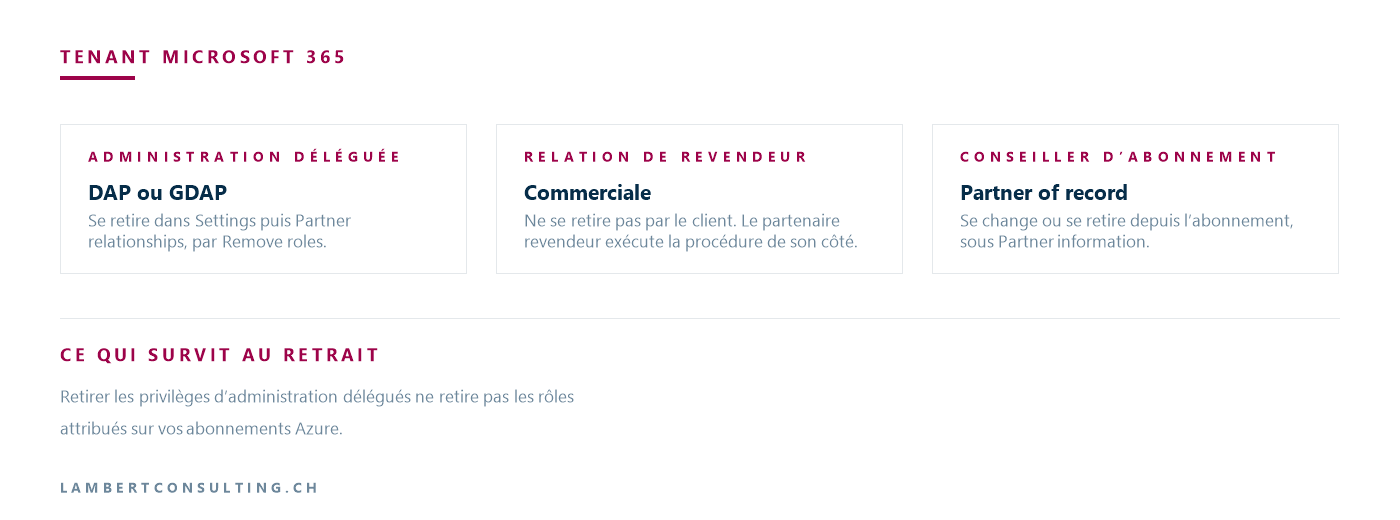
A partner can be linked to your environment in several ways, and these relationships cannot be terminated in the same way. Delegated administration grants the partner rights to your services; the reseller relationship and the subscription advisor role are commercial in nature.
Delegated administration. Microsoft defines it as follows: it enables technicians at a Cloud Solution Provider to manage Microsoft services such as Microsoft 365, Dynamics 365 and Azure on behalf of your organization, with the same roles and permissions as your own administrators. These roles are assigned to security groups located in the partner’s Entra tenant, meaning that the partner’s technicians do not need a user account in your tenant to administer your services.
Microsoft states that there are two types of delegated administration relationships: the older one, DAP, and the current one, GDAP.
DAP. All DAP relationships allow the CSP to delegate the Global Administrator and Helpdesk Administrator roles to its technicians. The partner’s Admin Agents group is assigned the Global Administrator role in your Entra tenant. A DAP relationship remains in effect until you or your CSP revoke it; it does not expire on its own.
GDAP. Microsoft describes it as a security feature that grants partners low-privilege, granular, and time-limited access to their customers’ workloads—that is, to the services they manage on their behalf. The customer must explicitly grant this access. When a CSP creates a GDAP relationship request for your tenant, a Global Administrator on your end must approve it; the request specifies the partner’s tenant, the roles the partner wishes to delegate to its technicians, and the expiration date.
The maximum duration of a GDAP relationship is two years, and Microsoft states that permanent relationships are not possible for security reasons. An automatic extension can extend a relationship by six months, until it is terminated or the extension is disabled. Customer consent is not required to enable this extension on an existing active GDAP relationship. A relationship with the Global Administrator role cannot be automatically extended.
Microsoft has handled part of the transition from DAP to GDAP itself. For affected partners, it automatically creates a GDAP relationship with a default set of roles, assigns those roles to predefined security groups CSP , and then removes the DAP relationship thirty days later. The relationship created in this way lasts for one year and has a name that begins with MLT_. Microsoft notes that emails that would normally be sent to customers as part of this transition are not being sent.
The reseller relationship. This is a commercial relationship and is distinct from administrative rights. Microsoft states that removing a customer’s GDAP relationships does not terminate the partner’s reseller relationship, and that the partner may continue to purchase products for that customer and manage their budget Azure.
The subscription advisor. A Microsoft-authorized partner can also be the “partner of record” for a subscription. Microsoft describes this role as an advisor who provides the sales, support, and technical expertise needed to set up and maintain your subscription Microsoft 365. They are added at the time of purchase or later by entering their Microsoft partner ID.
For more information on what Microsoft designations indicate about a partner—and what they do not—see “Choosing a Microsoft Partner.”
Where to view your partner relationships, and how to remove one
In the admin center Microsoft 365, in the navigation menu, open Settings, then Partner relationships: your partners are listed there. If you don’t have any, the page displays a message indicating that you don’t have any partners yet.
This is the page Microsoft provides to help you determine which partners have delegated administration privileges for your tenant. It also states that the recommended method for a customer to view or revoke existing GDAP relationships is through the admin.microsoft.com portal. A " Delegated Administration " page on the portal Azure also lists the two types of relationships: DAP and GDAP.
Delegated privileges are revoked in the same location: select the partner’s row, choose “Remove roles,” and then confirm. Microsoft states that at this point, the Entra role assignments are revoked and the partner can no longer administer your Entra tenant. Security groups associated with the relationship lose access to your organization, and the same applies when a customer terminates a DAP relationship.
You can change or remove the subscription advisor in one of two ways: from within the subscription itself, under "Billing " and then "Your products," or under "Subscriptions " in simplified view, by opening the subscription and selecting "Remove " under "Partner information." Microsoft notes that these actions require a Microsoft Online Services Agreement billing account and at least the Billing Administrator role.
What Remains After the Revocation of Delegated Privileges
Two things remain after this removal, and Microsoft documents both of them.
Azure Subscription Roles. When a customer revokes delegated administrative privileges through the portal, the partner can still manage the subscription Azure for that customer as long as they remain assigned to one or more roles on that subscription. To prevent this, you must revoke the role assignment itself, which is a separate action.
The reseller relationship. You cannot remove it yourself. If you try, the delete option is grayed out, and Microsoft directs you to a process that the reseller partner carries out on its own.
The tenant recovery process documented by Microsoft, and the scenario it covers
Microsoft documents a recovery procedure known as“admin takeover” for an unmanaged directory. The scenario described involves a tenant created without corporate approval: when a user self-registers for an online service that uses Microsoft Entra ID, they are added to an unmanaged Entra directory, created based on the domain of their email address.
There are two types of this procedure, and in both cases, verification is done through DNS : you add a TXT record with your registrar—the organization where your domain is registered—and once that record is verified, you can manage the Entra organization. Internal migration assigns the requester the role of Global Administrator for the unmanaged directory, without migrating any users, domains, or service plans to another directory. External migration adds the domain name to a directory you already administer and transfers users, subscriptions, and license assignments along with it; Microsoft states that this is not supported for a service whose plans include SharePoint, OneDrive or Skype for Business.
The scope of this procedure is limited. It addresses the case of a tenant created through self-service registration. It does not apply to a managed tenant, where your domain has already been verified and where certain accounts hold the Global Administrator role. In that case, two documented options remain available: holding at least one Global Administrator account yourself, and revoking delegated administration relationships.
The purpose of emergency access accounts is to ensure you have a Global Administrator account that you control. Microsoft recommends creating at least two of these accounts, cloud only on the domain .onmicrosoft.com, without federation or synchronization from a local directory, with the Global Administrator role, and to store the credentials in a secure location accessible to multiple members of the administration team. Among the situations that justify these accounts, Microsoft cites the departure of the person holding the last Global Administrator access: Entra ID prevents the deletion of the last Global Administrator account, but does not prevent that account from being deleted or deactivated on the local directory side.
Backing up your data Microsoft 365 : What Microsoft Covers
Microsoft states that, regardless of the type of deployment, you remain responsible for your data, your devices, account management, and access management.
Microsoft also enforces its own retention policies. The default retention period for an OneDrive whose account has been deleted is thirty days, which can be modified in the admin center SharePoint. At the end of this period, the OneDrive account is moved to the site collection recycle bin, where it is retained for ninety-three days; to restore it, you must use the command-line tool ` PowerShell`.
The backup itself is a separate product. Microsoft 365 Backup It covers sites SharePoint, accounts OneDrive , and mailboxes Exchange, with a recovery window configurable in the backup policy to three months, six months, one year, or two years. Microsoft states that this is a pay-as-you-go offering—not a per-user license—and that the same capacity can be utilized by a partner application built on the Microsoft 365 Backup : in this case, the tool’s operation is managed and paid for entirely through the partner’s application.
The same ownership issue applies to backup. Three elements are handled separately: the subscription to the backup product and its billing, the configured retention period, and the console from which a restore is initiated. Each of these can be located at your site or at your service provider’s site, and the answers for all three are not necessarily the same.
The same questions apply to a business application developed for you: where is the data stored, who has administrative access, and how long would it take a third party to take control?
Our Reading
It is common for a service provider to have administrative access to your tenant. The first question you should ask yourself is: Do you have at least one Global Administrator account that you control, and do you know how to locate it? If the answer is no, that is the first issue to address, before discussing delegated relationships, backups, or switching service providers.
If a DAP relationship still exists in your tenant, here’s our recommendation: request that it be replaced with a GDAP relationship. A GDAP relationship includes named roles and an expiration date, whereas the Global Administrator access delegated through a DAP relationship does not expire on its own. The factor that determines the response is the scope of the mandate: a service provider bound by an IT outsourcing contract covering your entire environment will need extended roles, and refusing access rights required for the job on principle wastes time with every intervention. The duration and traceability of access rights are managed within the GDAP relationship itself; their scope depends on the scope of the mandate.
If your administrative access rights are in order, the partner agreements match what you signed, and the backup is billed through your own subscription, that’s all there is to it. This issue does not warrant a project.
What You Can Check Today
- Open Settings, then Partner Relationships in the Admin Center Microsoft 365 and review the list. It shows the partners you work with and those who have delegated administrative privileges on your tenant.
- Open the " Role Assignments " page in the same administration center, select the "Global Administrator" role, and view the "Assigned Administrators" tab.
- Make sure that at least one of these accounts is yours and that it is active—not just listed.
- Review the role assignments for your subscriptions Azure : Removing delegated administrative privileges does not affect them.
- Ask which subscription plan your data backup Microsoft 365 is billed for, what retention period is configured, and who can initiate a restore.
- If you don't have any emergency access accounts, create two according to the guidelines published by Microsoft, and test them.
None of these items require a service provider.
Microsoft Sources
- Subscriptions, licenses, accounts, and tenants for Microsoft’s cloud offerings
- About administrator roles in the Microsoft 365 admin center
- Shared responsibility in the cloud
- Delegated Administration in Microsoft Entra ID
- Introduction to Granular Delegated Admin Privileges (GDAP)
- GDAP Frequently Asked Questions
- Microsoft-led transition from DAP to GDAP
- Obtain a customer's admin privileges
- Add, change, or delete a Microsoft 365 subscription advisor partner
- Administrator takeover of an unmanaged directory
- Manage emergency access administrator accounts
- Forward a former employee's email to another employee or convert it to a shared mailbox
- OneDrive retention and deletion
- Overview of Microsoft 365 Backup
What an article Can't Know
An article describes what applies to everyone. What varies from one organization to another is the inventory: which applications, which accounts, and which pieces of equipment are actually involved in your organization. The inventory determines the scope of the effort, and it cannot be summarized on a single page.
You'll be speaking directly with the engineers who will be doing the work, not with a middleman. We'll respond within 24 business hours.
Check what is still true
Announced dates are sometimes postponed, products are renamed, and conditions change. The blog tracks these topics over time: when a rule changes, a new post announces it.
Search for a topic in the blogIn the same issue
Three articles on the same topic. The blog has 153 articles, all of which are freely accessible.