


Microsoft 365 and Entra ID : Deadlines to Meet Before April 2027
Between August 31, 2026, and April 1, 2027, five mechanisms present in most tenants Microsoft 365 will no longer function according to their current rules: EWS access by applications to Exchange Online, calendar sharing with a partner tenant, multi-factor authentication via text message, the operator memberOf dynamic groups and basic authentication for SMTP sending.
Each one is handled through a configuration setting rather than a migration, but for each one, a decision must be made by a set deadline. The first deadline is August 31, 2026, on EWS.
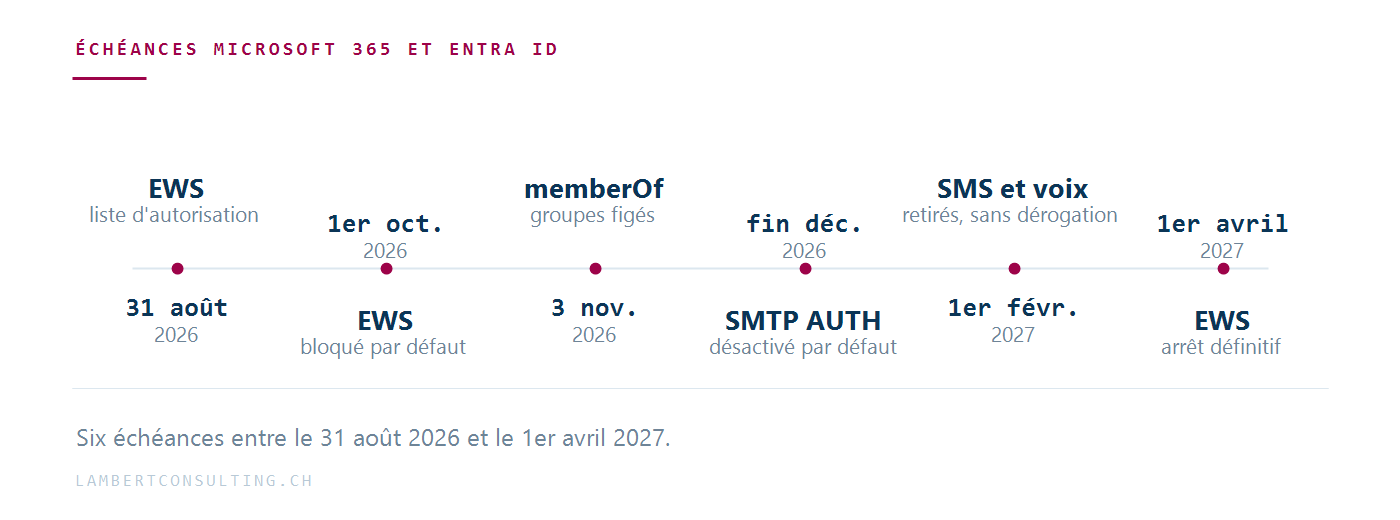
| Date | Component | Effect |
|---|---|---|
| August 31, 2026 | EWS | Last day to define an AppID authorization list and proceed EWSEnabled to True, in order to avoid automatic suspension on October 1. |
| September 1, 2026 | Entra ID | Users who still have SMS or voice calls enabled are eligible to use passkeys and are prompted to register one. |
| September 2026 | EWS | Microsoft pre-populates the authorization list for tenants who haven't created one, based on their observed usage. |
| September 18, 2026 | Entra ID | Listing of third-party telecom providers in the Microsoft Security Store. |
| October 1, 2026 | EWS | The defenders who remained on EWSEnabled = Null switch to False. EWS blocked for all of their applications. |
| October 30, 2026 | Entra ID | Option to configure a third-party telecom provider to retain SMS and voice services. |
| November 3, 2026 | Entra ID | The operator memberOf stops feeding dynamic groups, dynamic administrative units, and automatic assignment strategies. |
| Late December 2026 | Exchange Online | Basic authentication for SMTP AUTH is disabled by default on existing tenants. |
| February 1, 2027 | Entra ID | End of SMS and voice delivery provided by Microsoft. The registration prompt at passkey is now mandatory, with no exceptions. |
| April 1, 2027 | EWS | EWS Shuts Down for Good Exchange Online. Administrators lose control ofEWSEnabled. |
EWS: Reversal of the authorization list policy in October
Exchange Web Services is the interface through which many third-party applications still access mailboxes and calendars: signing tools, backup solutions, meeting room connectors, business applications, billing systems, and recruitment platforms. Microsoft announced its phase-out in 2018, set the end date for 2023, and accelerated the timeline following the Midnight Blizzard incident in January 2024, which involved EWS.
The withdrawal is controlled by an organizational property, EWSEnabled, which accepts three values: True, False and Null. Null is the default setting today, and it allows everything. On October 1, 2026, Microsoft will migrate any remaining tenants to Null toward False, which disables EWS for all their applications.
On the same date, the service of EWSEnabled = True when combined with an empty allowlist, changes. Microsoft clarified this point in June 2026 and then rephrased it in August 2026.
Starting in October, EWSEnabled = True An empty allowlist blocks all apps instead of allowing them all. A tenant configured with True and an empty list is therefore in the same situation as a tenant left on Null : EWS disabled for all applications.
Before October, the rule is lenient: Null allows everything and ignores the list; True With an empty list, everything is allowed; True When the list is filled in, it only allows the listed applications to pass through; False blocks everything. Starting in October, the second rule is reversed.
The list is called EWSAllowedAppIDs. It has been read and written since Exchange Online PowerShell :
Get-OrganizationConfig -RetrieveEwsOperationAccessPolicy | Format-List EwsAllowedAppIDs Set-OrganizationConfig -EwsAllowedAppIDs "11111111-2222-3333-4444-555555555555,aaaaaaaa-bbbb-cccc-dddd-eeeeeeeeeeee"Three key points to know. Writing replaces in its entirety The list: To add an AppID, read the current value, reformat it, and write it back; otherwise, the previous entries will be lost. A change will up to 24 hours to take effect, since the server cache is refreshed only once a day. And the setting -RetrieveEwsOperationAccessPolicy is required when reading; otherwise, the list is not returned.
The list must also include Microsoft applications that still depend on EWS, such as Office or Power Query for Excel. The EWS usage report in the admin center Microsoft 365 shows the AppIDs observed in the tenant; it does not resolve them to names, which means third-party applications must be identified manually.
Set up the list and move on EWSEnabled to True Completing the process by the end of August excludes the tenant from the automatic switchover on October 1 and protects it from temporary verification outages that Microsoft reserves the right to implement between now and then. For tenants who have not configured anything, Microsoft will pre-populate the list in September based on observed usage: this automatic list may include applications that have not been approved by the organization, and therefore requires a review.
It remains possible to reactivate EWS after the October shutdown until April 2027, with a service interruption in between. After April 1, 2027, no exceptions are planned. The exit path is Microsoft Graph, where Microsoft publishes the status of remaining parity discrepancies.
Exchange Server and hybrid scenarios
Exchange Server is not affected. EWS remains in place on local servers. In a hybrid environment, mailboxes that remain on-premises continue to use EWS, while those in the tenant must switch to Graph.
The mechanism for sharing calendars among tenants is changing
A direct consequence of the removal of EWS: sharing availability, MailTips, and calendars with another organization Microsoft 365 now relies on Organization Relationships, Availability Address Spaces, and Sharing Policies—three mechanisms that depend on EWS.
They are replaced by the Microsoft 365 Cross-Tenant Access Policy, which is based on Entra’s Cross-Tenant Entra Cross-Access Policy and identifies the partner organization by its Tenant ID rather than by its domain names.
Two factors determine how the operation is planned:
- The new policy is inbound. Each organization controls what external parties can access within it, so two-way sharing requires both parties to create complementary policies.
- The old configurations take precedence. As long as an Organization Relationship is active, the Cross-Tenant does not apply. Validation therefore requires deactivating the old configuration before testing the new one, in coordination with the administrator on the other end.
The inventory consists of three orders:
Get-OrganizationRelationship | Format-List Name, DomainNames, Enabled, FreeBusyAccessEnabled, MailTipsAccessEnabled Get-AvailabilityAddressSpace | Format-List ForestName, AccessMethod Get-SharingPolicy | Format-List Name, Enabled, Domains, DefaultThese configurations are particularly relevant for organizations that share calendars with a subsidiary, a sister company, a fiduciary, or a long-standing partner. More often than not, someone set them up once and no one has touched them since: they are not included in the operational documentation. The rollout of the replacement feature is phased: prepare for migration as soon as the feature becomes available in your tenant, and before the EWS deadline.
Text Messages and Voice Calls: Entra ID is switching to passkeys
On September 1, 2026, passkeys will become the default authentication method in Microsoft Entra ID. Users still enabled for SMS or voice call—in the authentication methods policy as well as in their old MFA per user — will be automatically placed in a " passkey" profile, and the enrollment campaign will transition to "Microsoft Managed" status. The next time they perform strong authentication, they will be prompted to register a passkey.
By default, this prompt can be postponed an unlimited number of times. This will no longer be possible as of February 1, 2027: on that date, Microsoft will discontinue the SMS and voice delivery services it currently provides, and users for whom this is the only available method must register a passkey before they can sign in. The prompt will become a blocking requirement, and Microsoft states that no exceptions are planned for any tenant.
There are two mechanisms that allow you to deviate from the default behavior, each with a different scope.
The first is a temporary suspension of automatic activation, valid only for the period from September 1, 2026, to February 1, 2027. It can be requested at Microsoft Graph :
PATCH https://graph.microsoft.com/beta/policies/authenticationmethodspolicy { "optOutSettings": { "passkeyDynamicMigration": true } }It postpones activation and the registration campaign, but has no other effect: On February 1, 2027, the standard rules apply regardless of this setting.
The second option is to set up a third-party telecom provider through the Microsoft Security Store, which will be visible starting September 18, 2026, and configurable starting October 30, 2026. This option is intended for organizations that are required by regulation to maintain a second verification channel on a device other than the user’s. It requires a carrier contract, recurring costs, and a pilot program. The February 1, 2027, deadline applies regardless: this option replaces the SMS channel; it does not postpone the deadline.
The preliminary work is the same in both cases: identify the users in the tenant who still rely on SMS or voice. Microsoft provides an analysis script for this purpose, which can be run with the Global Reader, Authentication Policy Administrator, or Security Reader role.
The groups that should be prioritized for review are service accounts, employees without company phones, temporary workers, field staff, and emergency access accounts, whose configurations are rarely changed.
The `memberOf` operator is being removed from dynamic groups
The operator memberOf allows you to define a dynamic group whose members are members of other groups. It has remained in preview, and Microsoft will end this preview on November 3, 2026.
The shutdown doesn't generate any error messages: you'll only notice it if you look for it memberOf according to your rules.
After November 3, 2026, dynamic groups, dynamic administrative units, and automatic assignment strategies that are based on memberOf stop updating and remain frozen in their last known state. Existing affiliations are retained, but they no longer change based on the source groups.
The consequences follow the chain of dependencies: Teams access and SharePoint that can no longer be revoked, drifting targeting of conditional access policies, group-based license assignments that become out of sync, and access packages that remain assigned. An employee who changes departments retains the access rights attached to their former group; a new hire does not receive theirs. You’ll see these issues come in as isolated support tickets, several weeks after November 3, without anyone making the connection to the end of the pre-release period.
This dependency requires special attention if your conditional access policies target groups structured in this way; our guide on conditional access details how policy evaluation is based on group membership.
The fix involves exporting the dynamic groups from the Entra administration center and identifying the rules that contain memberOf, and replace them with supported operators or switch the group to assigned membership. The same process applies to dynamic administrative units and automatic assignment strategies, which can be identified by Microsoft Graph PowerShell . Microsoft states that it is working on a replacement solution but has not announced when it will be available.
SMTP AUTH: Basic authentication is disabled by default
Basic authentication has been removed fromExchange Online several years ago for Exchange ActiveSync, POP, IMAP, EWS, Remote PowerShell, Autodiscover, and Outlook. SMTP AUTH was the last exception, maintained because a large number of organizations use it to send emails via devices and applications.
The schedule was revised in January 2026:
- Through December 2026, the behavior remains unchanged;
- As of late December 2026, basic authentication for SMTP AUTH will be disabled by default on existing tenants, though administrators can still re-enable it;
- Tenants created after December 2026 will not have it at all, as OAuth is the only supported method;
- In the second half of 2027, Microsoft will announce the date of permanent discontinuation.
Deactivation by default does not mean deletion: reactivation remains possible on existing tenants for a limited period, the end date of which will be announced in the second half of 2027. Before proceeding, identify which issuers depend on this feature.
The affected senders are rarely listed in an application inventory: multifunction printers that send scans via email, technical alarms, ERP , which sends invoices, monitoring tools, and in-house business applications. The tenant’s send logs serve as a reliable inventory source for identifying them.
Checks to Be Performed, in Order of Due Date
- Before August 31 — Open the EWS usage report in the administration center, identify the active AppIDs, and write down the list
EWSAllowedAppIDsand move onEWSEnabledtoTrue. If the deadline does not allow for a complete inventory, a partial but detailed list is still preferable to the list that Microsoft will compile in September. - Before September 1 —identify users who still rely on text messaging or voice calls, decide whether to implement the temporary suspension, and prepare internal communications before the registration prompt appears.
- In September —identify active Organization Relationships, Availability Address Spaces, and Sharing Policies, and contact the administrators of partner tenants who need to take action.
- Before November 3 — export rules for dynamic groups, dynamic administrative units, and automatic assignment policies, and search for
memberOf. - Before December —identify the devices and applications that send emails via authenticated SMTP, and verify which ones support OAuth.
The first two items can be completed in a few hours on a medium-sized property. The next three depend on the quality of the existing inventory.
Microsoft Sources
- Depreciation ofExchange Web Services in Exchange Online
- Exchange Online EWS: Your Time Is Almost Up
- Introducing EWSAllowedAppIDs
- Migrate to Microsoft 365 Cross-Tenant Access Policy
- Default Access Keys and Disabling SMS and Voice Authentication
- Dynamic groups configured using the `memberOf` operator
- Message Center MC1448379, “memberOf operator in dynamic groups — end of preview” — Microsoft 365 Message Center (accessible from the tenant administration center)
- Revised Timeline for the Deprecation of Basic Authentication for SMTP AUTH
- Deprecation of Basic Authentication in Exchange Online
What an article Can't Know
An article describes what applies to everyone. What varies from one organization to another is the inventory: which applications, which accounts, and which pieces of equipment are actually involved in your organization. The inventory determines the scope of the effort, and it cannot be summarized on a single page.
You'll be speaking directly with the engineers who will be doing the work, not with a middleman. We'll respond within 24 business hours.
Check what is still true
Announced dates are sometimes postponed, products are renamed, and conditions change. The blog tracks these topics over time: when a rule changes, a new post announces it.
Search for a topic in the blogIn the same issue
Three articles on the same topic. The blog has 149 articles, all of which are freely accessible.