


Goal
Microsoft Teams is a natural next step for a global company that uses Skype for Business for UC collaboration. Let us present a case study of one of our successful SFB to Teams migration project:
Client: Banking software industry
Locations: Switzerland HQ, 62 offices across 39 countries
UC: collaboration, meetings, PSTN calling, federation
User base: more than 8,000 users
Voice platform: Cisco CUCM, Skype for Business, Ribbon SBC
The goal of the project is to migrate all users to Microsoft Teams and decommission the aging Cisco voice system.
Solution
We started with a PoC and implemented Teams Direct Routing on the existing Ribbon SBC 1000. SBC It was connected to three different SIP trunk providers: SFBPolycom Video Conferencing, CUCM, and now Teams. This allowed us to keep all systems connected and ensured a selective, gradual migration from SFB to Teams.
So far, all users had already been " Teams " alongside Skype for Business, but there was no integration; the systems remained in " Islands " mode. This mode allows users you to start using cloud- Teams collaboration without relying on SFB, but it is very confusing for users, since most functions are also duplicated in Skype for Business with few exceptions. For example, it’ it not possible to communicate with federated partners from Teams Island. The best ways to integrate are
- Skype for Business only
- Skype for Business in collaboration with Teams
- Skype for Business with Teams , collaboration, and meetings
- Teams only
Each function is available in a specific application and there is no overalap.
Our goal was to provide the fastest way to Teams , so we chose overnight migration from SFB Teams -only mode. SFB The hybrid prerequisite was already in place, and we implemented PoC with 5 users Teams only. These Teams users could chat, make calls, and hold meetings with their colleagues in SFB and federated partners, as well as make calls to PSTN. One minor inconvenience remains: when these users talk with SFB and then SFB the user escalates the peer-to-peer call to a meeting, the peer-to-peer connection abruptly stops and Teams users receives a URL invitation to join SFB meeting. This will naturally go away when all users participants move to Teams.
Regarding the integration of PSTN into Teams, Teams can be connected to PSTN using
- Calling plan – Microsoft provides " PSTN " numbers in select countries
- Direct Routing – bring your own SIP trunk into Teams
We have decided to use Direct Routing to reuse existing connections to carriers in many locations, particularly due to local restrictions and the limited availability of calling plans in some countries.
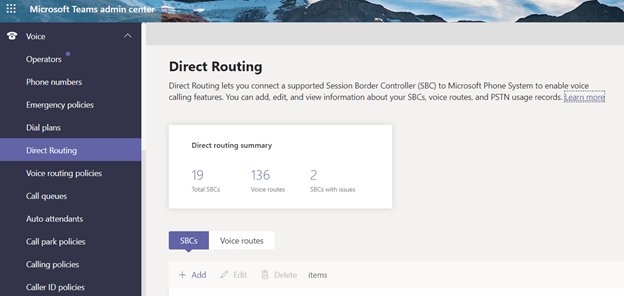
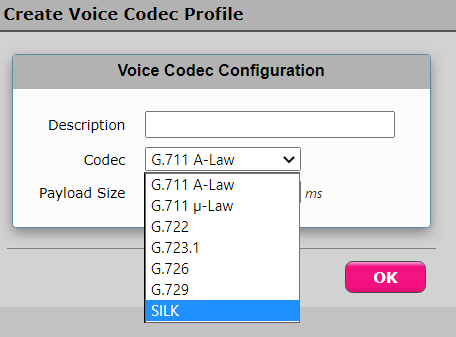
A Few Words About Ribbon SBC. It is very easy to deploy Teams Direct routing with Ribbon. The Ribbon SBC 1k/2k platform was one of the first to receive Direct routing certification from Microsoft. Ribbon supports SILK codec, which is highly efficient for carrying voice over Internet lines when QoS is not available.
PoC This raises an important point to consider—firewall rules. It It is very important to carefully analyze the use case, as there are two distinct modes in which Teams SBC it operates: media bypass ON or OFF. Media bypass This allows clients to avoid connections to a remote Teams tenant proxy and send voice directly to a nearby SBC. Imagine you’re using Teams in Switzerland, very close to your SBC, but with Media bypass OFF, your voice travels to Teams servers in the U.S., where your tenant is located. With Media bypass ON, it will route to nearby SBC and thus provide better voice quality. The downside of Media bypass is that you need to open firewall ports to ANY internet client. With media bypass OFF, we have the option to open ports only to Microsoft Teams servers. The client decided to use Media bypass "OFF" in most locations, except where " it " is required.
After the PoC , a rollout was scheduled, and it took from April to July to roll out in:
Greece, France, UK (2), Luxemburg, Romania, USA (2), Ecuador, Costa Rica, Mexico, Canada, India (3), Singapore, Australia, Switzerland (2)
Swiss SBCs are redundant and connected to three different SIP providers to serve as a central hub delivering PSTN services with local numbers for Switzerland, the Netherlands, Ireland, the UK, Germany, South Africa, and a few other countries.
Few challenges were resolved for locations in India. Due to office sizes and locations, 3 Ribbon SBC were deployed to replace existing Cisco CUCM voice systems. The Indian regulatory authority, TRAI, requires that location-based routing and logical partitioning be established between PSTN and VOIP calls. Fortunately, Teams provides the mechanisms to meet TRAI requirements – https://www.microsoft.com/itshowcase/blog/location-based-routing-enables-microsoft-india-move-to-microsoft-teams/
We implemented location based routing (LBR) for India Teams:
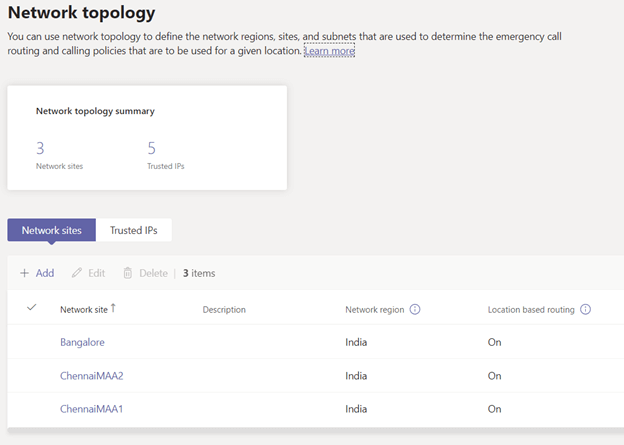
The LBR logic analyzes the IP address of a client at Teams and determines whether a call to PSTN is allowed from that location.
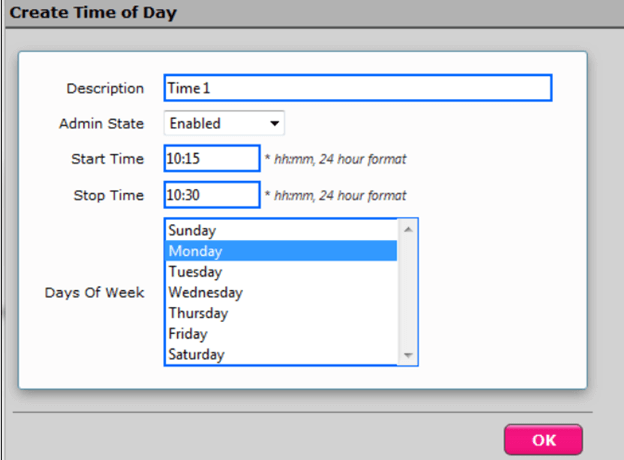
The Chennai offices use two alternative call PSTN . Due to specific contract terms, both operators must be used to handle calls. We implemented Ribbon’s “Time of Day Routing” feature to meet this requirement. This allows call traffic to be distributed 50/50 between the two concurrent operators.
Benefits
At this stage, the core infrastructure has been successfully deployed, and the client continues to gradually migrate users Teams in small groups.
We share your challenges, we accompany your changes
If you have a question or a suggestion, we are at your disposal to answer it by email or by phone.
Sign up
Receive notifications about our latest projects
*Only professional emails can be subscribed to this newsletter