


Power BI Premium P1 through P5: Switch to Microsoft Fabric before your contract expires
Microsoft is phasing out the capacity-based Power BI Premium SKUs (P1 through P5): each subscription will end upon the expiration of its contract. This is followed by a 30-day grace period, reduced access from day 31 through day 90, and then the rejection of all operations. The migration migration to Fabric capacity must be done manually, on a per-workspace basis.
Microsoft is phasing out the capacity-based “ Power BI ” Premium SKUs (P1 through P5) in favor of the “ Microsoft Fabric ” capacity tiers, known as F SKUs. An SKU is the product code for an offering: in this case, the size of the capacity purchased. There is no single phase-out date that applies to all customers. Each P subscription ends at the conclusion of its underlying contract; therefore, the date that applies to your organization is specified in your contract, not in a Microsoft announcement.
The migration Power BI Premium to Fabric is not automatic upon renewal. You must purchase F capacity in Azureand then reassign each workspace to it, either one by one or in batches. Microsoft also does not cancel the P subscription when the F capacity is created: cancellation must be done manually once the migration validated.
| Phase | Moment | What's happening |
|---|---|---|
| Withdrawal | Termination of the Current Contract | The P subscription is ending and will not be renewed |
| Grace Period | Days 1 through 30 after the end | The capacity continues to operate at its current level, at no cost; reassignment to F capacity remains possible |
| Slow Access | Days 31 through 90 | Interactive operations are delayed; data export and retrieval are still possible |
| Block | Starting on Day 91 | All operations are rejected; the data is retained but inaccessible |
Retrieved on September 29, 2026 from Microsoft documentation.
Who is affected by the discontinuation of SKUs P1 through P5?
The phase-out applies only to capacity-based Power BI Premium subscriptions, from P1 to P5. Per-user licenses are not affected: Power BI Pro and Power BI Premium Per User (PPU) will continue as is, and your users do not need to change their licenses as part of this migration. Microsoft clarifies that when an older article refers to “Power BI Premium” without specifying whether it refers to capacity or per user, the discontinuation applies only to the capacity-based version.
The Embedded EM and A licenses are not included in the phase-out. Microsoft’s sovereign environments, where Fabric is not yet available, are also excluded for now; Microsoft has announced separate guidelines for them.
On the purchasing side, Microsoft no longer sells new P SKUs. A customer whose Enterprise Agreement is still active may continue to use their existing P capacity and renew it annually under that agreement until the Enterprise Agreement expires. A customer whose Enterprise Agreement or Microsoft Cloud Agreement expires can no longer add or renew P capacity under that agreement. Microsoft refers customers to their account representative for the specific terms of each agreement.
After the P subscription ends: grace period until day 30, account blocked starting on day 91
The end of the subscription does not cut off access on the same day, but it triggers a process that Microsoft describes as a three-step process. During the first 30 days, capacity continues to operate at its current level at no charge, and workspaces can still be reassigned to F capacity. From day 31 through day 90, access is throttled: interactive operations are delayed, and data can still be exported. Starting on day 91, all operations are rejected. The data remains stored but inaccessible until the workspaces are migrated to F-tier capacity or the capacity is deleted.
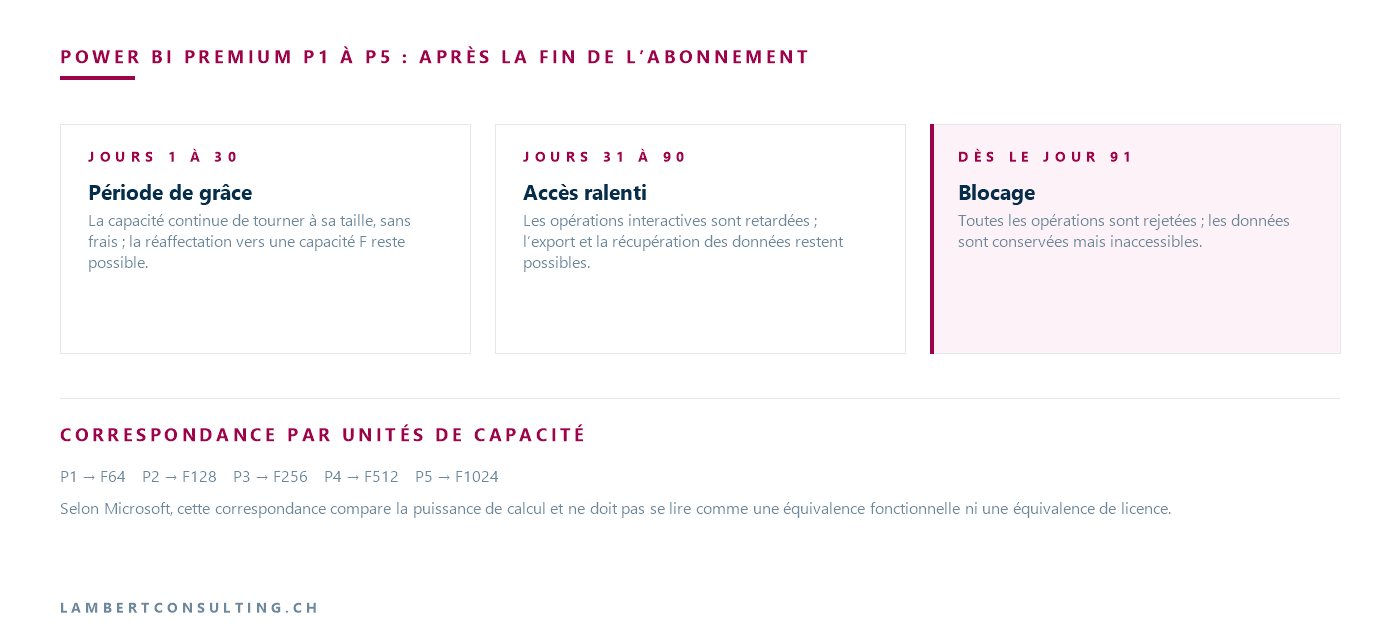
Microsoft states that the grace period and the reduced-access period are a safety net, not a migration . The same timeline applies if the P subscription is canceled before F capacity is in place: Microsoft recommends avoiding this sequence and instead purchasing the F capacity first, reassigning and validating the workspaces, and only then canceling the P subscription.
From P1 to F64: one v-core is equal to 8 capacity units
Microsoft aligns the two families using capacity units (CU), which measure computing power. The v-core, the computing unit of the P SKU, is equivalent to 8 CU.
| SKU P | Equivalent SKU F | CU | v-cores of SKU P |
|---|---|---|---|
| P1 | F64 | 64 | 8 |
| P2 | F128 | 128 | 16 |
| P3 | F256 | 256 | 32 |
| P4 | F512 | 512 | 64 |
| P5 | F1024 | 1,024 | 128 |
Microsoft notes that this table compares computational power and should not be interpreted as indicating functional equivalence or licensing equivalence. The equivalent SKU is a reliable starting point; adjustments are then made based on actual usage, measured using the Microsoft Fabric Capacity Metrics application, which allows you to review P-capacity usage over the past 30 to 45 days.
F64, the minimum size for drives without a Pro license or PPU
On an F64 capacity or larger, a user who has only a free Fabric license and the Viewer role in the workspace can view content, just as on a P capacity. On F2 through F32 capacities, each viewer needs a Power BI Pro, or PPU license. Authors and those who edit content in a shared workspace need a Pro or PPU license, regardless of the capacity size.
Microsoft adds that Power BI Premium features are only available with an F64 capacity or larger. An organization that switches from a P1 to a smaller capacity to reduce costs must therefore purchase a Pro license for each report viewer.
Changes to Purchasing and Billing
The P subscription is a commitment Microsoft 365—monthly or annual—billed each month. The F capacity is purchased as Azure : it is billed on a pay-as-you-go basis by default, charged by the second with a minimum of one minute, and can be reserved for one or more years. It can be paused and resized at any time. Prices for F capacity vary by region Azure, whereas P SKUs had a global price.
Microsoft notes that pay-as-you-go rates are generally higher than those of the equivalent P SKU, and that reservations typically provide a discount on recurring charges. For pricing details, Microsoft refers users to its pricing calculator Azure, broken down by region and size. Microsoft also cautions against changing regions solely based on price differences: the complexity of moving between regions generally outweighs short-term price differences.
Autoscaling and the " Power BI " Report Server are getting a new look
Autoscaling, which added v-cores billed in 24-hour increments on a P-capacity instance, is not available on F-SKUs: it is replaced by on-demand resizing and capacity overage protection. Power BI Report Server, included with a P SKU, requires a Fabric capacity reservation of size F64 or larger according to Microsoft’s comparison table, or an SQL Server Enterprise Edition with Software Assurance. Microsoft requires that you verify this license before canceling the P subscription. Power BI Embedded, on the other hand, is included in every F SKU.
The six steps of the migration described by Microsoft
The migration process takes place at the workspace level: there is no single switch for the entire tenant. Microsoft breaks it down into six steps.
- Take inventory of workspaces and their components. For each workspace assigned to capacity P: its owners, its reports and semantic models (the data layer on which the reports are based), its update schedules, and its data gateways (the software that connects Power BI to internal data sources). Microsoft notes that users were able to create Fabric elements during a trial, even in an organization that had only purchased Power BI Premium.
- Create capacity F in Azure before any reassignment, keeping the P subscription active until the validation is complete.
- Run the system in a non-critical environment that includes at least one report, one scheduled update, and a connection to a gateway.
- Reassign workspaces to Capacity F: manually through the capacity administration settings if there are only a few workspaces, or using a migration (a script run in Fabric) if there are many. Reassigning a workspace usually takes a few seconds.
- Validate each batch: the reports open, the updates are processed, the gateways respond, and the number of items matches the inventory.
- Deactivate capacity P by manually canceling the subscription on the Microsoft 365, once all spaces have been validated.
For a reassignment within the same region, Microsoft states that there will be zero downtime, except for updates in progress at the time of the change. After the reassignment, it may take up to one hour before you can create Fabric elements on the new capacity. Within the same region, semantic models, incremental refresh policies (which reload only the most recent portion of the data), and schedules follow the workspace, and Gen1 Dataflows— Power BI ’s first-generation data preparation flows—continue to run on F-class capacity.
Settings for the P capacity to be recreated based on the F capacity
Tenant settings, which apply to the entire organization, are not dependent on the capacity and remain in effect. Capacity-specific settings are not carried over: they must be reconfigured on Capacity F. These include workload settings (capacity parameters by workload type), capacity administrators, and any governance rules applied to capacity P. Microsoft recommends adding administrators for the new capacity before reassigning the first space, recreating the workload settings you rely on—such as memory limits for semantic models—and reviewing the tenant settings that authorize the creation of Fabric elements. Additionally, you must verify the permissions Azure on the capacity resource, which must be verified to ensure that the correct administrators can manage it.
A migration to another region Azure requires more work
Reports, semantic models in the default storage format (small format), and dashboards are migrated to another region. Templates in the large storage format and all Fabric elements—including Lakehouses, Warehouses, Notebooks, and Data Factory pipelines—are not transferred: you must back them up before the reassignment and then recreate them in the new region. Microsoft warns that failing to back them up will result in data loss. By default, Microsoft recommends migration in the same region.
Our Reading
The first question isn't technical: it's the end date of the contract covering your P subscription and the name of the person who holds that contract. The P subscription is a commitment Microsoft 365, whereas the F capacity will be a resource Azure, billed under a subscription Azure : these do not necessarily involve the same budget or the same administrators. We would start by bringing together the contract holder Microsoft 365 and the subscription manager Azure, and by verifying who holds the billing roles for the tenant Microsoft 365, since canceling the P subscription will require their involvement. Three checks can be performed without a service provider: the contract date, the inventory of workspaces, and the count of users without a Pro license.
When it comes to resizing, we would start with the equivalent SKU in the same region, without changing anything else. Microsoft itself recommends treating consolidation, region changes, or resizing as separate projects, after migration licensing process, and we agree: a resizing decision should be based on a measurement of capacity F, not on a prior estimate. Going below F64 should only be considered after counting the drives without Pro licenses, because the savings on capacity could be offset by licensing costs.
Finally, the actual timeline depends on validation, not on reassignment, which takes a few seconds per space. Microsoft recommends monitoring the new capacity one to two weeks after the switchover and validating it over a full business cycle—including monthly and quarterly closings—before considering the measurement final. Paying for both P capacity and F capacity in parallel during this time seems to us to be the normal cost of migration seamless transition, and it’s a reason not to start in the final month of the contract.
What to Check
- The end date of the contract covering Subscription P, and the person who holds that contract with you.
- The list of workspaces assigned to capacity P, along with the Fabric elements created during a test.
- The number of report readers without a Pro license or PPU, if a capacity of less than F64 is planned.
- The consumption recorded by the Microsoft Fabric Capacity Metrics app for capacity P.
- Settings for Capacity P to be replicated to Capacity F: administrators, workload settings, and capacity-specific governance.
- The potential use of Power BI Report Server and autoscaling, which change shape based on capacity F.
- The order of operations: purchase of F capacity, reallocation and approval of spaces, followed by cancellation of the P subscription.
Microsoft Sources
What an article Can't Know
An article describes what applies to everyone. What varies from one organization to another is the inventory: which applications, which accounts, and which pieces of equipment are actually involved in your organization. The inventory determines the scope of the effort, and it cannot be summarized on a single page.
You'll be speaking directly with the engineers who will be doing the work, not with a middleman. We'll respond within 24 business hours.
Check what is still true
Announced dates are sometimes postponed, products are renamed, and conditions change. The blog tracks these topics over time: when a rule changes, a new post announces it.
Search for a topic in the blogIn the same issue
Three articles on the same topic. The blog has 155 articles, all of which are freely available.