


Understanding Better SCCM / InTune / AutoPilot with our experts

We decided to write a short article for you about SCCM and these two new products, which represent a significant technological advancement and could greatly simplify the deployment and configuration of your workstations. This will also allow you to maintain a consistent and well-maintained fleet of machines. Note that both products are part of Microsoft 365 under the name Microsoft Endpoint Manager.
The changing way of working
37%
of the labour force is mobile
53%
of email opens are on a mobile or tablet
61%
of workers mix personal and professional tasks on their device
Findings on workplaces with mobility needs
Today, we can draw several conclusions from the evolution of this way of working.
Users want to adopt the latest features right away,
The old ways of approaching a “workstation” project no longer work with Windows 10 (Frequency of application fixes, masterization, etc.),
The “Cloud” is constantly changing—it’s hard to keep up,
It's hard to keep a workstation compliant (GPO),
Distributing updates is becoming complicated (WSUS),
Administration and monitoring are absent (inventories, remote management, etc.).
...but there is an ideal scenario!
Remove the Windows 10 from the box
Automatic registration and pre-configuration via a MDM such as Intune
Provision of the Applications that the user needs
Manage and monitor the workstation directly from the cloud (“No, your company data is not uploaded to the Cloud !” Your data remains on-premises; only the configurations go through the Cloud.)
The road to a modern workplace is not so long
Generally speaking, IT professionals spend a lot of time creating and customizing images that are then deployed to devices. Windows AutoPilotAutoPilot introduces a new approach. is not “computer imaging software” but a “device management program.”
What is Microsoft? AutoPilot
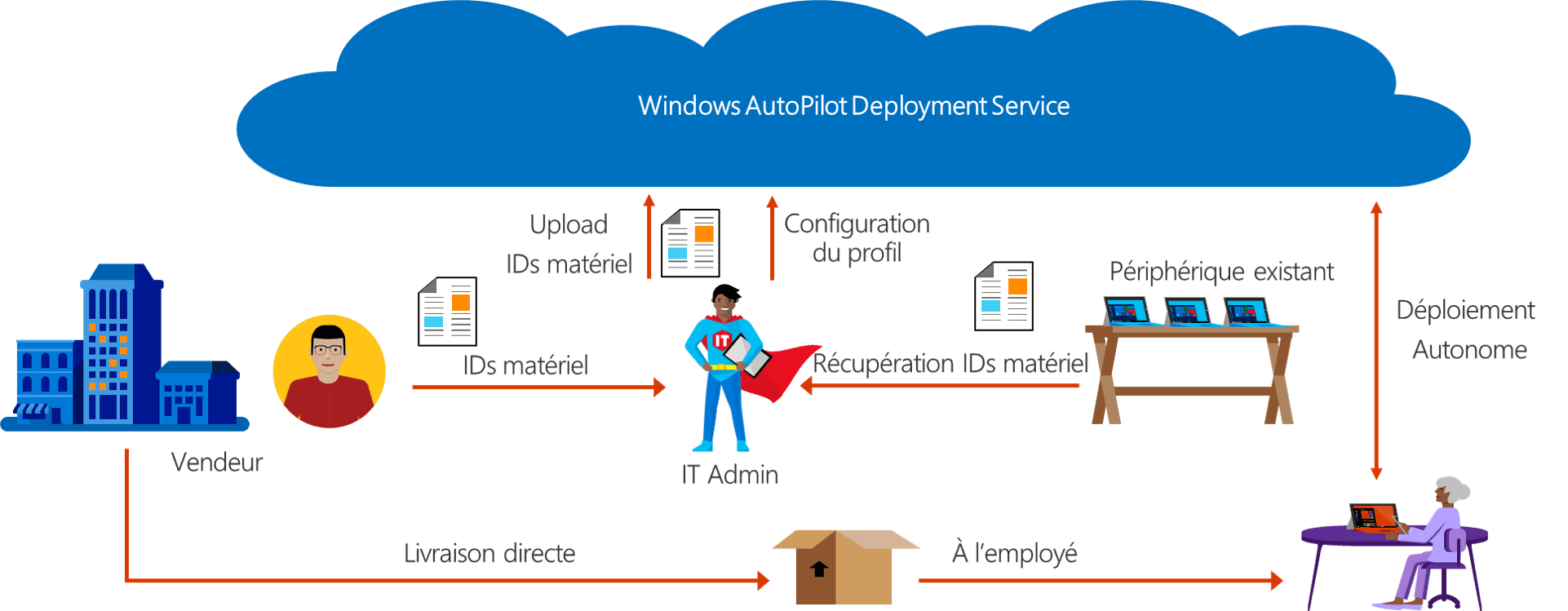
This solution enables organizations to ship new, unopened Windows 10 devices directly to end users and to define the provisioning workflow that the user follows to obtain a secure and productive Windows 10 device. First, the OEM registers the purchased devices with the service Windows Autopilot so that you can assign the Windows Autopilot required profile. This profile defines the OOBE (Out-of-Box Experience) for that device.
You can also register your existing Windows 10 devices with the service at Windows AutoPilot . That way, if a device needs to be reset or reconfigured for a new user, it will provide the same experience as new devices.
Many new computers come with AutoPilot support preconfigured by the manufacturer—Microsoft, Dell, HP, Lenovo, and Toshiba already support it. As a result, these PCs are automatically recognized when they are registered at Intune.
Prerequisites
AutoPilot
- Azure Active Directory Premium P1
- MDM – Mobile Device Management
- Windows 10, version 1703 or later
Note: Microsoft does not charge for Autopilot, but you must have Azure Active Directory Premium (or a service such as Microsoft 365 or Enterprise Mobility + Security , which includes it) and a mobile device management service (MDM) to Intune to use it, as well as Windows 10 Pro.
AutoPilot (with Active Directory On-Premise)
- Windows October 10, 1809
- Hybrid Azure AD
- Windows Server 2016 with Intune Connector for Active Directory
Deployment of posts
How has the deployment of a new workstation been handled up until now, and how will it be handled in the coming years (Modern Management) ?
Conventional: Building and managing custom operating system images is a time-consuming process. You may also spend time deploying these custom operating system images to new devices to prepare them for use before handing them over to your end users.
Modern Management Windows AutoPilot simplifies device enrollment in Intune. With Microsoft Intune and AutoPilot, you can assign new devices to your end users without having to create, manage, and apply custom operating system images to the devices. When you use Intune Autopilot to manage devices, you can manage policies, profiles, applications, and more after they are enrolled.
Key Benefits of the Modern Management
From the user's point of view, it takes only a few simple steps to get their devices ready for use.
From the teams' perspective IT, the only action required of the user is to connect to a network and verify their credentials. Everything else is automated.
Configuration of workstations
Conventional (with agent) Configuration via GPO Application management (EXE, MSI, others) Local update management
Modern, Lightweight, Agentless Configuration via MDM Application Management (MSI, Modern Apps) Updated via the cloud
Configuration tools
Group Policy Objects (GPO)
Managed via Active Directory
Applies when connected to the internal network (physical or VPN)
Configuring Service Providers (CSP)
Supported by all MDM devices that support the OMA-DM standard
Applies when connected to the Internet
Also allows you to push certain GPOs (1703+)
Other
SCCM : Basic machine configuration ( VPN, Wi-Fi, email, certificates, etc.)
Provisioning package
What is System Center Configuration Manager (SCCM) ?
This service offers many features. In particular for :
Remotely control computers Windows . You can manage the deployment of patches and operating systems. It is even possible to manage the computers’ energy consumption.
Deploy applications to allemployees' computersand mobile devices. Users can also use it to manage network security. In fact, the tool includes features for protecting against malware and identifying vulnerabilities.
The company's IT managers can define a "desired configuration state". The system automatically detects whether all computers match the desired configuration. If a machine's configuration does not match, the system sends an alert.
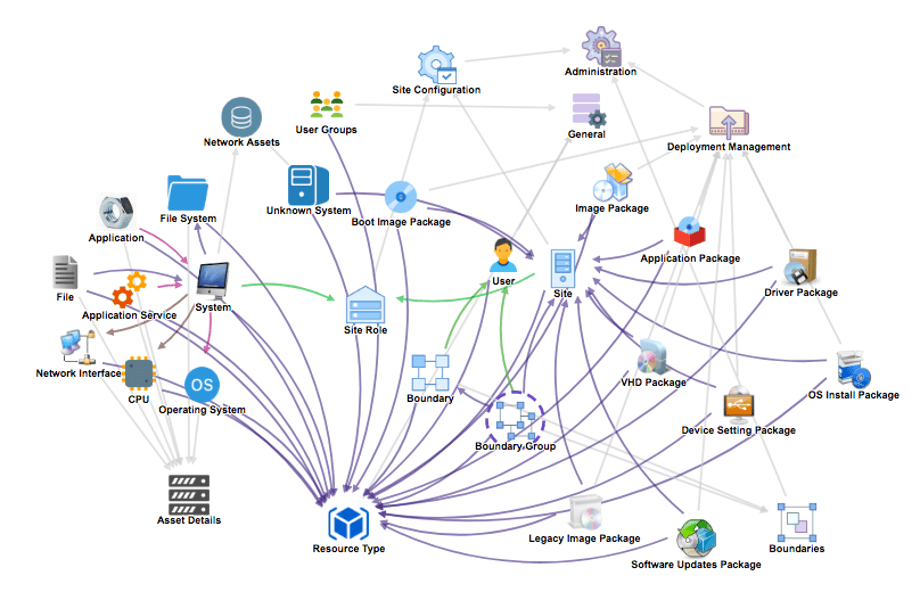
It is also possibleto integrate this system center configuration manager with Microsoft InTune. This allows you to manage computers connected to a corporate network. Although the suite is developed by Microsoft, it is worth noting that it is compatible not only with computers running Windows macOS, as well as with Linux and Unix servers, and with mobile devices connected to the cloud running Windows, iOS , or Android.
Co-managed deployment (co-management) with Intune and SCCM
You can "co-manage" devices with Intunet and SCCM to take advantage of the features of both systems.
Why do co-management ?
Manage Windows Windows 10 PCs with SCCM and Intune at the same time,
Gradually migrate certain workloads to cloud, in pilot mode and in a controlled manner,
Smooth transition from traditional to modern management, without disruption to users.
Advantage of the co-management
A convenient way to migrate in time,
Risks minimised during transition,
An integrated solution that is SCCM, easy to set up,
No impact on users.
Please note that the server + client licenses for SCCM as well as Intune are included in the product line Microsoft 365.
Learn more about the Co-Management

Frequently asked questions (FaQ)
- You cannot upgrade using AutoPilot. You must upgrade manually or using SCCM.
When you have Microsoft 365, you have the option to activate Windows 10. You can activate the license either with Azure Join Computer or Active Directory-based activation:
https://docs.microsoft.com/en-us/windows/deployment/volume-activation/activate-using-active-directory-based-activation-clien
Note: If you enroll a PC Windows 10 without a license, it will be activated using one of these methods.
How do I obtain the license key to deploy with SCCM and M 365.You can't - (see Question 2)
Do we h AutoPilot s with M365 Business?Yes
Benefits of setting up a AD OnPrem join instead of AD Azure Join? Can we combine the two?We can't join the two AD. If you perform the join on AD OnPrem, it enables management via SCCM , among other things.
How does SCCM with Intune / AutoPilot ?SCCM It offers an advantage for large-scale package deployments and updates. It should be noted that the license SCCM (server + client) is included in Microsoft 365 subscription.
Do we have to install the Company Portal?Yes, in order to be able to deploy the applications in available.
10. How do I register a Dell OEM on AutoPilot?In practice, you have to pay the manufacturer. It's easier to press Shift+F10 when selecting the region in OOBE, run the script to generate the hardware.csv file, and copy it to a USB drive. Then load the CSV file into Intune and start the enrollment process.
What an article Can't Know
An article describes what applies to everyone. What varies from one organization to another is the inventory: which applications, which accounts, and which pieces of equipment are actually involved in your organization. The inventory determines the scope of the effort, and it cannot be summarized on a single page.
You'll be speaking directly with the engineers who will be doing the work, not with a middleman. We'll respond within 24 business hours.
Check what is still true
Announced dates are sometimes postponed, products are renamed, and conditions change. The blog tracks these topics over time: when a rule changes, a new post announces it.
Search for a topic in the blogIn the same issue
Three articles on the same topic. The blog has 155 articles, all of which are freely available.