


October 13, 2026: Office 2021, Windows 11 24H2 and the End of ESUs Windows Server 2012
October 13, 2026, is the busiest date on Microsoft’s calendar this year. Four unrelated product families will reach end of life on the same day: the Office 2021 perpetual suite, the entire Office LTSC 2021 family, Windows Windows 11 Home and Pro version 24H2, and the third and final year of Extended Security Updates for Windows Server 2012 and 2012 R2. An organization may be affected by all four without realizing it, because each falls under the responsibility of a different manager.
The end of support on October 13, 2026, therefore warrants a review before a plan is developed.
What exactly stops?
Microsoft classifies these deadlines into four categories, each with different consequences. The table below breaks them down.
| Category | Products | What that means |
|---|---|---|
| Withdrawal | Access, Excel, Office, OneNote, Outlook, PowerPoint, Project, Publisher, Visio, and Word 2021 | The product has been discontinued. No more patches, no more support. |
| End of Support | The entire Office LTSC 2021 family, including versions for Mac, plus Skype for Business LTSC 2021 and Windows 10 2016 LTSB | No more security updates or patches. |
| End of Support | Windows Server 2012 and 2012 R2, Extended Security Updates, Year 3 | The paid extension ends here. There isn't a fourth one. |
| End of Service | Windows 11 Home and Pro versions 24H2, and Dynamics 365 Business Central on-premises 2025 Wave 1 (26.x) | This version is no longer supported; you must upgrade to the next one. |
| Transition to Extended Support | Windows Server 2022, including Datacenter Azure Edition and IoT, and Office LTSC 2021 for Mac | Security updates will continue to be provided free of charge, but there will be no further feature updates. |
The distinction between the first three lines and the last one is the one that costs the most if you miss it. Windows Server 2022 is not in danger on October 13: it is simply entering a new phase. Windows Server As for 2012, it will definitively fall out of coverage.
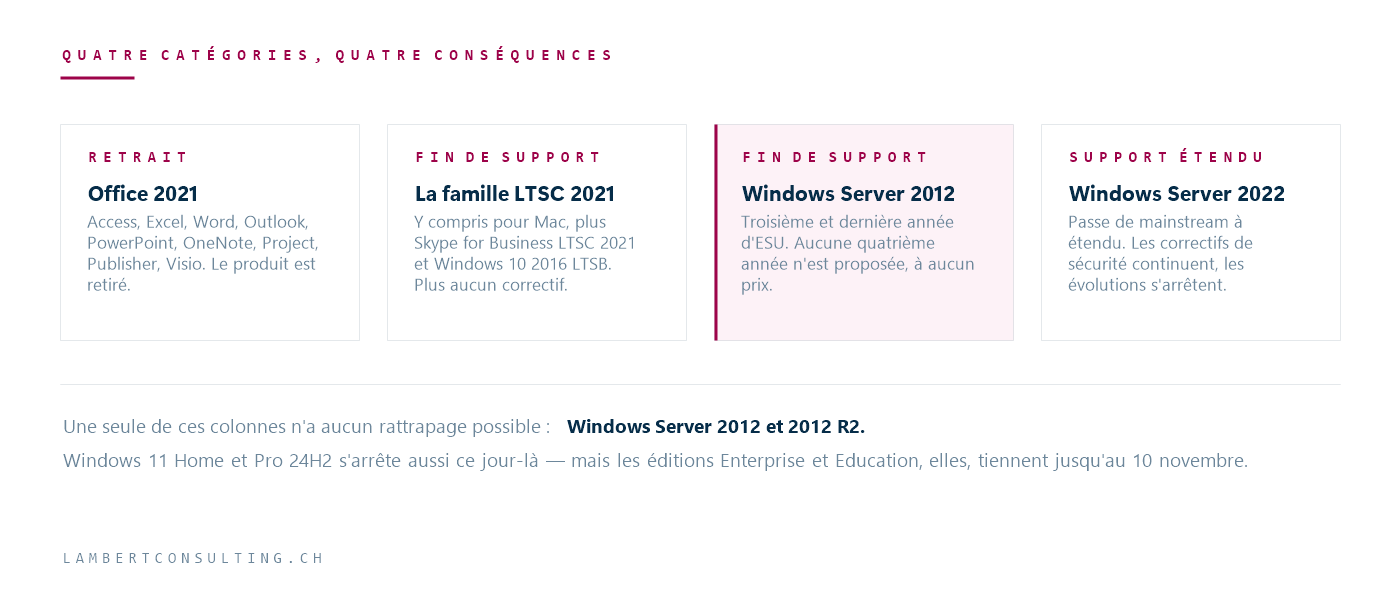
Windows Server 2012: the only deadline without a makeup opportunity
The Extended Security Updates for Windows Server 2012 and 2012 R2 were sold for three years following the end of extended support. The third year ends on October 13, 2026, and Microsoft has not announced a fourth year.
This is what sets it apart from the other rows in the table. An organization still running Office 2021 will continue to operate on October 14, with the risk slowly increasing. An exposed Server 2012, on the other hand, will no longer receive security updates, and this is often a machine that hosts a role we haven’t been able to migrate: a business application controller, a file server with legacy ACLs, or a front-end server for software whose vendor is no longer in business.
A useful inventory isn’t limited to a list of machines. For each one, three pieces of information determine the course of action: which application it runs, who owns it on the business side, and how much longer that application is expected to remain in use. A server that we know will be decommissioned in nine months isn’t migrated—it’s isolated. A server that needs to run for another five years is replatformed.
Office 2021 and LTSC 2021: A Licensing Issue Before It Is a Technical One
The roadblock is rarely technical. Files open, macros run, and add-ins work. The real roadblock is the purchase decision: whether to switch to Microsoft 365 subscription-based applications or purchase Office LTSC 2024 as a perpetual license.
There are three points worth checking before making a decision:
- Shared workstations, VDI environments, and Remote Desktop do not follow the same licensing rules as named workstations. This is where projects tend to go off the rails down the line.
- Publisher has no successor. He leaves the suite. The files
.pubExisting ones need to be converted, and no one does that on their own. - Project and Visio are licensed separately from desktop applications. An inventory that includes only Word and Excel overlooks part of the bill.
Also, be careful not to confuse two things that just happen to coincide on October 13: the end of supportfor Office 2021 does not apply to organizations that purchase Office through a subscription Microsoft 365. The applications Microsoft 365 are delivered on an ongoing basis and are subject to a different policy.
Windows 11 24H2: A publishing audit, not a version audit
October 13, 2026, marks the end of support forWindows s 11, version 24H2, for the Home and Pro editions only. The Enterprise and Education editions of the same version will continue to be supported for a longer period; specifically, versions 23H2 Enterprise, Education, and IoT Enterprise will reach end of support on November 10, 2026.
The practical consequence is counterintuitive: filtering the fleet by “ Windows 11 24H2” does not reveal which devices are affected. You have to cross-reference the version and the build. A mixed fleet—which is the case whenever devices have been purchased individually—contains both.
Other dates for the same season
Two upcoming events are worth looking at together, because they involve the same teams:
- July 14, 2026—already in the past: SharePoint Server 2016 and 2019, SQL Server 2016, Project Server 2016 and 2019. No paid ESU program has been announced for SharePoint. A farm still in production is currently without patches.
- November 10, 2026: Windows 11 Enterprise, Education, and IoT Enterprise version 23H2, as well as .NET 8 LTS and PowerShell 7.4 LTS. The latter two are intended for operational scripts and internal applications, not end-user devices.
On the online side, October 1, 2026, will see the removal of three services Azure — AI, Anomaly Detector, Metrics Advisor, and Personalizer — and will enable the default blocking ofExchange Web Services. This last point is part of a series of end-of-life dates that affect tenant configuration rather than individual machines; we’ve detailed them in our article on the end-of-life dates for Microsoft 365 and Entra ID by April 2027.
Where to start
The order that limits risk is not the order of dates; it is the order of irreversibility.
- Windows Server First, 2012 and 2012 R2, because that’s the only version for which there’s no way to catch up, no matter what.
- SharePoint Server 2016 and then 2019, if you're still operating it: the deadline has passed, and the farm has not yet been corrected.
- Windows 11 24H2 in ninth grade, as a review of the existing collection.
- Office 2021 and LTSC 2021 last, because the path forward is more of a purchasing decision than a technical undertaking—but it’s a decision that requires time for application validation.
What these four have in common: taking inventory takes a few hours and determines everything else. A fleet whose professional owners you know can be planned; a fleet you discover in October is something you just have to deal with.
Microsoft Sources
- End of Support in 2026 — Microsoft Lifecycle
- Support for Office LTSC 2021 will end on October 13, 2026 — Microsoft Lifecycle
- Microsoft Lifecycle Policy — Microsoft Learn
- End of Support for Office 2021 — Microsoft Support
What an article Can't Know
An article describes what applies to everyone. What varies from one organization to another is the inventory: which applications, which accounts, and which pieces of equipment are actually involved in your organization. The inventory determines the scope of the effort, and it cannot be summarized on a single page.
You'll be speaking directly with the engineers who will be doing the work, not with a middleman. We'll respond within 24 business hours.
Check what is still true
Announced dates are sometimes postponed, products are renamed, and conditions change. The blog tracks these topics over time: when a rule changes, a new post announces it.
Search for a topic in the blogIn the same issue
Three articles on the same topic. The blog has 149 articles, all of which are freely accessible.