


Exchange Server Roadmap Update
Microsoft recently made some changes to their Roadmap Exchange Server. We’re excited to share these updates with you. We know that some of our customers have reasons for using Exchange Server On-Premise and we are committed to supporting them.
Microsoft has moved up the release date of the next version ofExchange Server to the second half of 2025. The next version will require Server and CALs and will be available only to customers with Software Assurance, similar to the editions SharePoint Server and Project Server Subscription. Microsoft will provide more details on the product name, features, requirements, and pricing during the first half of 2024.
We will maintain the current support dates for Exchange Server 2013, Exchange Server 2016, and Exchange Server 2019; however,Microsoft plans to support the next version ofExchange Server beyond October 14, 2025. Microsoft will continue to support Exchange Server as long as there is substantial market demand.
Two of the main challenges with previous versions ofExchange Server when it comes to upgrading to the next version are that (1) the next version has always had higher hardware requirements than the previous version, and (2) customers have always had to migrate mailboxes from the old version to the new version. Microsoft addresses these challenges in the upcoming version by introducing the ability to perform an in-place upgrade fromExchange Server 2019. This means you may not have to purchase new hardware.
Our advice for all customers Exchange Server to upgrade to Exchange Server 2019 as soon as possible. If you are already running Exchange Server 2019, our advice is to always keep your servers up to date. Exchange Server 2019 includesseveral featuresnot available in previous versions, including a new and improvedweb-basedOutlook ,enhanced security,improved performanceandscalability, amodern architecture,integration with SharePoint ,Server , and OneDrive, aswell as new and updated messaging policy and compliance features.
With the H1 2022 CU release, Microsoft added new features to Exchange Server 2019 (including one that might allow you to shut down your last server Exchange ), they’ve also added the hybrid server license at no additional cost, and we’re adding even more features, as detailed below.
Investments in Exchange Server 2019
Over the coming months and years, Microsoft plans to add features to Exchange Server 2019 and will continue to address regulatory and data privacy requirements. Their ongoing investment in Exchange Server 2019 enables them to improve security, deployment and management capabilities, and reliability—the attributes our customers tell us they need most fromExchange Server.
Security investments
Servers Exchange often contain a company’s most sensitive data and host the company’s address book, which is why it is essential to protect these servers and this data. Microsoft will therefore continue to focus on the security ofExchange Server.
Modern Authentication Update
Historically, Exchange Server has used Basic Authentication (also known as Legacy Authentication) for client-to-server and server-to-server connections. Basic Authentication is an obsolete industry standard, and it is imperative for organizations to move away from it as quickly as possible in order to reduce attack surfaces and unnecessary risks.
Exchange is working to phase out basic authentication in Online and migrate users to a more secure method: authentication based on OAuth 2.0, or what they call “modern authentication.”OAuth 2.0 is the industry-standard protocol for authorization.
In about 120 days, on October 1, 2022, Microsoft will begin disabling Basic Authentication for specific protocols in Exchange Online for customers who are still using it. If you are an Exchange Online or Exchange hybrid customer, be sure to read the latest announcementto find out what you need to do to prepare for this change.
Modern authentication provides enhanced authentication capabilities, such as multi-factor authentication (MFA), smart cards, certificate-based authentication, and third-party security identity providers. Among the many benefits and improvements of modern authentication is the fact that it helps mitigate security issues associated with basic authentication. For example, enabling modern authentication is an important step toward protecting your organization against brute-force and password-spraying attacks.
Microsoft is currently working on adding modern authentication to Exchange Server pure on-premises environments (i.e., no cloud or hybrid). They plan to share their timeline for supporting modern authentication for each Outlook customer later in 2022.
Support for TLS 1.3
They recently introducedsupport forExchange Server 2019 on Windows Server 2022. By default, Windows Server 2022 uses Transport Layer Security (TLS) 1.3, which encrypts data to provide a secure communication channel between two endpoints. TLS 1.3 eliminates obsolete cryptographic algorithms, improves security compared to older versions, and aims to encrypt as much of the handshake as possible.
WhileExchange Server 2019 supports Windows Server 2022, they are still working on adding support for TLS 1.3. They plan to support TLS 1.3 in Exchange Server 2019 next year.
Software Update Dashboards for Exchange Online and Exchange Server
UpdatingExchange Server is an essential security practice, which is why Microsoft is also investing in helping you stay up to date with the latest updates forExchange Server.
Later this year, they will introduce a new feature in the administration center Microsoft 365 to display the update status of servers Exchange in hybrid environments. This new experience is designed to show administrators which servers Exchange need updates and which servers are nearing or have reached the end of support.
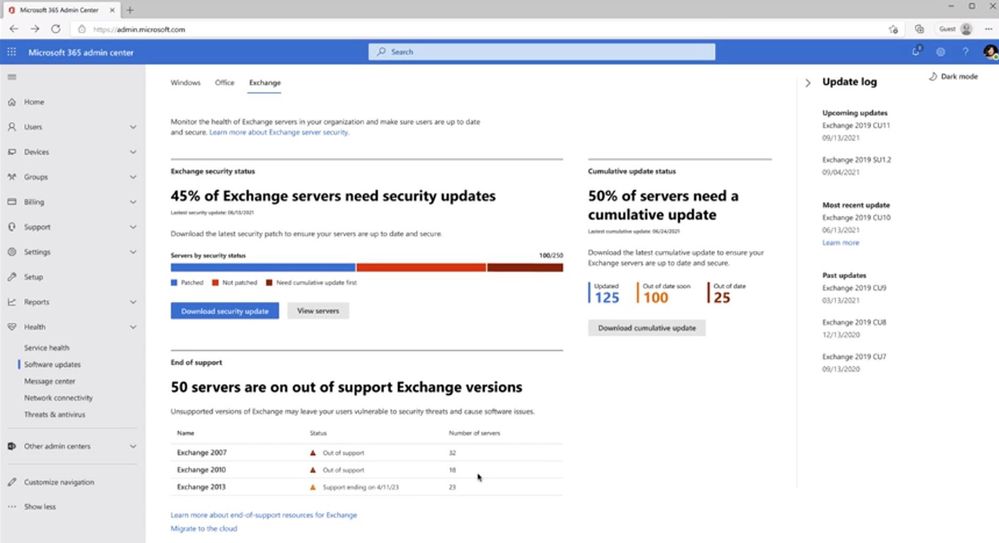
This experience provides a view of Exchange on-premises servers, organized using data from multiple sources, such as data that customers agree to submit, Microsoft Online Services processing logs, and publicly available data, such as records from DNS. .
A similar experiment is expected to be added to Exchange Server 2019 early next year.
Restoration of the Emergency Mitigation Service Exchange
The Exchange (EEMS)emergency mitigation service that they added to Exchange Server last year helps secure your servers by applying Microsoft’s mitigation measures to address any potential threats to your servers. EEMS is an integrated version of EOMTthat provides protection against security threats for which known mitigations exist.
Once a mitigation applied by EEMS is no longer required, an administrator can manually remove it. To simplify the process, Microsoft is currently working on a script ( PowerShell ) that administrators can use to remove all mitigations that are no longer needed. They plan to release the script next year.
Hybrid experience improvements
To help administrators manage hybrid environments, we’re making even more changes to the Hybrid Configuration Wizard (HCW). Today, the HCW performs severaltasks, including configuring federation approval, updating connectors and email address policies, and configuring endpoints and OAuth between on-premises and Exchange Online. Once the wizard has completed its tasks, administrators often customize the environment.
When running HCW again, most of the initial configuration tasks are not necessary. But since HCW does not allow skipping steps, custom configurations created after the first HCW run may be lost, which may result in a bad hybrid state.
To address this issue, we are changing the HCW to allow an administrator to choose which steps to perform and ignore those that are not necessary. We plan to publish an updated HCW with these changes later this year.
Call to Action for Customers Exchange Server
For many organizations, Exchange Online at Microsoft 365 offersthe best productivity, thebest security and compliance features, and provides themost cost-effective solutionand thebest experience. If you are a customer Exchange Server and would like to migrate to Exchange Online, contact the Lambert Consulting team today for assistance and end-to-end guidance.
As we mentioned earlier, we know that customers have reasons for running Exchange Server and, as Microsoft, we are committed to supporting them.
Our advice for customers who are Exchange Server is to switch to Exchange Server 2019 now.
Exchange Server The 2019 version already includesseveral featuresnot available in previous versions, including:
- Support for Windows Server 2022 and Windows Server Core
- Client/server connections use TLS 1.2 by default
- New research infrastructure based on Exchange Online
- Modern hardware support
- Improvements in scheduling, customer experience, compliance (on-premises archiving, retention, eDiscovery), data loss prevention, performance, and scalability
- Update to management tools Exchange that eliminates the need for servers Exchange used solely for recipient management purposes
- The latest updates to the hybrid experience, including support for using compatible administrator credentials MFA with the hybrid agent’s control applets
Coming soon, Exchange Server 2019 will include support for TLS 1.3, modern authentication, and more, and will provide the smoothest and simplest path to the next version ofExchange Server in 2025.
Before rolling out Exchange 2019 in your organization, you need to plan carefully, so be sure to review the information provided by the EDA thoroughly.
If you are planning a hybrid environment Exchange, be sure to reviewthe hybrid deployments at Exchange Serverand the accompanying information.
What an article Can't Know
An article describes what applies to everyone. What varies from one organization to another is the inventory: which applications, which accounts, and which pieces of equipment are actually involved in your organization. The inventory determines the scope of the effort, and it cannot be summarized on a single page.
You'll be speaking directly with the engineers who will be doing the work, not with a middleman. We'll respond within 24 business hours.
Check what is still true
Announced dates are sometimes postponed, products are renamed, and conditions change. The blog tracks these topics over time: when a rule changes, a new post announces it.
Search for a topic in the blogIn the same issue
Three articles on the same topic. The blog has 148 articles, all of which are freely available.