


Switching IT Service Providers: An Inventory of Access Rights and Contracts
Access to your environment is divided between you and your service provider: licenses and subscriptions, domain name and DNS, backups, contracts, and technical documentation. This is the inventory you need to be aware of to maintain the freedom to switch, regardless of the quality of your current relationship.
An IT service provider has access to your environment—that’s a prerequisite for them to do their job. Some of these access rights are set up in their name, others in yours, and this distribution has evolved over the years, folder by folder, without anyone ever defining it all at once.
This distinction between the access credentials that belong to you and those that belong to your service provider becomes apparent again the day you decide to switch IT service providers, bring part of the operations back in-house, or respond to an audit inquiry. These access rights do not form a single block: licenses and subscriptions, the domain name and its DNS, backups, the terms of the contract, and technical documentation are held separately, and each can fall on one side or the other. None of them depends on the quality of your relationship with your current service provider.
What Remains Your Responsibility, Both On-Site and Online
Microsoft has published a shared responsibility matrix that compares four scenarios, ranging from on-premises deployment to a ready-to-use online service. Data, configurations, and identities are listed on the customer side in all four scenarios. Microsoft states that, regardless of the model, you own your data and identities, and it lists four responsibilities that remain with you in all cases: data, devices, user account management, and access management.
This ownership says nothing about who exercises day-to-day control. A service provider manages the tenant because roles have been assigned to it, and these roles are assigned separately from ownership. For Microsoft 365, the details—which roles exist, what they allow, where partner relationships can be viewed, and how they are removed—are covered in “Who Owns Your Tenant?” Microsoft 365. The same question applies to servers, workstations, the network, telephony, business applications, and their subscriptions.
The scope of a service provider’s access rights corresponds to the scope of its mandate. A comprehensive managed services contract entails broader rights than a one-time engagement, and there is no need to draw any conclusions from this: what matters is knowing what rights the provider has and where they are documented.
Licenses and Subscriptions: Account, Invoice, Console
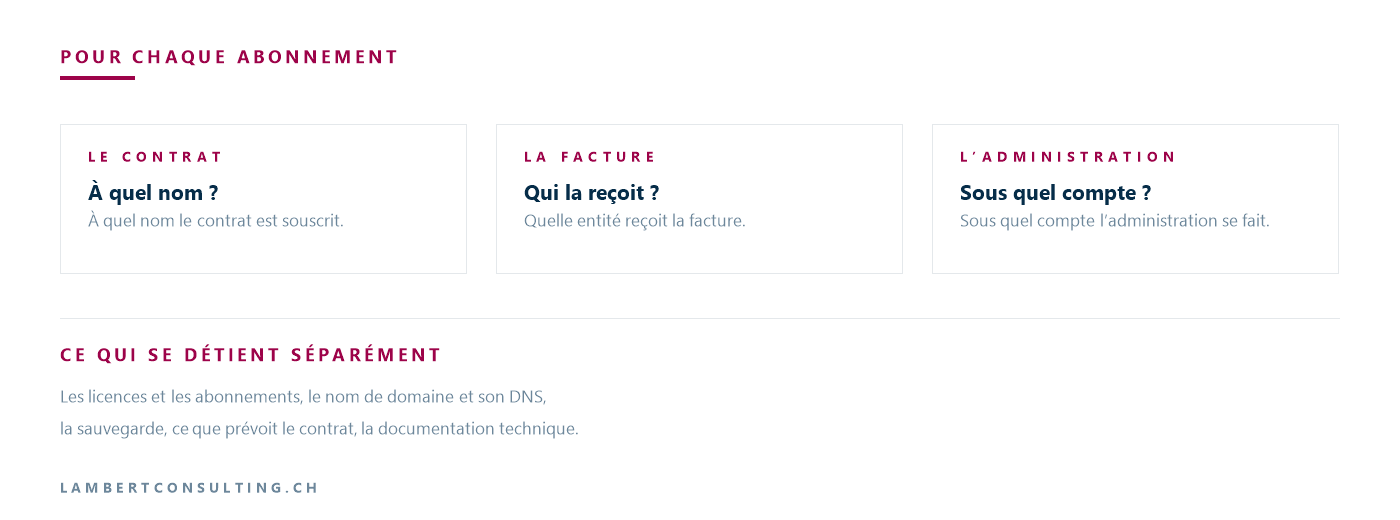
A subscription involves two accounts that are not always the same: the one through which it is purchased and billed, and the one used to manage it. The first may be with you, and the second with your service provider.
This raises three questions for each subscription—whether it’s for email software, antivirus software, phone service, or a business application: in whose name is the contract signed, who receives the bill, and under which account is the billing handled?
Purchasing through a reseller has a consequence that Microsoft documents: only Global Administrators can view and manage subscriptions purchased through a partner. These administrators have nearly unlimited access to the organization’s settings and most of its data, and Microsoft recommends limiting their number as much as possible. A user in your organization who does not hold this role cannot, therefore, view these subscriptions.
The fact that a subscription is transferable does not apply across different products. A subscription purchased directly, a subscription purchased from a reseller, and a perpetual license installed on a server are not treated the same way: ask the relevant software publisher.
You can create a list of your IT subscriptions on your own, including the billing entity and the administration console address for each one. Your own invoices already provide some of this information.
The domain name and the web DNS : the account with the registrar
Your email addresses and your website address are based on your domain name. This domain is registered with a registrar—the organization with which your company registered it—and it is the account held with that registrar that manages its registrations DNS or designates the web host that publishes them. Microsoft typically identifies an organization by one or more public domain names DNS , and it is this organization that holds its subscriptions.
This account is also used to prove that the domain belongs to you. Microsoft verifies that a domain name belongs to you through a TXT record ( DNS )—a line of text published in the domain’s configuration at the registrar. This is the case when adding a custom domain, where you must enter the TXT records to prove ownership of the name. This is also the case in the takeover procedure that Microsoft documents for an unmanaged directory: the TXT record is added at the registrar, and once these records are verified, you can administer the organization Microsoft Entra—the directory that contains your accounts. External migration requires the same validation process as internal migration.
This procedure has a narrow scope: it addresses the case of a directory created through self-service registration, not that of an environment that has been managed for years. When your company’s tenant—the space Microsoft 365 that contains its accounts and data—is already managed, other options are available.
It makes sense that your service provider manages the account with the registrar: that’s where they publish the records your services need. The question is about who has access to that account, not just who uses it. Three answers are all that’s needed: which registrar the domain is registered with, who has the account username and password, and where renewal notices are sent. A renewal notice sent to an email address that no one at your organization checks won’t tell you anything until the renewal deadline.
For a domain in .ch, the first of these three answers can be read without having to ask anyone. Switch manages the registry—the central registry of names in .ch — on behalf of the Federal Office of Communications, and its public domain name search displays the registrar and technical details for a registered domain. Personal data, however, has not been disclosed since January 1, 2021, and obtaining information about domain holders is only possible in exceptional cases: to find out the name of the registered holder, you must request it from the registrar. Switch also redirects users to the registrar for any questions regarding a domain. .ch, and for any changes to an already registered domain.
Backups: Where They're Stored, Who Pays for Them, and Who Can Restore Them
A backup consists of three components, and these three are not necessarily in the same hands: the product subscription and its billing, the configured retention period, and the console from which a restore is initiated.
Microsoft 365Backup provides a documented example of this. Microsoft states that this is a pay-as-you-go offering, rather than a per-user license, and that this product can be managed just as easily from the administration center Microsoft 365 as from partner applications built on its storage platform. For a partner application, it specifies that the tool’s operation is managed and paid for entirely through the partner’s application. Therefore, depending on the configuration chosen, the restore process is initiated from a different console.
The same approach applies to the rest of the infrastructure. For your servers, backups rely on a storage medium, software, and a location: on-premises, at the service provider’s facility, or at a third-party hosting provider. For your workstations, the first question is which ones are backed up. For your business applications, the data may be stored in a database that you host or at the vendor’s facility, subject to the retention periods that the vendor enforces.
Knowing that a backup exists and knowing that a restore works are two different things. You can find out the latter by requesting the report from the most recent restore test or by asking to see one.
For an application developed for you, the same question arises regarding the code, the data, and administrative access: it is addressed by determining who owns the application once it is complete.
The Contract: What Is Provided for at the End of the Term
The return of access rights and documentation at the end of a contract is not automatic: it depends on the terms of the contract. A contract that does not address this issue does not create any problems while it remains in effect; it leaves the matter open for when it becomes relevant.
Four points are included in an existing IT outsourcing contract:
- the notice period, and when it begins;
- the provisions regarding the administrative records and technical documentation at the end of the contract;
- the delivery of the data and the format in which it is provided;
- the period during which the outgoing service provider remains available to answer questions from the incoming service provider.
These are common questions that come up at the time of signing, and renewal is a natural opportunity to review them.
Technical inventory: equipment, administrative records, diagrams
A technical inventory answers three questions: what you have, how to access it, and how it’s connected.
What you have. The list of equipment, including each item’s serial number, warranty or support expiration date, and the contract that covers it. This list is useful regardless of any change in service provider: when a piece of equipment breaks down, this list determines whether it is still covered.
How to gain access. The administrative accounts for hardware and software, and where their passwords are stored. Having the password for a shared account is not the same as having an account of your own: anyone who knows that password can change it.
How it's connected. The network diagram, address ranges, carrier connections with their contract numbers, and the list of business applications with their vendors and support contacts.
Form is just as important as content. Documentation that exists only in your service provider’s management tool remains accessible as long as you have access to that tool, but the day that access ends, you can no longer view it. Keeping a copy on your end, in a format that can be opened without that tool, is all it takes to resolve this issue.
Our Reading
Let’s decide on the order: start with the domain name. Your email addresses depend on it, verifying your domains with Microsoft depends on it, and the recovery process documented by Microsoft also depends on it. Verification involves just one read-through and one request: for a .ch, the registrar can be found in the public query at Switch, and the account ID must be requested from that registrar.
This answer changes if you do not have administrative access to your primary environment. In that case, start here: the domain initiates a process, but you still need someone on your end to carry it out.
We do not publish average migration times or the average cost of switching providers. These figures depend on the number of services, the condition of the documentation, and the availability of both providers. An average taken from another company would not help you budget for your own.
There is a common misconception that needs to be corrected: a contract that provides for the return of access rights does not actually grant those rights. It describes what is supposed to happen, while the inventory lists what actually exists. Both serve a purpose, and the inventory comes first, because it specifies what the contract will need to cover.
Finally, this inventory is not tied to a proposed change. The same answers will be useful when the person who knew everything leaves—whether at your company or at your service provider’s. If they are already known and documented, there is no need to take any action: the matter does not warrant a mandate.
What You Can Do Without Outside Help
- List your IT subscriptions and, for each one, the entity that receives the invoice and the address of the administration console.
- For a domain in
.ch, look up the registrar's name in the public database at Switch. Then ask them for the registered owner's name, the account ID, and the address where renewal notices are sent. - Make sure you have at least one administrator account on your main systems that is assigned to you, and that you know how to use it.
- For each backup scope, ask where the backups are stored, which subscription they are billed to, what retention period is configured, and who can initiate a restore.
- Review your IT outsourcing contract: the notice period, what happens to the administrative accounts and documentation at the end of the contract, the return of data and its format, and the period during which the outgoing service provider remains available.
- Request a copy of the technical documentation in a format that can be opened without your service provider's tool, and keep it on file.
None of these six points requires a power of attorney: they are questions to ask your current service provider and documents to keep on file. Nor does any of them imply that anything is wrong.
Sources
- Domain Name Application — Switch
- Legal Information on .ch Domain Names — Switch
- Frequently Asked Questions About .ch Domain Names — Switch
- Shared responsibility in the cloud
- About administrator roles in the Microsoft 365 admin center
- Subscriptions, licenses, accounts, and tenants for Microsoft’s cloud offerings
- Administrator takeover of an unmanaged directory
- Overview of Microsoft 365 Backup
What an article Can't Know
An article describes what applies to everyone. What varies from one organization to another is the inventory: which applications, which accounts, and which pieces of equipment are actually involved in your organization. The inventory determines the scope of the effort, and it cannot be summarized on a single page.
You'll be speaking directly with the engineers who will be doing the work, not with a middleman. We'll respond within 24 business hours.
Check what is still true
Announced dates are sometimes postponed, products are renamed, and conditions change. The blog tracks these topics over time: when a rule changes, a new post announces it.
Search for a topic in the blogIn the same issue
Three articles on the same topic. The blog has 153 articles, all of which are freely accessible.