


Connect Your SIP Phones to Microsoft Teams Phone System – SIP Gateway Generally Available (GA)
Although Microsoft Teams phones offer the richest and most comprehensive Teams experience, Microsoft recognizes that many customers have already invested in IP phones. To help customers take advantage of their existing telephony hardware as they transition to Teams Phone System, Microsoft is now offering a “SIP Gateway” service. This solution enables the use of basic Teams calling functionality on compatible SIP phone models from Cisco, Poly, Yealink , and AudioCodes.

Compatible IP phones
The SIP Gateway is limited to only certain SIP devices that Microsoft has certified for this service. Here is a non-exhaustive list below. (updated 08.12.2021)
Cisco IP phones with MPP firmware (6821 series, 7800 series, 8800 series), Polycom SIP phones (VVX 100, 200, 300, 400, 500, 600 series, etc.), Yealink (T20 series, T30 series, T40 series, T50 series), AudioCodes HD 400 series.
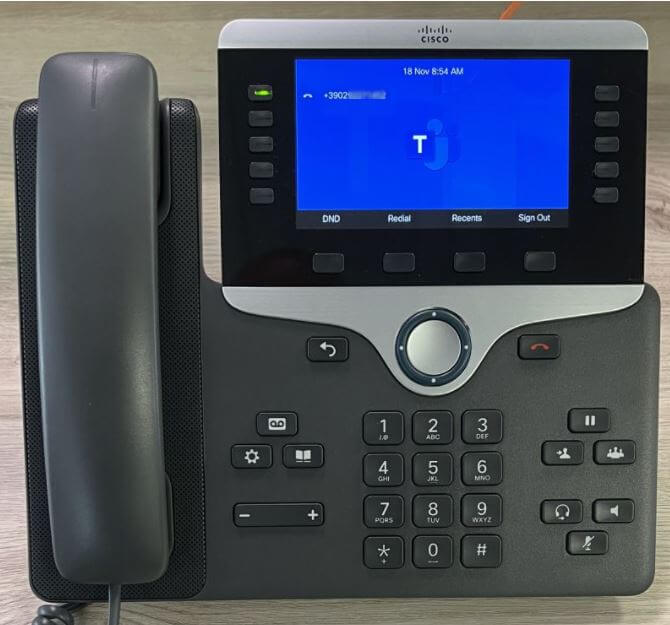
Below is a photo of an IP Phone Cisco configured with Microsoft Teams using the SIP Gateway.
Support for call features
Currently, the SIP Gateway supports the following basic calling features Teams :
- Incoming and outgoing calls
- Call forwarding
- Appointments and meeting appointments
- Presence, Device-based e.g. "do not disturb
- Voice mail with waiting indicator
Teams support for third-party IP phones (3PIP) will continue beyond 2023
Customers who use phones Skype for Business to connect to Teams via the 3PIP Gateway will be able to do so beyond 2023. However, no new investment is planned for the 3PIP Gateway, and 3PIP phones will be activated via the SIP Gateway after the 3PIP Gateway reaches end-of-life. No additional configuration is required for basic features such as authentication, calls, calendar, and presence, as well as meetings, when using 3PIP phones.
Cost
There is no additional cost for organisations wishing to use the SIP Gateway. All users meeting the following requirements can use the SIP Gateway:
- Users must have a license for Teams Phone System (via Office 365 E5, Microsoft 365 E5, or Phone System with E3, Microsoft 365 Business Standard, or Premium).
- RTC activation (i.e., assigned phone number) via a Microsoft calling plan Teams, direct routing, or a carrier connection.
- Common area devices require a common area telephone licence.
Upgrade to telephone devices Teams
While SIP Gateway and 3PIP Gateway offer valuable flexibility to organizations with legacy SIP phone investments, Teams phone devices offer the most comprehensive Teams experience. Switch to Teams today!

12 consecutive
years
Gold
Partner

What an article Can't Know
An article describes what applies to everyone. What varies from one organization to another is the inventory: which applications, which accounts, and which pieces of equipment are actually involved in your organization. The inventory determines the scope of the effort, and it cannot be summarized on a single page.
You'll be speaking directly with the engineers who will be doing the work, not with a middleman. We'll respond within 24 business hours.
Check what is still true
Announced dates are sometimes postponed, products are renamed, and conditions change. The blog tracks these topics over time: when a rule changes, a new post announces it.
Search for a topic in the blogIn the same issue
Three articles on the same topic. The blog has 139 articles, all of which are freely available.