


New Teams features improve call and meeting quality
With the rise of virtual meetings and hybrid work becoming the new norm, the quality of call and meeting experiences on Teams becomes even more important. Micosoft is committed to continuously improving the audio and video quality of Teams, through user features and settings, codecs and advanced AI.
Built in the cloud, designed for performance
Before diving into the new features, it’s worth taking a look at Teams ’s highly resilient global infrastructure, based on Azure Intelligent Cloud and Intelligent Edge. Azure Teams is able to combine data with AI to deliver experiences that optimize voice and video across environments with variable bandwidth. This is also supported by Wi-Fi and cellular networks. The cloud Intelligent also provides real-time insights, comprehensive security, unified identity, and simplified device management. All of this is designed to ensure that Teams performs at its best.
Let's talk about the quality improvements of Teams in the following categories:
- AI-based audio and video quality improvements
- Real-time intelligent adjustments improve call and meeting experiences in the office and on the move
- Administration tools to help manage and optimise call and meeting experiences
AI-based audio and video quality improvements
Satin Audio Codec – Excellent sound quality with great durability
As the number of virtual meetings increases, users need excellent call quality, even when faced with network and connectivity constraints. Many scenarios can contribute to low bitrates: parents and children sharing the home network for meetings and classes, or aging infrastructure. To address these challenges, Microsoft’s new Satin audio codec offers excellent audio quality at bitrates as low as 7 kbps, making meetings sound natural and clear even when network bandwidth is limited.
Learn more about the Satin audiocodec .
Background noise suppression - Keep unwanted sounds out of the conversation.
Teams ’s background noise cancellation uses neural networks specially trained to filter out noise and retain only speech, ensuring that barking dogs and garbage trucks can no longer distract you during your meetings. Traditional noise-cancellation algorithms handle simple, stationary noise sources such as constant fan noise. Microsoft’s AI-based approach learns to distinguish between speech and unwanted noise and can suppress various non-stationary noises, such as keyboard typing or the rustling of food packaging. This user-favorite feature is generally available on Windows both Windows and Mac and will soon be rolled out to iOS.
Learn more about the suppression of team background noise.
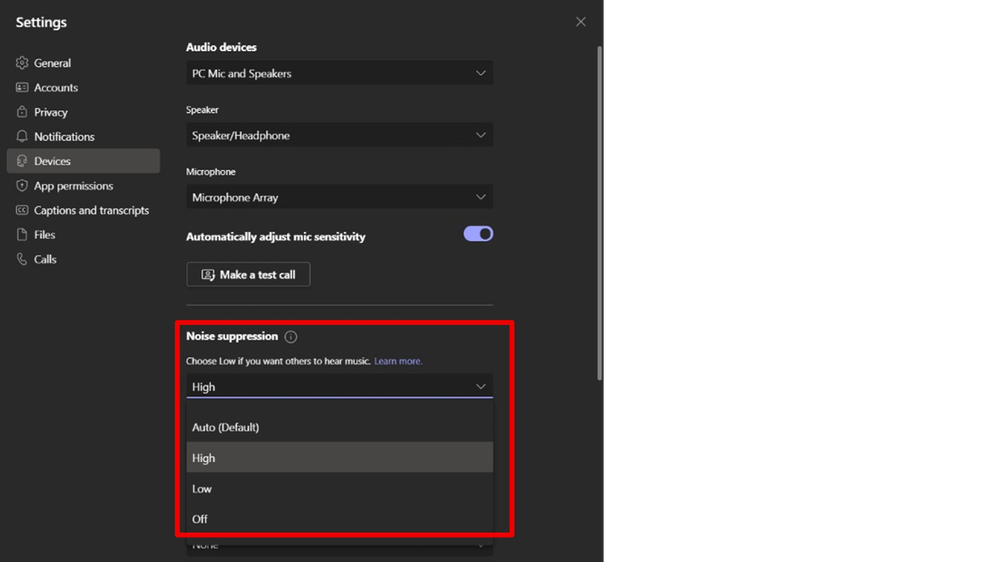
Noise suppression can be enabled in the settings Teams or from a meeting window.
High Fidelity music mode
Because of its foundation as a calling and meeting platform, Teams was designed to optimize dialogue. But with High Fidelity Music Mode, Teams also offers a High Fidelity experience for music.
AI-based video and screen sharing optimization - Smooth, distraction-freevideo
With Full HD 1080p support, AI-powered video optimization adapts to network conditions and bandwidth constraints to deliver a smooth and consistent viewing experience, even with high packet loss. And for added control, adjustable bitrate caps allow teams IT to further customize video performance.
The new screen sharing optimizations in Teams automatically optimize shared content for features such as small fonts and video. This ensures your users don't miss an important detail. Now you can focus on meetings instead of manually adjusting content type settings.
Real-time intelligent adjustments improve call and meeting experiences
Real-time user alerts
Even the most robust networks cannot compensate for user issues, which can lead to poor call and meeting experiences. Microsoft Teams can provide users with real-time alerts, recommendations, and adjustments to minimize disruptions and enable smooth, seamless connections. For example:
- When joining a meeting Teams already in progress, users automatically join the meeting with their speakers muted.
- If users join a meeting Teams with their speakers muted, Teams provides them with an alert to turn their speakers back on.
- During an active Teams meeting, if users are muted and start talking, Teams detects this and alerts users that they are muted.

Teams warns users when they are speaking in mute mode.
Seamless endpoint transfers between PCs and mobile devices
Teams allows you to easily make and receive calls from multiple different endpoints. The new endpoint transfer capability allows you to seamlessly transfer your calls between different devices, such as from your laptop to your cell phone and vice versa, without any interruption in service or call quality. When you decide to switch to another device, you will be presented with 2 options to choose from: "transfer to this device" or "stay on both devices" by choosing one of the options you immediately streamline your selection.
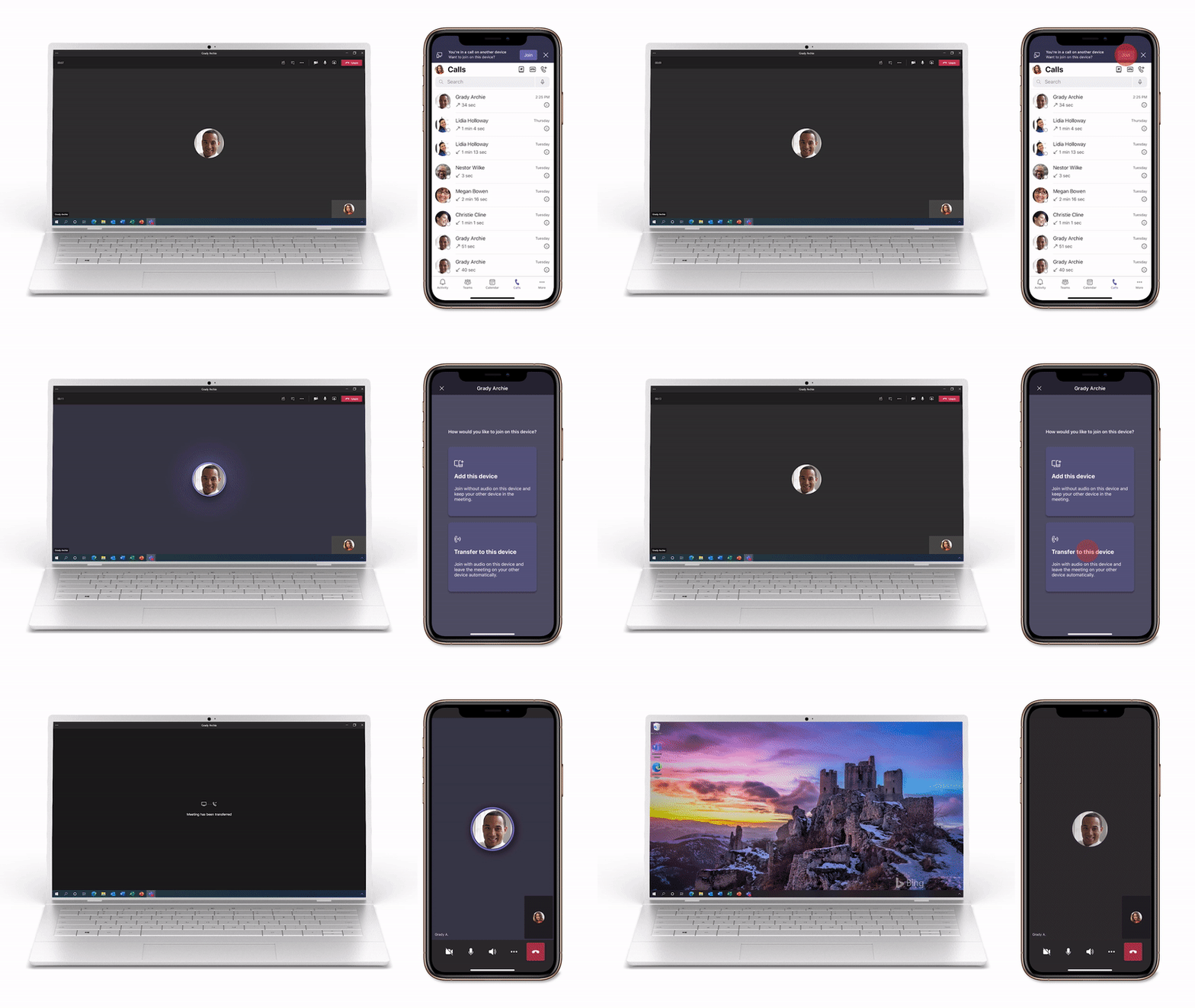
Call Me Backup
Teams can detect when an audio or device problem occurs and offer a "Call me back" option, so you can continue the meeting over the phone instead of wasting time trying to solve the problem.

In case of technical problems, Teams can call you back on a mobile device.
Find out how to set up the callback function.
Mobile network switching
When network quality suddenly deteriorates, it is important to ensure a seamless transition from Wi-Fi to cellular or vice versa. Teams can automatically switch to a mobile data network while maintaining video and screen sharing. Participants will continue the meeting without any disruption.
What an article Can't Know
An article describes what applies to everyone. What varies from one organization to another is the inventory: which applications, which accounts, and which pieces of equipment are actually involved in your organization. The inventory determines the scope of the effort, and it cannot be summarized on a single page.
You'll be speaking directly with the engineers who will be doing the work, not with a middleman. We'll respond within 24 business hours.
Check what is still true
Announced dates are sometimes postponed, products are renamed, and conditions change. The blog tracks these topics over time: when a rule changes, a new post announces it.
Search for a topic in the blogIn the same issue
Three articles on the same topic. The blog has 139 articles, all of which are freely available.