


Dynamics 365 Updates: Follow the AI at Work " roadmap " Instead of Release Plans
Since September 2026, Microsoft has been continuously releasing new features for Dynamics 365, Power Platform , and Dataverse on the “ roadmap ” AI at Work. The Release Planner will be retired no later than November 15, 2026, along with its saved views, and the two annual updates will continue to be scheduled by region.
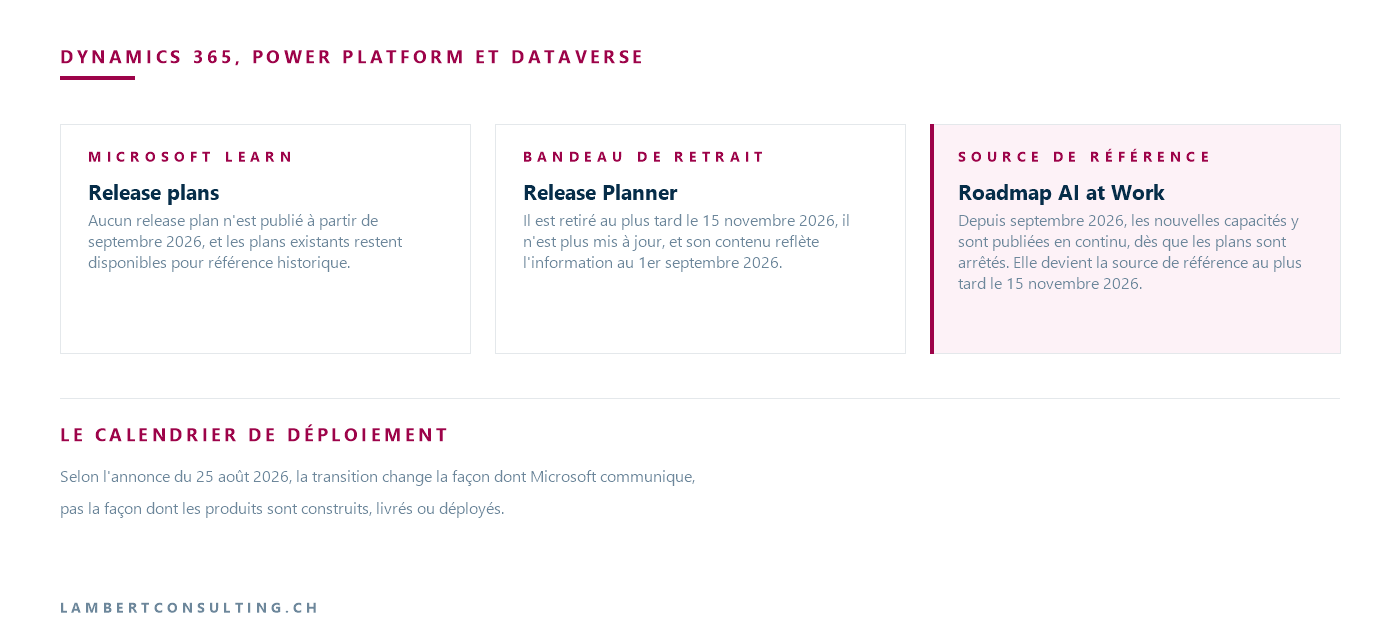
Microsoft no longer publishes release plans for Dynamics 365, Power Platform , and Dataverse. As of September 2026, the roadmap Dynamics 365 has been merged into the roadmap AI at Work, the former Microsoft 365 Roadmap, and new capabilities are published there on an ongoing basis as soon as plans are finalized, rather than waiting for the next release wave. The FAQ for the August 25, 2026, announcement asks whether there will be an announcement or a release plan for Release Wave 2 of 2026, and answers “no” to that question.
For a team that used to prepare its updates according to the schedule of two annual release plans, three things are changing: the tool used to review updates, the way status updates are reviewed, and the timing of the review. The deployment schedule, however, is not affected by the announcement, which clarifies that the transition changes the way Microsoft communicates, not the way products are built, delivered, or deployed.
| Milestone | What's happening | Source |
|---|---|---|
| September 2026 | The new features Dynamics 365Power Platform , and Dataverse are beginning to be published on the AI at Work roadmap | Microsoft Learn Release Plans Page |
| September through November 2026 | Existing content with a public preview or GA date on or after June 1, 2026, will be migrated to the AI at Work " roadmap ." | Announcement dated August 25, 2026 |
| No later than November 15, 2026 | Removal of the Release Planner | Release Planner Header |
| After withdrawal | Custom saved views in the Release Planner are no longer available | Announcement dated August 25, 2026 |
| No end date announced | Existing release plans remain on Microsoft Learn for historical reference | Microsoft Learn Release Plans Page |
Schedule announced by Microsoft on August 25, 2026, supplemented by the Microsoft pages cited in the "Source" column, as of September 29, 2026.
What Microsoft Is Stopping Publishing, and What Remains Available
The Release Plans homepage on Microsoft Learn now features a box labeled “Release Plans are retiring”: no release plans will be published starting in September 2026, and existing plans will remain available for historical reference “until further notice.” The last wave listed is Release Wave 1 of 2026, which covers the period from April to September 2026.
According to the announcement on August 25, 2026, any feature whose public preview or general availability (GA) is scheduled for June 1, 2026, or later will be moved to the AI at Work “ roadmap ” between September and November 2026, while older content will remain in the Learn release plans. In our list of “ Dynamics 365 ” Sales agents from Wave 1 of 2026, several entries fall within this scope based on their dates, such as“Copy opportunities for repeat deals,” which reached GA on August 6, 2026.
The Release Planner, the tool available at releaseplans.microsoft.com, displays a deprecation banner: it will be deprecated no later than November 15, 2026; it is no longer being updated; and its content reflects information as of September 1, 2026. Custom saved views in My Release Plans will not be carried over: the August 25, 2026, announcement states that they will no longer be available after the service is retired, and that the AI at Work roadmap does not offer them.
The two annual updates, Wave 1 and Wave 2, are still on schedule
The end of the release waves refers to the publication of the schedules, not the updates themselves. The Microsoft blog post states this, and the administration pages for the Power Platform —accessed on September 29, 2026—confirm it. The "Policies and Communications " page describes two major update events per year: in April for Wave 1 and in October for Wave 2. The “General Availability Deployment” page provides the schedule for Wave 2 of 2026, Build 9.2.26093, and the deployment window for the Switzerland region was set there for September 25–28, 2026, while that for the Europe region was set for October 9–12, 2026: In 2026, the so-called October wave therefore arrived in Swiss environments as early as the end of September. The page also specifies that a release wave is a mandatory update that cannot be postponed.
The release channel, described on the "Opt in to early access updates" page, is configured per environment in the Power Platform admin center under Settings > Product > Behavior: the Monthly channel makes new features available each month, while the Semi-annual channel makes them available at the April or October general availability (GA) release, without any preview features. Microsoft intends the former for development and testing environments and the latter for production.
The Finance and Operations applications in unified environments follow their own service update schedule, which we had relied on regarding the unified management of Finance and Operations Dynamics 365 . As of September 29, 2026, this schedule set the release of service update 10.0.49 for October 10 and 11, 2026, for Site 2, which includes Switzerland West.
The "Opt in to early access updates" and " General availability deployment" pages, updated on August 14, 2026, still refer to the release plans for the feature schedule. For the October 2026 wave, this plan does not exist: the features are listed on the AI at Work " roadmap ," and the specific deployment dates are published in the Message Center.
The Three Statuses of the " roadmap " at AI at Work, and the Case of the Preview
Each entry in the roadmap goes through three statuses, which are updated throughout the feature's lifecycle. Microsoft defines them as follows in the guide at roadmap :
- In development: The feature is currently being developed and tested, and may be available to certain customers enrolled in a preview program;
- Rollout: The rollout is beginning for the first affected customers, and the feature is not yet available to everyone;
- Launched: The feature is available to all affected customers.
A feature in public preview is labeled with the "Preview" release phase and a "Preview Available" date, but its status remains "In development," because a preview can still change before production. The status does not change to "Rolling out " until the start of the production deployment, and the " Rollout Start " date indicates that start. A team familiar with the two columns in release plans— Public Preview and General Availability—should therefore consider the status, the release phase, and both dates together.
Entry 570842, “Dynamics 365 Finance: Support requirements of tax reform in Brazil in 2027,” created on September 8, 2026, has the status “In development,” the release phase “General Availability,” and a release date specified by month, “November CY2026,” just as the release plans did for a feature that had not yet been delivered. Its fields do not include an equivalent to the “Enabled for” designation found in release plans, which indicated whether a feature is automatically enabled for users or must be enabled by an administrator. For a tracked feature, this information must therefore be found elsewhere, in its description or documentation.
Filters, RSS feeds, and CSV exports instead of saved views
Without custom views, a working view is generated based on the filters in the roadmap. The guide describes six of these: Products, Status, Release Phase, Platform, Cloud instance, where “Worldwide (Standard Multi-Tenant)” refers to the standard instance, and “New or Updated,” which shows what has been added or modified in the last week or month. Selecting multiple products displays all features tagged with any of them.
The view is saved in its URL: the guide explains that the URL encodes the selected filters, and that you simply need to copy it to share the view. This serves as the “saved filter” that Microsoft recommends using to create a monthly or quarterly review—depending on the organization’s adoption pace—with an RSS subscription.
For this feed, the two documents don’t say exactly the same thing. The blog post refers to the guide on how to follow filtered views via RSS. The guide, accessed on September 29, 2026, describes two feeds: one for the entire roadmap, accessible via the RSS icon above the filters, and one for a specific feature, accessible from its card. The download icon exports the entire roadmap or just the filtered view as a CSV file.
The Message Center for changes affecting the tenant
The Microsoft blog post retains the Message Center as the source for tenant-specific notifications, and transition notifications also go through it. For Dynamics 365 and Power Platform, the "Policies and Communications " page confirms this: updates, maintenance, and incidents are communicated there, as well as in the Service Health Dashboard, and the Microsoft 365admin center can send a weekly summary via email of all messages, major updates only, and data privacy messages. Microsoft may also contact holders of the “ Power Platform administrator” and “ Dynamics 365 administrator” roles in a tenant affected by a change directly.
For the planning team, two settings are important. The " Message Center Reader " role allows users to read and share messages without any additional administrative privileges. Each administrator's preferences determine which services are displayed and which emails are received.
The "Status for your org" field, which tracks the availability of a feature in your tenant in the Message Center, is available—according to its page—only for a limited number of Microsoft announcements : Teams. For Dynamics 365, you can track the status of a feature at roadmap .
From September through November 2026, two parallel sources
During the migration, a feature may appear on one or both roadmaps. In this case, the AI at Work roadmap contains the most up-to-date information and will become the official source no later than November 15, 2026.
As recorded on September 29, 2026, by theAPI of the roadmap, the entries tagged with the product “ Dynamics 365 ” that we found there were created on or after September 8, 2026, and none of them include the product “Dynamics 365 Sales.” The Dynamics 365 Sales features from Wave 1 of 2026 with a release date of June 1, 2026, or later were therefore not yet listed there as of that date. Until they have been migrated, their latest published status remains that shown in the Release Planner as of September 1, 2026, or that shown in the release plan on Learn.
What to Check
- Links, bookmarks, and internal documents that point to the Release Planner or to release plans: Microsoft recommends that you start pointing them to the " roadmap " AI at Work.
- Saved views from My Release Plans: Each one must be recreated as a filter in the " roadmap " before the Release Planner is discontinued, no later than November 15, 2026, and its filtered address will be retained.
- Reading the articles of incorporation: a feature in public preview remains "In development," with the " Preview" release phase.
- The release channel for each environment— Monthly Channel or Semi-Annual Channel—in Settings > Product > Behavior.
- Who Receives the Message Center: Message Center Reader Role, Display Preferences, and Summary Emails.
- For a tracked feature that has not yet been migrated: its date in the Release Planner is set to September 1, 2026.
- The frequency of the internal review—monthly or quarterly—which replaces the two scheduled release waves.
Our Reading
In our opinion, what requires the most attention is not the tool itself but the review schedule. Release waves required two review sessions per year, and the published schedule served as the agenda. Without these scheduled sessions, nothing triggers the review, even though updates for Wave 1 and Wave 2 continue to arrive on the published dates for each region, including in environments on the Semi-annual channel. We recommend aligning the review with this deployment schedule rather than with feature releases: a monthly review using a filtered view, and a more comprehensive review a few weeks before each wave deployment in the environment’s region.
It takes some time to get used to reading the statuses. In a release plan, a “Preview” release appeared in its own column; on the roadmap, it remains under “In development,” and a team filtering by “Rolling out ” to prepare its next update won’t see what it can already test in a Monthly channel environment. We would keep two separate filtered views: one for the “Preview” release phase and the other for the “Rolling out” status.
We also wouldn't rely on the Release Planner until it is retired. As of September 1, 2026, it remains useful for locating a feature that hasn't yet been migrated, but any date listed there should be verified on the AI at Work " roadmap " page before being included in an update schedule.
Microsoft Sources
- One always-on roadmap: Dynamics 365, Power Platform, and Dataverse join the AI at Work roadmap — Microsoft Dynamics 365 Blog, August 25, 2026
- Release plans for Dynamics 365 and Power Platform — Microsoft Learn
- Release Planner — Withdrawal Banner
- Use the AI at Work Roadmap — Microsoft Learn
- Microsoft AI at Work Roadmap, entry 570842
- What's New and Planned for Dynamics 365 Sales, 2026 Release Wave 1 — Microsoft Learn
- Policies and Communications — Microsoft Learn
- General Availability Deployment — Microsoft Learn
- Opt in to early access updates — Microsoft Learn
- Release Schedule for Service Updates (Unified Environments) — Microsoft Learn
- Track new and updated features in the " Microsoft 365 " Message Center — Microsoft Learn
What an article Can't Know
An article describes what applies to everyone. What varies from one organization to another is the inventory: which applications, which accounts, and which pieces of equipment are actually involved in your organization. The inventory determines the scope of the effort, and it cannot be summarized on a single page.
You'll be speaking directly with the engineers who will be doing the work, not with a middleman. We'll respond within 24 business hours.
Check what is still true
Announced dates are sometimes postponed, products are renamed, and conditions change. The blog tracks these topics over time: when a rule changes, a new post announces it.
Search for a topic in the blogIn the same issue
Three articles on the same topic. The blog has 150 articles, all freely available.