


Azure Features as of November 10, 2026: .NET 8, .NET 9, PowerShell 7.4, and the in-process model
On November 10, 2026, Azure Functions will no longer support .NET 8, .NET 9, PowerShell 7.4, and the in-process model. Applications will continue to run, but without security updates. An application on Linux running on the Consumption plan must switch to the Flex Consumption plan before .NET 10 or PowerShell 7.6.
Four featureAzure Functions are set to expire on the same day, November 10, 2026: .NET 8 and .NET 9 in the isolated worker model, the in-process model itself—which only works with .NET 8—and PowerShell 7.4. Microsoft reiterated this on September 23, 2026, in two entries in the Azure Updates, urging users to upgrade to .NET 10 and PowerShell 7.6 before that date.
These four end-of-life scenarios require different amounts of work. Changing the .NET version in the isolated worker model requires updating the project, its dependencies, and the application configuration. Moving away from the in-process model is a migration code change. And an application hosted on Linux under a Consumption plan must first switch plans, because neither .NET 10 nor PowerShell 7.6 are available there.
| Heads or Tails | End of support in Azure Functions | Target documented by Microsoft |
|---|---|---|
| .NET 8, Isolated Worker model | November 10, 2026 | .NET 10, supported through November 14, 2028 |
| .NET 9, Isolated Worker model | November 10, 2026 | .NET 10 |
| In-process model (".NET 8 only") | November 10, 2026 | Isolated Worker pattern, then .NET 10 |
| PowerShell 7.4 | November 10, 2026 | PowerShell 7.6, coverage through November 14, 2028 |
Dates retrieved on September 29, 2026, from Microsoft documentation.
A discontinued version continues to run without security patches
Applications will not stop running on November 10, 2026. The support policy for language stacks inAzure specifies that after the end-of-life date, an application using a deprecated version can still be created, deployed, and will continue to run on the platform. However, it will no longer receive new features, security patches, or performance optimizations until it has been upgraded.
Microsoft also reserves the right, if necessary and in certain cases, to limit the number of instances allocated to these applications to as few as one. Finally, Microsoft Support requires that you upgrade before providing assistance for an application running on an unsupported version.
Why .NET 9 Is Not an Intermediate Step
.NET 9 is an STS release. Its end of support was initially announced for May 12, 2026; the .NET team subsequently extended the support period for STS releases to 24 months, starting with .NET 9, which means it will end on November 10, 2026—the same day as .NET 8. An application that migrates from .NET 8 to .NET 9 would therefore be out of support on the same date.
The target is .NET 10, the LTS version released on November 11, 2025, and supported through November 14, 2028. The migration provides two targets in the isolated worker model: .NET 10 if the application and its dependencies can run on .NET, and .NET Framework 4.8 if they depend on libraries orAPI specific to the .NET Framework.
The in-process model: switch to an isolated worker before upgrading to any newer version of .NET
The in-process model supports only .NET 8. For an application Azure in-process Functions application to upgrade to a newer version of .NET, it must first migrate to the isolated worker model. Microsoft provides a script Azure PowerShell that lists the applications in the current subscription that are still running in-process:
$FunctionApps = Get-AzFunctionApp $AppInfo = @{} foreach ($App in $FunctionApps) { if ($App.Runtime -eq 'dotnet') { $AppInfo.Add($App.Name, $App.Runtime) } } $AppInfoThe script works with the subscription configured in Azure PowerShell. To evaluate another one, first run Set-AzContext -Subscription '<YOUR SUBSCRIPTION ID>'.
The migration affects the project in several places. The attribute Sdk of the element Project go to Azure.Functions.Sdk/1.0.0. A file Program.cs is added to the project and replaces the file with the attribute FunctionsStartup, generally speaking Startup.cs. The function signatures also change: generally, the input binding attributes take the suffix Input and those for output have the suffix Output, such as CosmosDBInput or QueueOutput. As for configuration, the application setting FUNCTIONS_WORKER_RUNTIME ranges from dotnet to dotnet-isolated. For a .NET 10 target, Microsoft states that the .NET Upgrade Assistant can automatically make many of these changes.
System.Text.Json ignores Newtonsoft.Json attributes without reporting an error
The in-process model used Newtonsoft.Json; the isolated worker model uses System.Text.Json by default. System.Text.Json ignores Newtonsoft.Json attributes such as [JsonProperty] and [JsonIgnore], and then associates the property in question with its default value, without reporting an error. A function that reads a message whose field names are specified by [JsonProperty] Therefore, it receives these unspecified properties without any errors during the binding process.
Microsoft recommends two fixes: replace these attributes with their System.Text.Json equivalents, such as [JsonPropertyName], or configure Newtonsoft.Json for the layer that processes this data.
FUNCTIONS_WORKER_RUNTIME and publication: two restarts, with error AZFD0013 occurring between them
In Azure, the toggle requires two operations: switching FUNCTIONS_WORKER_RUNTIME to dotnet-isolated, and publish the migrated project. Each user restarts the application. In the meantime, the deployed code and the configured runtime do not match, and the application returns the error AZFD0013 until the second operation.
Microsoft therefore recommends using a staging slot: make both changes there, verify that the errors have been resolved and that the application is working, and then swap the slot with the production environment in a single update. FUNCTIONS_WORKER_RUNTIME must not be marked as a slot parameter. An CI/CD pipeline or other automated application provisioning process must also be updated to maintain dotnet-isolated and target the correct .NET version.
The type of storage determines the order of operations
On Linux under the Consumption plan, .NET 9 is the latest supported version of .NET, and Microsoft is not adding subsequent versions to it: a .NET 10 application cannot run on it. The same rule applies to PowerShell, where version 7.4 is the latest available under this plan. Before upgrading to .NET 10 or PowerShell 7.6, such an application must therefore migrate to the Flex Consumption plan. Linux hosting on the Consumption plan is itself scheduled to be phased out on September 30, 2028, and will no longer receive new features or new language versions.
An in-process application in this context therefore involves changing the model, plan, and version. Flex Consumption does not support the stack dotnet of the in-process model, and Microsoft requires that you first migrate to the isolated worker model. Since .NET 10 does not run on Linux under the Consumption tier, the application must then switch tiers before it can upgrade to .NET 10.
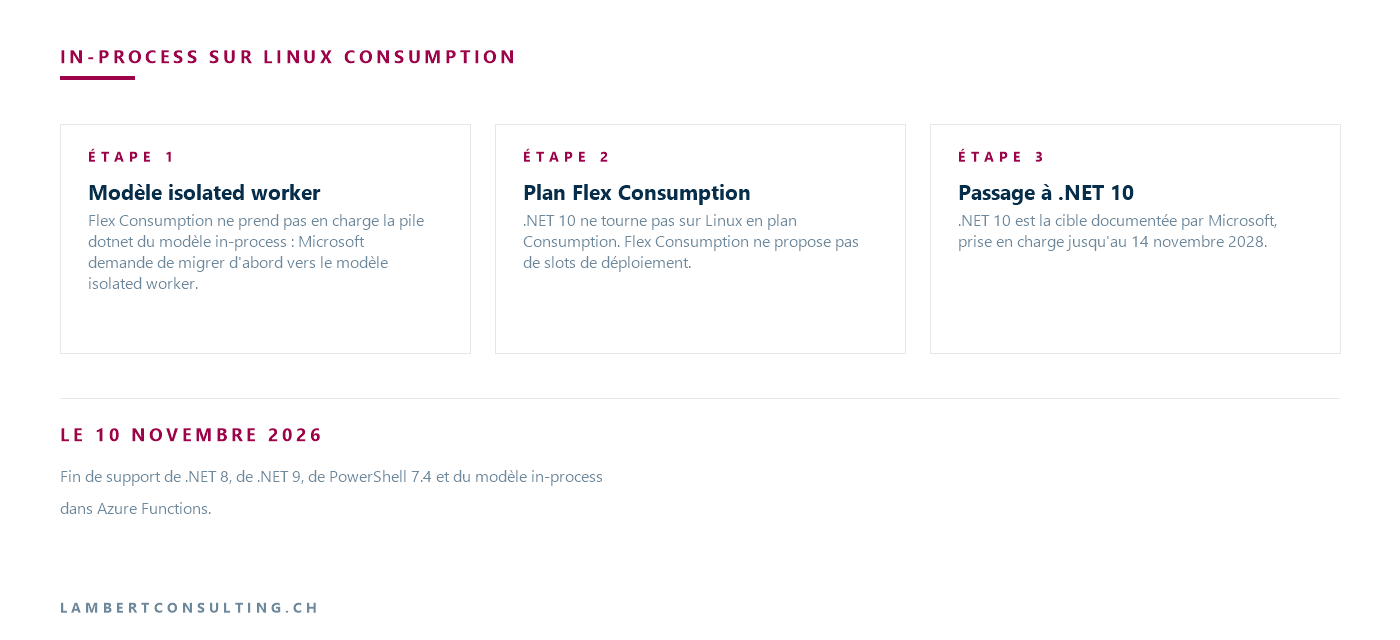
The announced phase-out applies to Linux: Microsoft states that applications on the Consumption plan at Windows are not affected at this time. PowerShell 7.6 is supported on all plans except the Linux Consumption plan, including Premium and Dedicated at Windows and Linux, Windows Consumption, and Flex Consumption.
Two orders Azure CLI is taking inventory. az functionapp flex-migration list analyzes the subscription and returns two lists, eligible_apps and ineligible_apps, along with the reason for each incompatibility. It evaluates only applications on the Consumption plan on Linux; to find out the plan for all applications, Microsoft provides az functionapp list --query "[].{name:name, sku:sku}" -o table, where the value Dynamic refers to the Consumption plan.
Flex Consumption does not offer deployment slots
Microsoft's procedures for migration in-process and version-upgrade procedures rely on a staging slot. However, Flex Consumption does not currently support deployment slots. Microsoft recommends testing the updated code in a non-production function application and suggests using the rolling update strategy for deployment to a live application. The presence of a slot does not prevent the migration, but you must define before the switchover how the application will be tested and deployed without it.
Change the stack version, then verify it
Except for Flex Consumption, the stack version is changed in the application configuration once the code has been updated and deployed—preferably to the staging slot, if one exists. With Azure CLI:
- at Windows,
az functionapp config set --net-framework-version "v<VERSION>.0"for .NET, and--powershell-version "<VERSION>"for PowerShell ; - on Linux, with a Premium, Dedicated, or Consumption plan,
az functionapp config set --linux-fx-version "<LANGUAGE|VERSION>", with the value returned byaz functionapp list-runtimes --os linuxfor the specified battery.
Each order takes --name, --resource-group and, for one slot, --slot. The value that is actually applied corresponds to az functionapp show, on siteConfig.netFrameworkVersion, siteConfig.linuxFxVersion or siteConfig.powerShellVersion. Also make sure that FUNCTIONS_EXTENSION_VERSION is worth ~4 : Microsoft assumes that the application is already running on version 4.x of the Functions runtime, and refers users to its migration for earlier versions.
Without a slot, the change restarts the application in production: it is unavailable for a short period—typically 30 to 60 seconds—pending requests are interrupted, and new requests fail until the application has restarted. Microsoft recommends scheduling a maintenance window in this case.
In Flex Consumption, these properties are deprecated and should not be used. The application parameters reference states that LinuxFxVersion, netFrameworkVersion and powerShellVersion are replaced by functionAppConfig.runtime, and that FUNCTIONS_EXTENSION_VERSION It is handled by the platform and does not need to be set manually.
PowerShell 7.4, in Azure "Functions" and elsewhere
In Azure Functions, PowerShell 7.6 and 7.4 are the two supported versions, and support for 7.4 ends on November 10, 2026. PowerShell 7.6, an LTS version released on March 18, 2026, on .NET 10, is supported through November 14, 2028.
The date is outside Azure Functions. The lifecycle of PowerShell follows that of the .NET version on which each release is built: PowerShell 7.4 is based on .NET 8, and PowerShell 7.5, built on .NET 9, will end on the same day. Operational scripts running under PowerShell 7.4 or 7.5 on servers, in scheduled tasks, or on build agents are therefore also affected. Windows PowerShell , a component of Windows, follows the lifecycle of Windows instead.
November 10, 2026, is also listed for .NET 8 and PowerShell 7.4 in the Fall 2026 end-of-support schedule, which details what will be discontinued on October 13, 2026.
Our Reading
We would not treat these four end-of-support dates as a single deadline, because they require efforts that are not comparable. An application already running as an isolated worker on .NET 8, hosted on Premium, Dedicated, or Flex Consumption, requires a version upgrade and a round of testing. An in-process application on Linux running on the Consumption plan combines the execution model, the hosting plan, and the .NET version; once migrated to Flex Consumption, it no longer has any slots available to accommodate the remaining changes.
The inventory is therefore based on two criteria: the value of FUNCTIONS_WORKER_RUNTIME and the hosting plan. The script Azure PowerShell from Microsoft and the command az functionapp list are enough to set it up, and we start by opening the apps dotnet in plan view Dynamic on Linux. For those, we switch migration switch to the isolated worker model before the plan change, as long as the staging slot still exists.
We’re targeting .NET 10 directly, skipping .NET 9, which is being discontinued on the same day. And in an migration in-process, we first test serialization using actual messages: the binding reports no errors, and the function receives these properties with their default values.
What to Check
- The list of apps that
FUNCTIONS_WORKER_RUNTIMEis worthdotnet, obtained via the Azure PowerShell from Microsoft, subscription by subscription. - The hosting plan for each application, and in particular those in
Dynamicon Linux that run on .NET or PowerShell : they must go through Flex Consumption to reach .NET 10 or PowerShell 7.6. - Applications that use a deployment slot and need to migrate to Flex Consumption, for which a different testing and deployment method must be defined.
- Types bound by functions that carry Newtonsoft.Json attributes such as
[JsonProperty]or[JsonIgnore]. - CI/CD pipelines and infrastructure models that define
FUNCTIONS_WORKER_RUNTIMEor the stack version. - Excluding Flex Consumption, the value of
FUNCTIONS_EXTENSION_VERSION, which must be~4. - PowerShell 7.4 or 7.5 applications and scripts, on Azure Functions, just like on servers and build agents.
Microsoft Sources
- Retirement: Support for .NET 8 and .NET 9 ends on November 10, 2026
- PowerShell : Support for 7.4 ends on November 10, 2026
- Azure Functions, Language, Stack, Support, Policy
- Supported languages in Azure Functions
- Migrate C# apps from the in-process model to the isolated worker model
- Guide to Running C# Azure Functions in the Isolated Worker Model
- Update language stack versions in Azure Functions
- App Settings Reference for Azure Functions
- Migrate Consumption Plan apps to the Flex Consumption Plan
- Azure Functions: Consumption Plan Hosting
- .NET and .NET Core Support Policy
- PowerShell support lifecycle
What an article Can't Know
An article describes what applies to everyone. What varies from one organization to another is the inventory: which applications, which accounts, and which pieces of equipment are actually involved in your organization. The inventory determines the scope of the effort, and it cannot be summarized on a single page.
You'll be speaking directly with the engineers who will be doing the work, not with a middleman. We'll respond within 24 business hours.
Check what is still true
Announced dates are sometimes postponed, products are renamed, and conditions change. The blog tracks these topics over time: when a rule changes, a new post announces it.
Search for a topic in the blogIn the same issue
Three articles on the same topic. The blog has 142 articles, all of which are freely available.