


AI and Privacy: What Really Protects Your Critical Data
The question that managers ask is almost always the same: Does what our employees write in the tool leave our company?
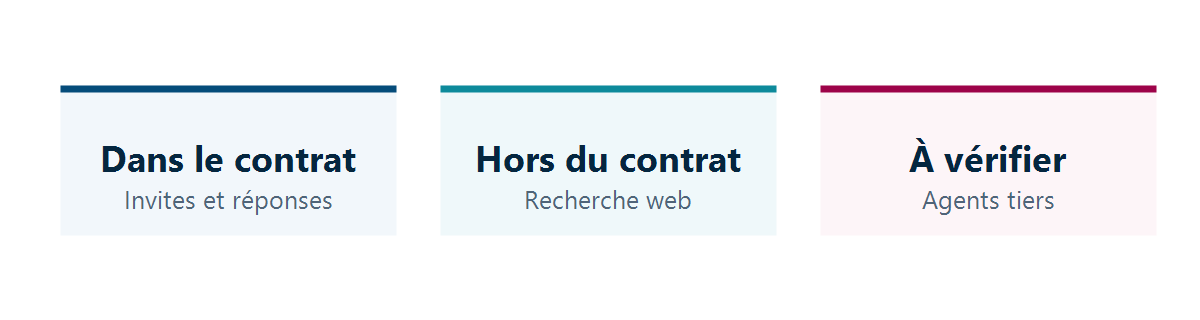
The answer depends on a boundary that is rarely explained—the one that separates what is covered by your business contract from what falls under a different legal framework. This boundary cuts across the same product, and it shifts from one query to the next depending on what the assistant has retrieved.
What Is Covered by the Contract
For Microsoft 365 Copilot and Copilot Chat, the prompts entered by your employees and the generated responses are covered by the Data Protection Addendum and Microsoft’s product terms, as Microsoft acts as a data processor. These are the same contractual commitments that already cover your messages in Exchange and your files in SharePoint.
Specifically, this involves four commitments:
- Encryption at rest and in transit, and isolation between client organizations.
- Use is limited to your instructions, in accordance with the European General Data Protection Regulation and the EU Data Boundary.
- Implementing your own controls: your identity model, permissions, confidentiality labels, retention policies, and interaction auditing.
- Lack of training: The prompts, responses, and data read from Microsoft Graph are not used to train the foundation models.
This last commitment is the most reassuring one, and Microsoft puts it in writing. It applies to the scope described above, and not to everything the tool does.
What Is Not Covered by the Contract
When the assistant searches for information on the web, it generates a search query that is sent to the Bing service. Microsoft provides detailed documentation on this process, which differs from the previous one:
- the user and organization identifiers are removed from the request;
- It is not shared with advertisers and is not used to train large language models;
- but the search service operates separately from Microsoft 365, with its own data processing practices;
- Microsoft acts as an independent data controller in this context, rather than as a data processor, under the terms of the service agreement and the privacy statement;
- And most importantly: the EU Data Boundary does not apply to web search queries.
In other words, part of the same conversation may be covered by your business contract and part may not, depending on whether or not the assistant searched the web.
Second point to note: Microsoft states that Anthropic models are currently excluded from the EU Data Boundary and, where applicable, from the commitments regarding processing within the EU. An organization that has included processing location requirements in its internal policy must take this into account when authorizing these models.
Third area: agents. Microsoft says it plainly—when you use agents in Copilot, you must review each agent’s privacy statement and terms of use to understand how it will handle your organization’s data. The publisher’s commitment does not automatically extend to what others have built.
Note: Your interactions with the assistant are stored in the user’s Exchange Online mailbox. As a result, they are subject to your retention policies, remain searchable by e-discovery tools, and are deleted according to the retention period you have set. This is good news for compliance, and it’s important to be aware of this before telling an employee that their exchanges with the assistant are private.
Our Reading
The distinction between public AI and enterprise AI is the most common way of framing the issue, and we believe it is misleading. It reassures management that has just purchased an enterprise license, even though the real dividing line runs right through the very product they have purchased.
Our recommendation is to rephrase the question. Rather than asking which tool is secure, ask which policy applies to that specific piece of information. A summary note based on your own documents and a question asked via a web search do not fall under the same contract, within the same product, thirty seconds apart.
The practical consequence is within your reach without outside help: decide whether web access from the assistant remains open—and for whom. This is an administrative setting, not a project. An organization that handles sensitive data has good reasons to disable this feature for the relevant user groups and leave it enabled elsewhere, because disabling it everywhere reduces usability without providing any additional protection for users who do not handle confidential information.
On one point, we don’t follow the prevailing wisdom. Many organizations focus on choosing the right tool and overlook what actually determines what gets leaked—namely, who has access to what. A corporate application—even one with a solid contract in place—that relies on permissions that have never been reviewed exposes more content than a consumer-grade tool that no one has populated with company documents. The contract protects you from the vendor; it says nothing about what your own employees can access.
One final point, which is often disappointing: none of these safeguards eliminates the need to write an internal guideline and share it with the teams. This isn’t a 40-page legal document, but rather a single page that explains what not to include in an assistant—and why.
What to Do
- Decide, on a population-by-population basis, whether the assistant can search the web. You won't be able to make the same decision for everyone.
- Check your organization's position on the models excluded from localization commitments, if your internal policy includes any.
- For each authorized third-party agent, require that they provide their own terms of service—and reject any that do not.
- Set the retention period for interactions with the assistant, just as you did for messaging.
- Write a one-page set of guidelines and distribute it. It’s the least expensive and most effective measure on this list.
- Set up access rights. Everything else comes later.
The contractual aspects of this topic are covered in the publisher’s documentation, and your teams can review them on their own. What requires an outside perspective is comparing these policies with your own obligations and making decisions on a setting-by-setting basis. Lambert Consulting conducts this comparison on Microsoft 365 Copilot and considers the restoration of access rights to be the first priority, before making any decisions regarding specific tools.
Microsoft Sources
What an article Can't Know
An article describes what applies to everyone. What varies from one organization to another is the inventory: which applications, which accounts, and which pieces of equipment are actually involved in your organization. The inventory determines the scope of the effort, and it cannot be summarized on a single page.
You'll be speaking directly with the engineers who will be doing the work, not with a middleman. We'll respond within 24 business hours.
Check what is still true
Announced dates are sometimes postponed, products are renamed, and conditions change. The blog tracks these topics over time: when a rule changes, a new post announces it.
Search for a topic in the blogIn the same issue
Three articles on the same topic. The blog has 149 articles, all of which are freely accessible.