


Microsoft 365 Copilot: Updating Access Rights Before Purchasing Licenses
Microsoft 365 Copilot does not provide access to any new documents. It responds based on content that the user can already open, and Microsoft documents this as follows: Copilot retrieves only data from the organization for which the user has at least read access. The documentation immediately adds the condition that accompanies this promise: it applies only if the authorization models Microsoft 365 are actually enforced. This is why organizing access rights is the first step in deployment, before ordering licenses.
What Microsoft's promise covers, and what it entails
The promise is about access, not visibility. A document that an employee was authorized to open but could never find is still a document that they are authorized to open—and Copilot can find it, summarize it, and quote it in response to a question asked in everyday language.
The discrepancy, therefore, does not stem from the tool itself. It stems from the accumulation of permissions over the years: sites open to the entire organization, sharing links valid for anyone, legacy permissions that are no longer valid, and sites with no identified owner. Microsoft has created reports specifically designed to detect these four specific situations, which provides a fairly good indication of how frequently they occur.
From a management perspective, the implication is as follows: a company that activates Copilot without first reviewing its access rights does not create a data leak; rather, it reveals a vulnerability that already existed. This distinction is important from a legal standpoint, but it will do nothing to alleviate the unease that will arise the day an employee obtains a summary of a payroll file or a buyout proposal.
Three Questions to Determine If Your Organization Is Affected
How long has your Microsoft 365 environment been in use? After three or four years, there’s a high probability that sites have been shared too widely, regardless of how well the environment is managed: permissions expand with each new project and are rarely restricted.
Is there a list of websites that contain sensitive data? Contracts, personnel files, financial data, confidential projects. If no one can produce this list within a day, the first task is to create it.
Does every workspace have a living owner? A site whose owner has left the company no longer has anyone to decide who should have access to it, and this is the situation that persists the longest.
If you’re unsure about even one of these three points, that’s reason enough to have the property inspected before buying.
The tasks to be done, in order
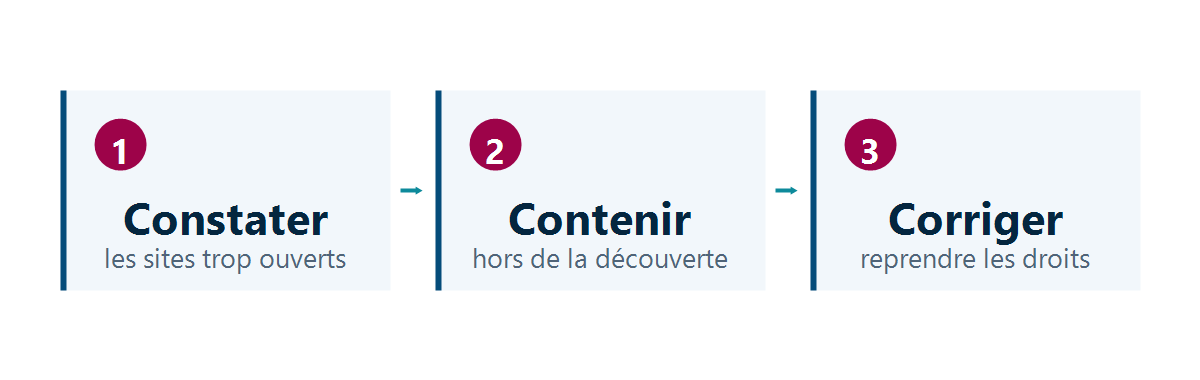
Identify. The data access governance reports from SharePoint identify sites shared across the organization, those with the most sharing links, those where permission inheritance has been broken, and those that no longer have an owner. Microsoft Purview rounds out the picture on the data side by highlighting where sensitive information is located and which data points are exposed.
Restrict. A sensitive site whose permissions cannot be revoked immediately can be removed from discovery experiences using the Restricted Content Discovery feature. The content will then no longer appear in organization-wide searches or in Copilot’s responses. Microsoft clarifies two key points about this feature, both of which are important factors in the decision: this feature does not change any permissions, and it is designed as a temporary governance control. It therefore saves time on the most exposed sites, without eliminating the need to reclaim permissions.
Correct. Access reviews leave the decision up to the site owners, who are the only ones who know who actually needs space. This is the longest phase, because it depends not on IT but on the availability of business units.
This sequence follows that outlined in the Microsoft deployment guide, which identifies three phases: a pilot with a small group, a broader deployment, and then routine operation. Data preparation precedes all three.
What degrees are required for this job?
This is the item that is least often quantified, and the one that affects the budget the most.
The SharePoint Advanced Management used for this inventory are included as soon as at least one user in the organization has a Copilot- Microsoft 365 license. Microsoft announced this at Ignite 2024 and began rolling these features out to Copilot customers in early 2025. In practice, an organization that purchases even just one pilot license gains access to oversharing reports, site access reviews, and Restricted Content Discovery.
Two caveats to keep in mind before building a plan around this. The foundation Microsoft 365 or Office 365 is still required—plans E1, E3, E5, and A5, or Office 365 E3, E5, and A5. And certain features remain out of scope: the report on confidentiality labels requires E5 or G5, and some website creation checks require a paid add-on module.
In terms of pricing, the Microsoft 365 Copilot license is priced at $30 per user per month with an annual commitment, and is in addition to an Microsoft 365 eligible license that you’re already paying for. It does not replace it.
The order of magnitude of the effort
The inventory itself is quick: the reports are generated, and a first review takes just a few hours. What takes time comes next.
The decision to lock down the most at-risk sites is made within a few days, because it doesn’t require anyone’s approval. Restoring access, on the other hand, depends on the number of sites involved and how quickly their owners respond: it takes weeks for about a hundred sites, and months for more than that. This is the only part of the project that a project schedule may underestimate, and it’s the one that determines the date the site opens to users.
Three functions must be involved from the outset: the IT department, which generates reports and implements adjustments; the business units, which manage access to their own areas; and the data protection officer, who approves the processing of sensitive information.
Our Reading
This project is almost always poorly managed, and rarely for the reason one might think.
It’s presented as an IT project, when in fact it isn’t one. Reports are generated in a matter of hours, and settings can be configured with just a few clicks. What takes time are the hundreds of small decisions—such as “who in this company still needs access to this area?”—and those aren’t the IT department’s responsibility. A management team that entrusts the matter to its IT team IT without giving them a mandate regarding the business units is assigning them a task they are unable to complete.
Our recommendation: Start with one license, not fifty. A single Copilot license unlocks the inventory tools for your entire organization. Use it to assess your current situation, determine the number of sites actually affected, and then decide on the volume. This is the only way to negotiate with full knowledge of the facts—and it costs thirty dollars.
There is also a scenario where the right approach is simply not to proceed. If your organization cannot free up the time of business unit managers over a three-month period to manage access, it is better to stick with a closed pilot. The lockdown of sensitive sites lasts a few weeks, not two years, and a broad rollout based on access rights that have never been reviewed will eventually lead to the incident that everyone saw coming.
Here’s a counterpoint—because it often changes people’s minds: this work isn’t wasted if you decide not to use Copilot. Up-to-date access rights support compliance, employee departures, audits, and incident response. It’s arguably the only prerequisite for an AI project that retains its full value even when the project doesn’t move forward.
What You Need to Decide Before Signing
- Define the scope of the pilot before negotiating the number of licenses. One license is sufficient to access the inventory tools.
- Have a list of sites containing sensitive data generated, and date it.
- Decide who will adjudicate disputed access requests when a website owner does not respond.
- Make the system available to users after the rights have been restored, not at the same time.
- Assume that the lockdown of a sensitive site is temporary, and set a date for when access rights will be restored.
Most of the technical work involves reports and settings that your administrators know how to handle; the real challenge lies elsewhere—in the access decisions that only business units can make. Lambert Consulting can assess the current situation and define the scope of these decisions before committing to licenses, using the tools already included in Microsoft 365 Copilot. If this topic is new to your teams, Copilot’s day-to-day capabilities provide useful context before diving into the preparation phase.
Microsoft Sources
- Data, Privacy, and Security for Microsoft 365 Copilot
- Accelerate Microsoft 365 Accelerate Copilot adoption with built-in content governance
- Prerequisites for SharePoint Advanced Management
- Restrict the discovery of sites and content SharePoint
- Microsoft Purview for Microsoft 365 Copilot
- Configure Microsoft 365 Copilot and assign licenses
- Pricing Microsoft 365 Copilot
What an article Can't Know
An article describes what applies to everyone. What varies from one organization to another is the inventory: which applications, which accounts, and which pieces of equipment are actually involved in your organization. The inventory determines the scope of the effort, and it cannot be summarized on a single page.
You'll be speaking directly with the engineers who will be doing the work, not with a middleman. We'll respond within 24 business hours.
Check what is still true
Announced dates are sometimes postponed, products are renamed, and conditions change. The blog tracks these topics over time: when a rule changes, a new post announces it.
Search for a topic in the blogIn the same issue
Three articles on the same topic. The blog has 149 articles, all of which are freely accessible.