


Azure Migrate: The Classic Experience Will Close on September 30, 2026
Organizations that migrate from VMware or physical machines to Azure agent-based replication have until September 30, 2026, to complete the migration. After that date, the standardAzure Migrate will be discontinued: no more migration, no failover, and no visibility into the machines that have remained on it via the portal Azure.
Two of the three dates on the schedule have already passed, and that's what makes the situation less comfortable than it seems.
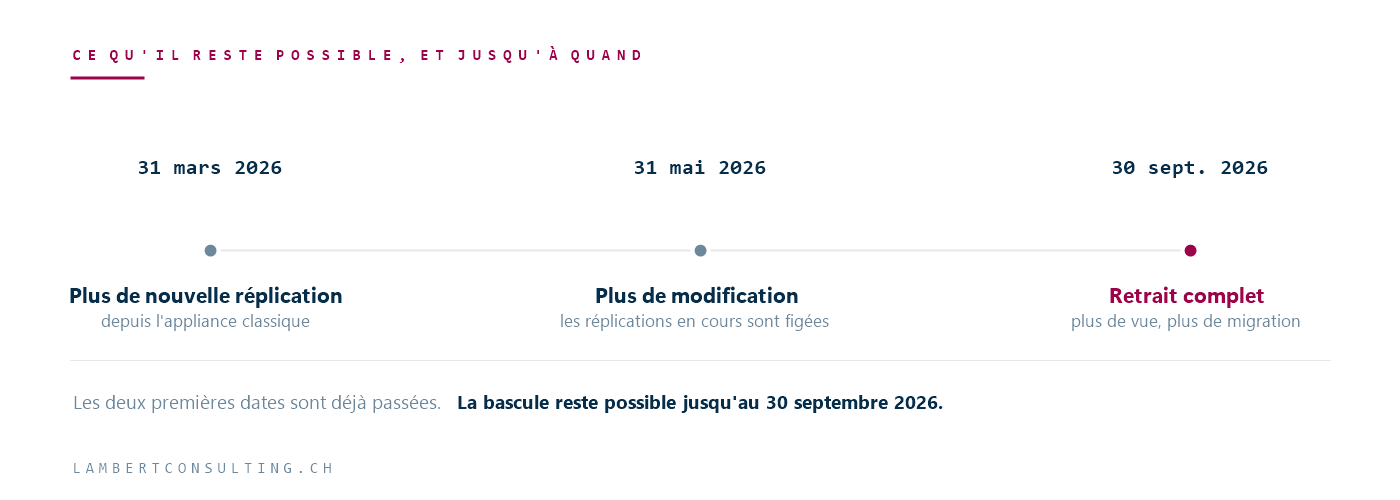
The schedule, and what's already behind us
| Date | What Comes to an End |
|---|---|
| March 31, 2026 | No new replications can be started from the classic appliance. Existing replications continue. |
| May 31, 2026 | Replication support ends with the classic experience. Migrations of existing replicas are still possible, but you can no longer modify them or start new ones. |
| September 30, 2026 | Complete removal. No more views, no more management, and no more replication or migration on these machines via the portal. |
An organization that initiated replication before March 31 and has not yet switched over is therefore in a tight spot: it can still migrate, but it can no longer make any adjustments. If the replication configuration is not suitable, the only option is to go back through the new appliance.
What the simplified experience replaces
The simplified experience isn't just window dressing: it's a stack of migration with an agent, rebuilt for physical and VMware environments. Microsoft highlights four key differences that matter in day-to-day operations.
The replication appliance runs on Windows Server 2022, whereas the classic version was based on an older version. That’s the key to making the rest work.
Support for operating systems has been expanded, particularly for recent Linux distributions. A unified matrix replaces the separate tables—which greatly simplifies the verification phase, even before migration.
Updates are now automatic for both the mobility agent and the appliance. In the classic version, both components had to be updated manually—and that’s typically something people forget to do on an appliance set up for a three-month project.
Integration requires about half as many configuration steps. For a project involving several dozen machines, that’s no small matter.
One thing you shouldn't miss: new features, security fixes, and support for new Linux distributions are only available in the simplified experience. The classic version is no longer being updated.
Who Is Actually Affected?
Not everyone, and it's worth pointing that out before triggering an unnecessary alert.
Agent-based replication applies to physical servers, virtual machines VMware s migrated in agent mode, and machines in other environments treated as physical. The migration VMware Agentless replication, on the other hand, uses the same appliance as discovery and assessment and does not rely on the traditional replication appliance. The migration Hyper-V replication involves agents installed on the host and follows a different path.
In other words: if your project migration uses the replication appliance, this applies to you. If it relies on agentless discovery, it does not.
The question to ask the team managing the project is therefore specific: Which appliance is deployed, and which machines are still replicating through it? Even a vague answer is still an answer.
What to Do, Depending on the Situation
migration s completed, but the appliance is still in place. There’s no rush on the Azure, but the appliance is a machine that consumes resources and holds credentials. It should be removed.
A replication is currently in progress, with the switchover scheduled before the end of September. It’s feasible as is, without a transition period. But lock in the configuration: it can no longer be modified, and discovering the need for an adjustment in September leaves little room for maneuver.
A replication is currently in progress; the switchover will take place after September. We need to transition to the simplified appliance. This is not an update to the existing system: it is a new appliance that needs to be deployed, and the replications need to be restarted.
migration ation has not yet begun. There’s no question about it: the legacy appliance has not accepted any new replicas since March.
In the last three cases, the real constraint isn’t technical—it’s time-related. An initial replication of a large volume takes days, application validation takes several more, and the switchover windows must be negotiated with the business units. Think in terms of weeks, not days.
This type of trade-off between a static platform and a dynamic one comes up regularly in infrastructure projects; we also address it from the perspective of connected local hosting in our article on Azure Local.
Microsoft Sources
- Simplified Experience for Azure Migrate — Microsoft Learn
- AboutAzure Migrate — Microsoft Learn
- Migrate VMware virtual machines using agent- migration — Microsoft Learn
- Azure Migrate Support Matrix — Microsoft Learn
What an article Can't Know
An article describes what applies to everyone. What varies from one organization to another is the inventory: which applications, which accounts, and which pieces of equipment are actually involved in your organization. The inventory determines the scope of the effort, and it cannot be summarized on a single page.
You'll be speaking directly with the engineers who will be doing the work, not with a middleman. We'll respond within 24 business hours.
Check what is still true
Announced dates are sometimes postponed, products are renamed, and conditions change. The blog tracks these topics over time: when a rule changes, a new post announces it.
Search for a topic in the blogIn the same issue
Three articles on the same topic. The blog has 149 articles, all of which are freely accessible.