


AI use cases that pay for themselves within the first month in Microsoft 365
An AI deployment that hasn’t produced any visible results after a month is unlikely to make up for lost ground later on—not because the technology is at fault, but because the teams’ attention will have shifted to something else.
The key question, then, is not what AI can do, but what produces visible results within four weeks—without a project, without integration, and without extensive training. One distinction is enough to sort them out: some applications work with what the user already has in front of them, while others require retrieving information from the company’s document repository. The former produce an immediate effect, while the latter depend entirely on the condition of your data.
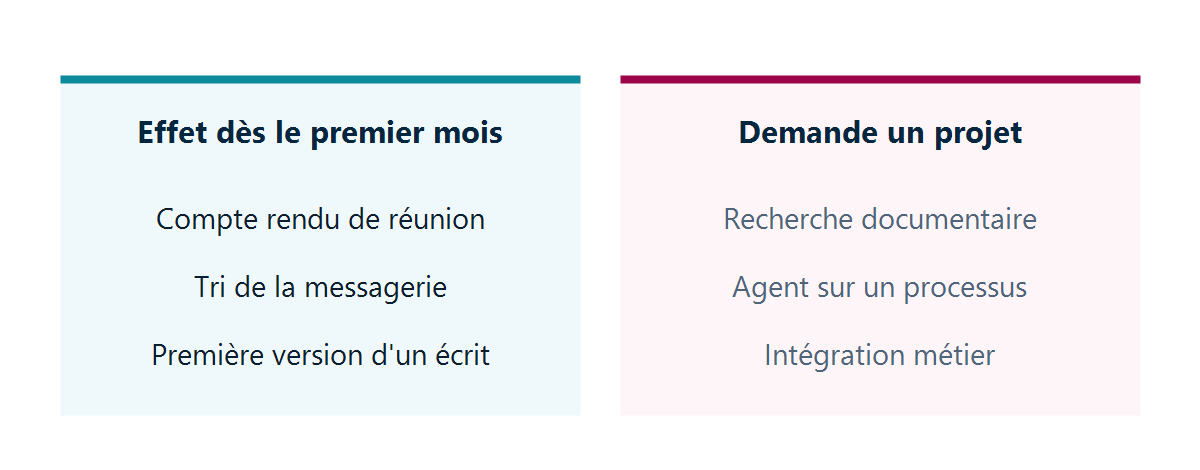
Ways to Make Money in Four Weeks
They share three characteristics: a daily volume, a result that the user can immediately assess, and no dependence on the quality of your data.
- Meeting minutes. A recorded or transcribed meeting yields a summary and a list of decisions. The benefit is automatic: it applies to all meetings, every day, and is especially helpful to those who were unable to attend.
- Sorting and summarizing email. Long threads, conversations picked up again after an absence. This is the most common use case, because it addresses a common frustration that everyone shares.
- The first draft of a written piece. A note, a reply, a document. The machine doesn’t finish the work: it eliminates the blank page, which is the most time-consuming and least visible part of the process.
- Formatting and analyzing a table. Describe what you want rather than searching for the function. The benefit is concentrated among a small number of people, but it is important to them.
These are the four use cases to highlight in a pilot. They do not require any governance prerequisites: they work with content that the user has already opened.
Uses that require a project
They pay out more. They don't pay out in the first month.
- Searching the documentary heritage. “What does our framework agreement with this supplier say?” The assistant responds based on what the user is authorized to view. If access rights have not been specified, the answer will be either incomplete or awkward.
- An agent connected to a process. Processing a shared mailbox, triaging incoming requests, preparing a reporting. The value is real and measurable, but it requires development, testing, and monitoring.
- Integration with business applications. Quotes, orders, and customer files. This requires a connection, access rights, and output control.
It's best to keep them out of the driver: a driver that mixes the two families fails on the second one, and that failure takes the first one down with it.
How to Verify That the Win Is Real
Feelings aren't enough, and the enthusiasm of the first month can be misleading. The administration center Microsoft 365 presents a usage report that provides three actionable insights:
- the number of active users relative to the number of users with access;
- Breakdown by application — Teams, Outlook, Word, Excel, PowerPoint, and others;
- For each person, the number of active days and the date of the last activity.
There is one methodological point to note here. Microsoft counts only intentional actionsas active: opening a pane does not count, but submitting a request does. The displayed rate is therefore not inflated, and can be taken at face value.
The most revealing indicator is the breakdown by application, rather than the overall rate. A device fleet whose use is concentrated on a single application has found a one-time use, whereas a fleet spread across four applications has established a work routine. The latter continues without question, while the former warrants further review.
Note: Before purchasing, some of these features are available without an additional license. Microsoft 365 Copilot Chat is included with an Microsoft 365 . However, it is not integrated into the organization’s content —neither files, emails, nor conversations. This is precisely the distinction between the two categories described above.
The calculation that determines what happens next
Three figures, available at the end of the first month:
| What We Measure | Where to Read It |
|---|---|
| Active User Rate | Usage report, 28-day window |
| Number of apps used per person | breakdown by application |
| Cost per active user | license divided by the asset ratio |
The license Microsoft 365 Copilot license is priced at $30 per user per month with an annual commitment and is in addition to the Microsoft 365 eligible license you’re already paying for. A 50% active user rate therefore doubles the actual cost per use. It is this figure—not the listed price—that should be a factor in the decision to expand.
Our Reading
The first month of a Copilot deployment hinges on a decision that has nothing to do with technology: what we show the teams, and what we choose to save for later.
A full demonstration is tempting. You introduce everything at once, the effect is successful, and six weeks later, the usage rate has dropped because everyone tried ten things without sticking with any of them. Our recommendation is to introduce four features, name them, and not introduce any others for a month. An established habit is better than a series of discoveries that lead nowhere.
The selection of participants deserves the same attention. The pilot group is all too often made up of the executive committee and enthusiasts, which is the worst possible sample: the former don’t have time to use it, and the latter would have adopted any tool. Instead, choose people who are constantly in meetings and swamped with emails—including those who didn’t even ask for it—because they are the ones who will produce a figure you can rely on.
There is one situation where it’s better to postpone. If your organization cannot set aside one hour a week, for four weeks, for a check-in among the pilot team members, the exercise is unlikely to succeed: without a space to share what’s working, users become isolated, and an isolated user eventually gives up. The constraint isn’t budgetary; it’s a scheduling issue, which, paradoxically, makes it harder to overcome.
One final point, which the enthusiasm of the first month often causes us to overlook: The four immediate benefits are real, but they relate to individual work comfort—they do not transform any processes and will not appear on the income statement. This type of effect falls into the second category, which requires preliminary work. Telling management the opposite sets the stage for disappointment in the twelfth month.
What to Do
- Focus the presentation solely on the four immediate uses. Introduce it as such.
- Select the people for the pilot based on their volume of meetings and emails, not on their position in the hierarchy.
- Show the meeting minutes first. That’s the approach that’s most likely to win over a skeptic.
- Record the three figures at the end of the first month, before any discussion of an extension.
- Do not launch the “documentary heritage” family until you have resolved the access rights.
- Keep any requests for integration with a business application out of the driver. There’s a place for that, but later.
The challenge for a pilot is almost never technical: it lies in the choice of people and in resisting the temptation to pursue spectacular results that cannot be measured. Lambert Consulting outlines this scope and the associated checklist at Microsoft 365 Copilot. Before launching the second family, reorganizing access rights remains a necessary step, and the identification of candidate processes must precede any agent development.
Microsoft Sources
What an article Can't Know
An article describes what applies to everyone. What varies from one organization to another is the inventory: which applications, which accounts, and which pieces of equipment are actually involved in your organization. The inventory determines the scope of the effort, and it cannot be summarized on a single page.
You'll be speaking directly with the engineers who will be doing the work, not with a middleman. We'll respond within 24 business hours.
Check what is still true
Announced dates are sometimes postponed, products are renamed, and conditions change. The blog tracks these topics over time: when a rule changes, a new post announces it.
Search for a topic in the blogIn the same issue
Three articles on the same topic. The blog has 149 articles, all of which are freely accessible.