


Scale appropriately to optimize your investment in cloud with Microsoft Azure
If your infrastructure is based on on-premises servers, there’s a good chance you’re using only a fraction of your total server cores most of the time. Even so, you still need to over-provision your infrastructure to handle peak workloads. By shifting these peak workloads to the cloud, you can significantly reduce your costs by sizing your server capacity based on your day-to-day needs.
Resizing is one of the key tools you have at your disposal to control costs and optimize resources. By understandingthe economics of cloud and using what itAzure it offers, you can identify the virtual server instances that best meet your needs. This allows you to realize immediate savings by eliminating unused capacity.
Many industries experience spikes in server usage. These spikes in demand lead to excess capacity and excessive spending. When you’re able to scale with Azure, you no longer have to purchase and provision capacity based on those spikes.
For example, one of our clients noticed that its servers were used most heavily at specific times of the year. Maintaining a costly on-premises infrastructure year-round was driving up its costs. Once we had migrated the first 20% of its applications and platforms to Azure, it became very clear how the variable-cost model of cloud contrasted with the fixed-cost model of on-premises data centers, prompting the client to reevaluate its architecture.
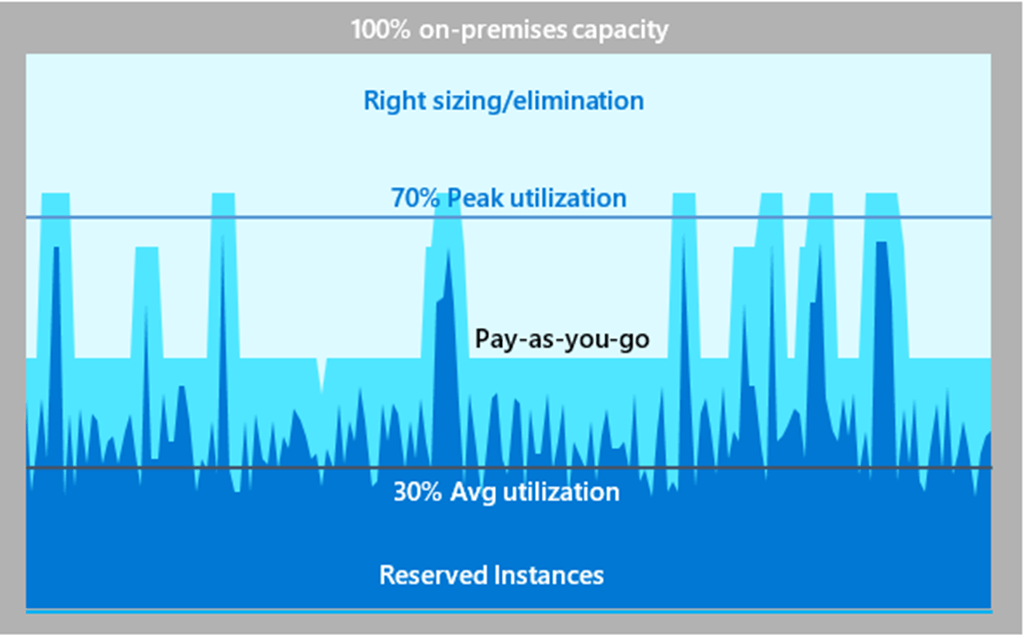
Scaling in the cloud means different things for different organizations. One of the first questions to ask is to what extent your environment is elastic (vs. static) to get an idea of the potential savings based on reducing overprovisioning. In the example below, static utilization never exceeded 30% of capacity, indicating a huge opportunity for savings.
What does resizing look like for you?
Turning off workloads can obviously have an immediate impact on your budget. But how hard should you try to cut it? Do you always know what drives consumption? Are there situations where you cannot immediately adjust the size? For workloads that are still needed, what can be done to optimise these resources?
This optimisation can take several forms:
- Resizing virtual machines: Business and application requirements change, so the anticipated commitment to a specific virtual machine size may be limited.
- Shut Down Underutilized Instances: With workloads in the cloud, usetheAzure Advisorto identify underutilized resources and get recommendations for resource optimization. This tool can also help determine the savings achieved by resizing or shutting down central processing units (CPUs).
- Interruptible Workloads with Virtual Machines Azure Spot: You can earn significant discounts for interruptible workloadsthat do not need to be completed by a specific deadline.
- Identify the workloads that require additional capacity: with Azure, it’s easier to meet demand. In fact, the process can be largely automated.
Migration to the Cloud
When migration your workloads to Azure, do not assume that this is an migration one-to-one mapping of server cores. The cloud is infinitely more flexible, accommodating unpredictable workloads. You’ll pay only for the resources you need. Plan for peaks, but know that you don’t have to maintain that capacity. For consistently high usage, usage-based pricing may be less effective at estimating baseline costs compared to equivalent reserved pricing.
Be sure to consider the trade-offs between cost optimization and other design aspects, such as security, scalability, resilience, and operability. When using tools such asAzure Advisor, keep in mind that they can only provide a snapshot of usage during their discovery period. If your organization experiences significant seasonal fluctuations, you can save on provisioning your baseline workloads—typically your business applications—by reserving instances and virtual machine capacity at a discount. And when these seasonal trends and occasional spikes drive up usage, pay-as-you-go pricing kicks in.
With these consistent workloads—such as a batch process that runs every day using the same resources—you can get reduced pricing by taking advantage ofreservations Azure and receive discounts of up to 72% by reserving your resources in advance.
And speaking of cost optimization tools, usetheAzure Well-Architected Frameworkto optimize the quality of your workloads Azure. Read thecost optimizationoverview to learn more about the tools and processes for creating cost-effective workloads. These tools can really help. According to anIDC assessment,customer enablementtoolsAzure can reduce the cost of operations by 24% over three years.
Planning for growth no longer means overstocking out of fear of reaching capacity. When you understandthe economics of cloud and follow the key financial and technical advice fromAzure, your workloads will be much more profitable in Azure.
What an article Can't Know
An article describes what applies to everyone. What varies from one organization to another is the inventory: which applications, which accounts, and which pieces of equipment are actually involved in your organization. The inventory determines the scope of the effort, and it cannot be summarized on a single page.
You'll be speaking directly with the engineers who will be doing the work, not with a middleman. We'll respond within 24 business hours.
Check what is still true
Announced dates are sometimes postponed, products are renamed, and conditions change. The blog tracks these topics over time: when a rule changes, a new post announces it.
Search for a topic in the blogIn the same issue
Three articles on the same topic. The blog has 155 articles, all of which are freely available.