


Third-Party Contact Center vs Microsoft Queues App
Which call solution is best for customer engagement?
Microsoft recently announced a new app called Queues. The app is an add-on for Microsoft Teams that allows you to manage call queues in Microsoft Teams and view detailed reports. Established third-party contact center solutions offer similar and more advanced capabilities. How do they compare?
Every day, more than 300 million people use Microsoft Teams to collaborate in the workplace. The platform integrates chat, calls, and video for a unified communications experience. However, the native voice features of the cloud—including automated attendants and call queues—do not meet the needs of many organizations. Certified third-party contact center solutions can fill this gap. Now, Microsoft has announced the Queues app. In this blog post, we’ll compare Microsoft’s app with third-party alternatives. We’ll explore which option is best for customer engagement.
The new "Queues" app in Microsoft Teams
Microsoft announced the new Queues application at Enterprise Connect 2024 in March. The application enables team members to manage customer calls. In future, supervisors will be able to use the app to monitor call queues, access reports and analyze data.
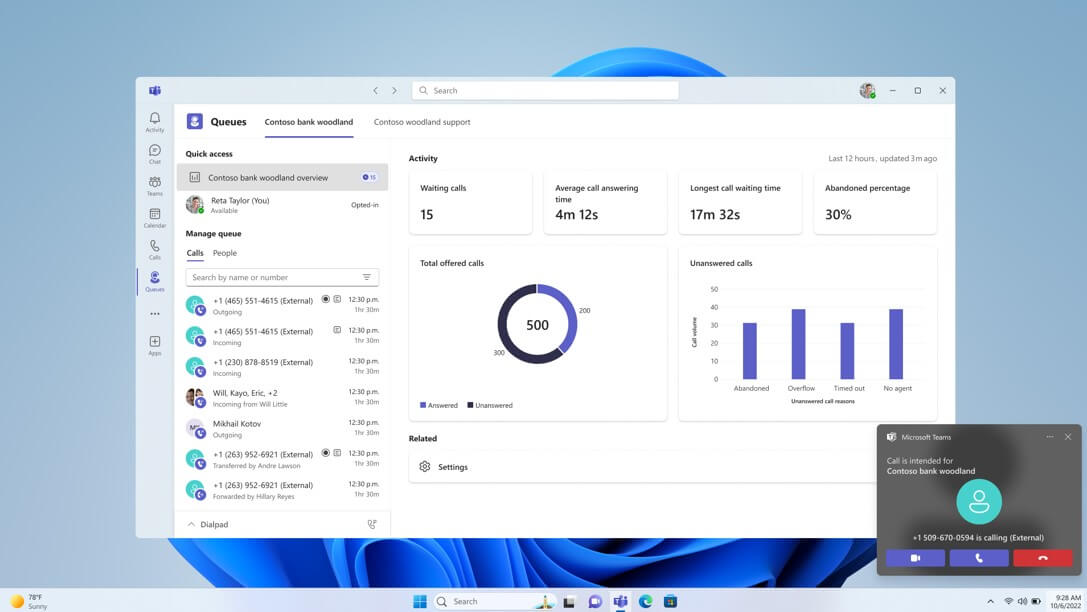
The new Microsoft Queues application lets you manage call queues and analyze statistics.
Microsoft will release the new app in the summer of 2024. The exact release date is unknown. What we do know is that you’ll need a Microsoft Teams Premium license to use the app, which is licensed on a per-user, per-month basis. The add-on also adds features such as intelligent AI capabilities and security features to Teams.
For customer engagement, the Queues application adds features such as:
- 360-degree view of your call queue: members can choose to enter or deactivate call queues, and view queue performance and statistics in real time.
- Call management: members can transfer calls with a single click, or place outgoing calls on behalf of a queue.
- Supervision: managers can monitor and support their teams with Monitor, Barge, Whisper and Takeover (not yet available at launch).
- Real-time and historical reporting: Managers have access to a dashboard of relevant statistics and performance indicators.
Third-Party Contact Center Solutions for Microsoft Teams
There are already manythird-party contact center integrations for Microsoft Teams. They offer customer engagement features as well as advanced contact center capabilities. Different vendors offer varying levels of integration with Teams. However, contact center integrations based on the Extend model also provide a native Teams experience. With these contact center solutions, you can also manage your customer calls without leaving the platform.
Luware Nimbus provides detailed, consolidated information on every aspect of your contact center
An extended contact center integration for Microsoft Teams, such as Luware Nimbus, adds features such as:
- Workflow editor: integrate your business tools and automate workflows between them. Thanks to an intuitive drag-and-drop workflow editor, you can deploy workflows instantly.
- Intelligent routing: Distribute calls, e-mails and tasks to members based on their skills or customer preferences. Users can use contact center functions such as after-call work and RONA to manage them efficiently.
- Simplified Administration:Supervisors can manage their entire contact center through the Nimbus Luware administration portal. More granular administration options are available through team roles and organizational units. This facilitates the efficient management of complex organizational structures.
- In-depth real-time and historical reporting: Managers and members can create dashboards to track their key performance indicators and monitor queues in real time. Consolidated reports are stored for all departments and can be exported to a data warehouse.
Microsoft Queues application vs. third-party contact center solution for teams: which is better for customer engagement?
To ensure a seamless customer journey, it's important to give agents tools that enable rapid visibility and efficient processing of requests. Consolidating these tools into a single platform eliminates the need to switch between applications, and provides supervisors with unified reporting.
For simpler needs, small organizations may find the call management features of the Queues app appealing. However, larger and more complex organizations may find that essential features are missing, such as advanced IVR, skill-based routing, and in-depth reporting . In such cases, third-party solutions such as Luware Nimbus offer more comprehensive features.
Luware Nimbus lets you manage all customer service scenarios in a single system, providing a unified experience and reporting. Since Luware Nimbus is built on the Extend model, you always enjoy a native Teams experience and never have to leave the platform. Using a single application streamlines administration. While the Queues app requires you to configure settings in the Administration Center Teams and manage queues separately, Luware Nimbus provides centralized control through its administration portal.
For organizations with basic needs, the Queues app offers a cost-effective option with additional features from Teams Premium. However, for advanced support and compliance assurance, a third-party provider such as Luware Nimbus is a better option.
Conclusion
In summary, whether you choose the Queues app or a third-party contact center solution such as Luware Nimbus depends on your needs. If you’re a small business with modest needs, the Queues app may be a good fit for you. However, it still lacks some essential features needed for a seamless customer experience.
What an article Can't Know
An article describes what applies to everyone. What varies from one organization to another is the inventory: which applications, which accounts, and which pieces of equipment are actually involved in your organization. The inventory determines the scope of the effort, and it cannot be summarized on a single page.
You'll be speaking directly with the engineers who will be doing the work, not with a middleman. We'll respond within 24 business hours.
Check what is still true
Announced dates are sometimes postponed, products are renamed, and conditions change. The blog tracks these topics over time: when a rule changes, a new post announces it.
Search for a topic in the blogIn the same issue
Three articles on the same topic. The blog has 139 articles, all of which are freely available.